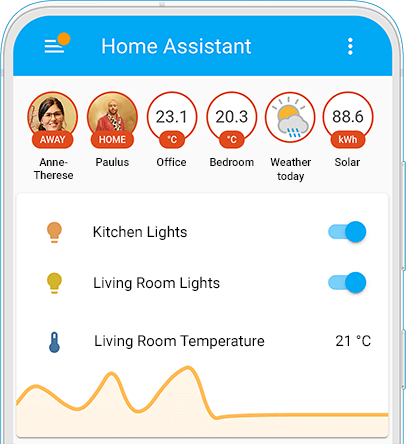
Do either of you know what entity is being used for weather? I use openweathermap for my weather entities, but none of them provide a nice image of the weather like in the picture above
Maybe a template sensor over the openweathermap_forecast_condition state? You can pretty easily have a template change its icon, and mdi: has all the icons built in.
Here’s a template I use for current condition in a card, but it should work similarly for the forecast. Or works just need to be applied to the icon of a template sensor.
5 Comments
CondorWonder@lemmy.ca · 37 pts · 2y
It’s called Badges - edit the dashboard page, then click on the edit button beside the tab.
sabreW4K3@lemmy.tf · 8 pts · 2y
Thank you!
ThrustyRL@lemmy.world · 2 pts · 2y
Do either of you know what entity is being used for weather? I use openweathermap for my weather entities, but none of them provide a nice image of the weather like in the picture above
CondorWonder@lemmy.ca · 2 pts · 2y
Maybe a template sensor over the openweathermap_forecast_condition state? You can pretty easily have a template change its icon, and mdi: has all the icons built in.
Here’s a template I use for current condition in a card, but it should work similarly for the forecast. Or works just need to be applied to the icon of a template sensor.
sabreW4K3@lemmy.tf · 1 pts · 2y
If you go into your HA, open up the integrations panel and it should list all the entities