cross-posted from: https://lemmy.world/post/1172020
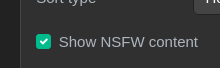
It appears that all NSFW content is blurred. I looked in the user settings, and I don't appear to have any option to disable it. All that I see is the following:
Edit: I just found out that !lemmy_support@lemmy.ml exists. I assume that these sorts of posts are supposed to go there. I will crosspost this to that community.
4 Comments
tustamido@lemmy.fmhy.ml · 4 pts · 3y
Watch the reported issue.
As for now, you can install an extension like Stylus and create a style like this:
I'm using it with FireMonkey on Firefox, but I believe it should work with Stylus too.
For those using other Lemmy instances, you need to edit or duplicate the
@matchline with the URL of the one you're using.Yeah2206@infosec.pub · 1 pts · 3y
You may want to consider posting an enhancement request to https://github.com/LemmyNet/lemmy/issues . The two developers are swamped, though, so most likely, what you see is what you get, or maybe the apps will be different?
sin_free_for_00_days@lemmy.one · 1 pts · 3y
https://github.com/howdy-tsc/LemmyTools
Lemmy tools has the unblur nsfw option