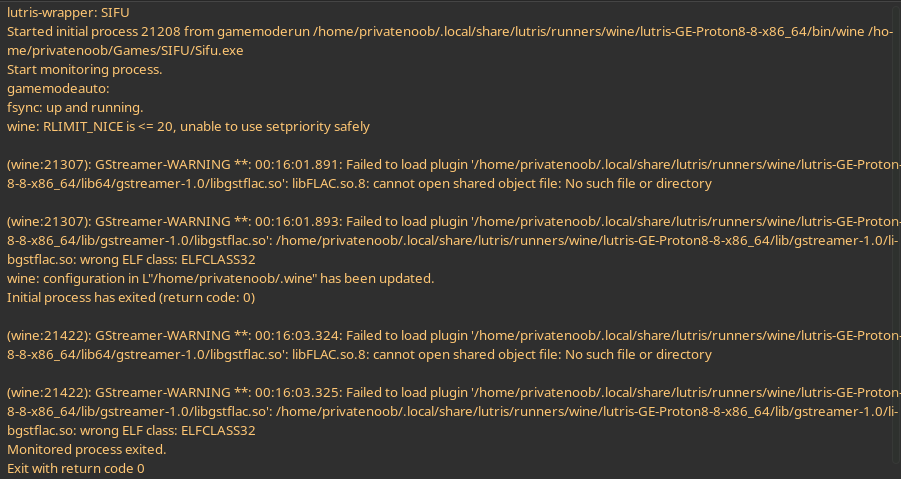
Several games don't run (itch.io games) or run unbearably slowly (SIFU, HighFleet, Teardown) on Wine with my new PC (7600X + 6700XT), even though for example Highfleet worked flawlessly on my laptop. (4800H + 1650ti)
For SIFU I have tried 8.11, ProtonGE 8.8, Lutris 7.2.2 with the same results. (Picture is from ProtonGE 8.8).
I wasn't able to try Proton Experimental since this is a pirated version. (Sorry I fully know that pirating indie games isn't ethical, I have my reasons)
EDIT: Previously I have tried switching back to X11 but didn't solve the issue in Highfleet's case.
I'm using EndevaourOS with 6.3.9-arch1-1 kernel version with Vulkan running (tested with vkcube).
SOLUTION: It seems DXVK wasn't installed, so by following this guide (How to Use) https://github.com/doitsujin/dxvk fixed Dave the Diver and SIFU for me, but Teardown and Highfleet is still problematic. It's interesting since DXVK is enabled for all of the 4 games in Lutris.
- 1: Download the newest DXVK release tar.gz (https://github.com/doitsujin/dxvk/releases)
- 2: Copy the dlls over to your wineprefix (wineprefix is probably located in $HOME/.wine)
export WINEPREFIX=/path/to/wineprefix cp x64/*.dll $WINEPREFIX/drive_c/windows/system32' cp x32/*.dll $WINEPREFIX/drive_c/windows/syswow64' winecfg
- 3: In the winecfg (the opened app) go to Libraries and in the "new override..." listbox, add those dlls which you copied over. Add those dlls which are present in dxvk-/x64 if you ls them.
17 Comments
dark_stang@beehaw.org · 5 pts · 3y
Which CPU? Which GPU? What kernel are you on? Which distro are you running?
PrivateNoob@sopuli.xyz · 2 pts · 3y
Oh sry I forgot to mention it:
New PC: 7600X + 6700 XT, 6.3.9-arch1-1, EndevaourOS w/ Wayland
Laptop: 4800H + 1650 ti, 6.1+ probably, EndevaourOS w/ Wayland
wallmenis@lemmy.one · 3 pts · 3y
Ok maybe try some nice command on the process to increase the priority. Also which distro are you using? I suggest you install the flac codec.
PrivateNoob@sopuli.xyz · 3 pts · 3y
Oh sry I forgot to mention it:
New PC: 7600X + 6700 XT, 6.3.9-arch1-1, EndevaourOS w/ Wayland
Laptop: 4800H + 1650 ti, 6.1+ probably, EndevaourOS w/ Wayland
Performance still stayed the same with renice -12 on SIFU's 3 most used processes, but the CPU usage is indicated as over 100+%, although the actual threads don't indicate that. Unfortunately running SIFU from the terminal crashes the game, so couldn't use nice on it. The flac codec is already installed.
wallmenis@lemmy.one · 2 pts · 3y
Ok! How did you install lutris?
PrivateNoob@sopuli.xyz · 2 pts · 3y
I've used the extra repo: https://archlinux.org/packages/extra/any/lutris/
ElectroLisa@lemmy.blahaj.zone · 2 pts · 3y
Teardown is an OpenGL game and it won't use DXVK, that's why it didn't help there
PrivateNoob@sopuli.xyz · 2 pts · 3y
Oh thank you for throwing the light on Teardown! ^^
ElectroLisa@lemmy.blahaj.zone · 2 pts · 3y
You might want to try MangoHUD, it will hint you which API is being used (OpenGL, Vulkan, DXVK, VKD3D etc.)
PrivateNoob@sopuli.xyz · 2 pts · 3y
Thank you for the idea. Definitely will dwelve into it!