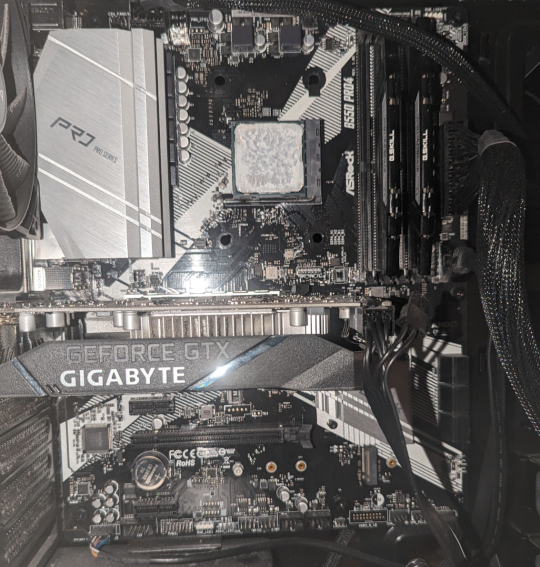
I'm not 100% certain of this, but id suspect it's in the lower right quadrant in the pic you posted. Probably nestled between the graphics card and the ram. Might be covered by a heat shield
No that's the small M.2 for wifi, there is a large M.2 above that with a heatsink over it. It's not visible in the photo because the GPU is in the way.
12 Comments
SirMechsALot@lemmy.world · 41 pts · 2y
Looks like its here
kvasir476@lemmy.world · 30 pts · 2y
Looks like there's an M.2 slot under the graphics card. Link
GravitySpoiled@lemmy.ml · 5 pts · 2y
Thx!
supernicepojo@lemmy.world · 23 pts · 2y
Ask the internet isnt always available, or right. Refer to the manufacturer manual whenever possible as a first.
AsRock B550 Pro4 manual
Page 13 of the Manual PDF has the answer in this case.
suction@lemmy.world · -3 pts · 2y
Where do you get the manual without internet? The local library?
catloaf@lemm.ee · 3 pts · 2y
Usually it comes with the board.
TootSweet@lemmy.world · 2 pts · 2y
Clearly OP's got internet access some-which-how.
ClydapusGotwald@lemmy.world · 1 pts · 2y
Beefytootz@lemmy.world · -6 pts · 2y
I'm not 100% certain of this, but id suspect it's in the lower right quadrant in the pic you posted. Probably nestled between the graphics card and the ram. Might be covered by a heat shield
GravitySpoiled@lemmy.ml · 3 pts · 2y
It is covered by a heat shield. Thanks!
Beefytootz@lemmy.world · 1 pts · 2y
Glad that worked!
Death_Equity@lemmy.world · -24 pts · 2y
The M.2 is unoccupied and is for wifi. The hard drive is not on the board.
pezmaker@sh.itjust.works · -1 pts · 2y
Thorry84@feddit.nl · 1 pts · 2y
No that's the small M.2 for wifi, there is a large M.2 above that with a heatsink over it. It's not visible in the photo because the GPU is in the way.