Since yesterday (I think), the 'comments' text is cropped. Is there a way to fix this? e.g. by swapping to showing just a number next to the comments icon, or by removing the share button from the bottom bar so there's more space?
UI question
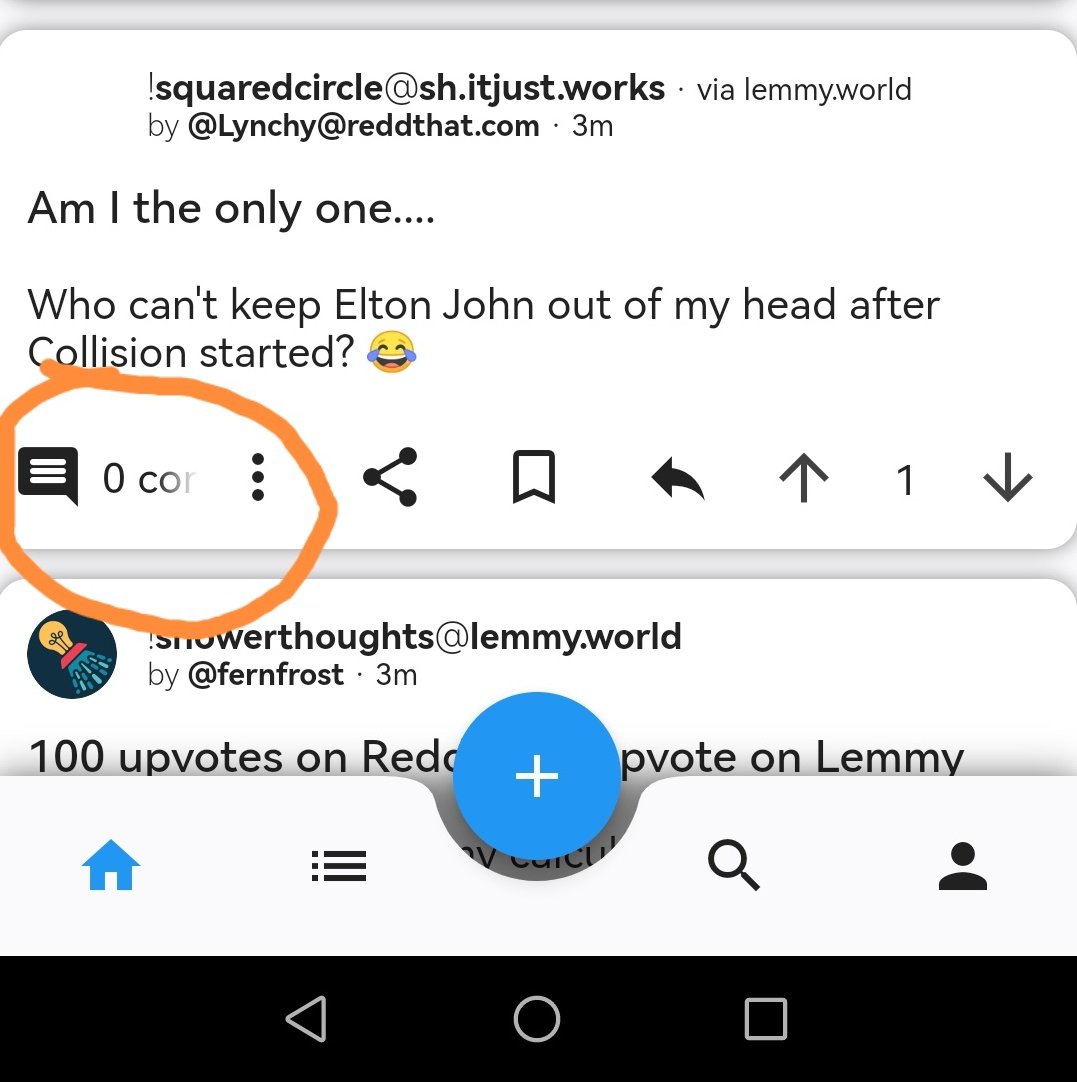
Since yesterday (I think), the 'comments' text is cropped. Is there a way to fix this? e.g. by swapping to showing just a number next to the comments icon, or by removing the share button from the bottom bar so there's more space?
5 Comments
KitchenNo2246@lemmy.world · 2 pts · 3y
Same
Pyroglyph@lemmy.world · 1 pts · 3y
Interestingly, I'm missing 2 of the buttons you have. Perhaps it's a setting?
v81@lemmy.world · 1 pts · 3y
Non issue here. Galaxy S10+ I do have some scaling settings customised in my phone to for more content on screen.
fruity@lemmy.world · 2 pts · 3y
That's a good tip, if I change the scaling from default to small it all fits. I'd rather not do that though, especially considering it looked fine on default yesterday :)
TurnItOff_OnAgain@lemmy.world · 1 pts · 3y
I have a S22 and it's set to whatever the default is for screen scaling and I have no issue. It looks just like yours.
Spliffman1@lemmy.world · 1 pts · 3y