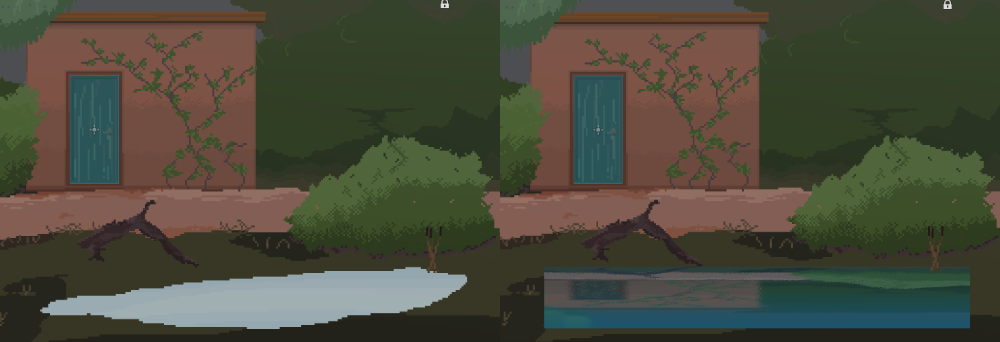
I have been looking for a 2D reflective water shader for some time and was delighted to see that this tutorial was posted on YouTube to create just that:
https://www.youtube.com/watch?v=wPr5PvSgxFo
I've had a go at implementing it and have got the reflective water rendering. It's very "Kingdom: Two Crowns" like when spread across the full width of the scene.
However, as you can see from the image above, I've drawn a pond (as a separate Sprite2D) and I've applied the water shader to the pond. It's done that, but draws the water as a rectangle.
Is there a way to apply this shader to the Sprite2D, but conform to the actual sprite (only the light blue), rather than as a rectangle?
3 Comments
julianh@lemm.ee · 21 pts · 2y
I think you'd want to apply the alpha value of the sprite. You can do that by making the last line "COLOR = vec4(mix(...).rgb, texture(TEXTURE, UV).a)"
HobbesHK@startrek.website · 5 pts · 2y
This worked perfectly - thank you!!
For anyone else looking here later, the final shader code (confirmed working Godot 4.2) is:
Credits to Single-mindedRyan for creating this shader in the first place.
parpol@programming.dev · 8 pts · 2y
Wxnzxn@lemmy.ml · 8 pts · 2y
Oof, I haven't touched shaders in Godot myself yet, besides a very simple section during one tutorial, so maybe I should not give any advice, but I think this can be solved by applying the shader to the pond and adding a check for transparency before applying the changes to the pixels.