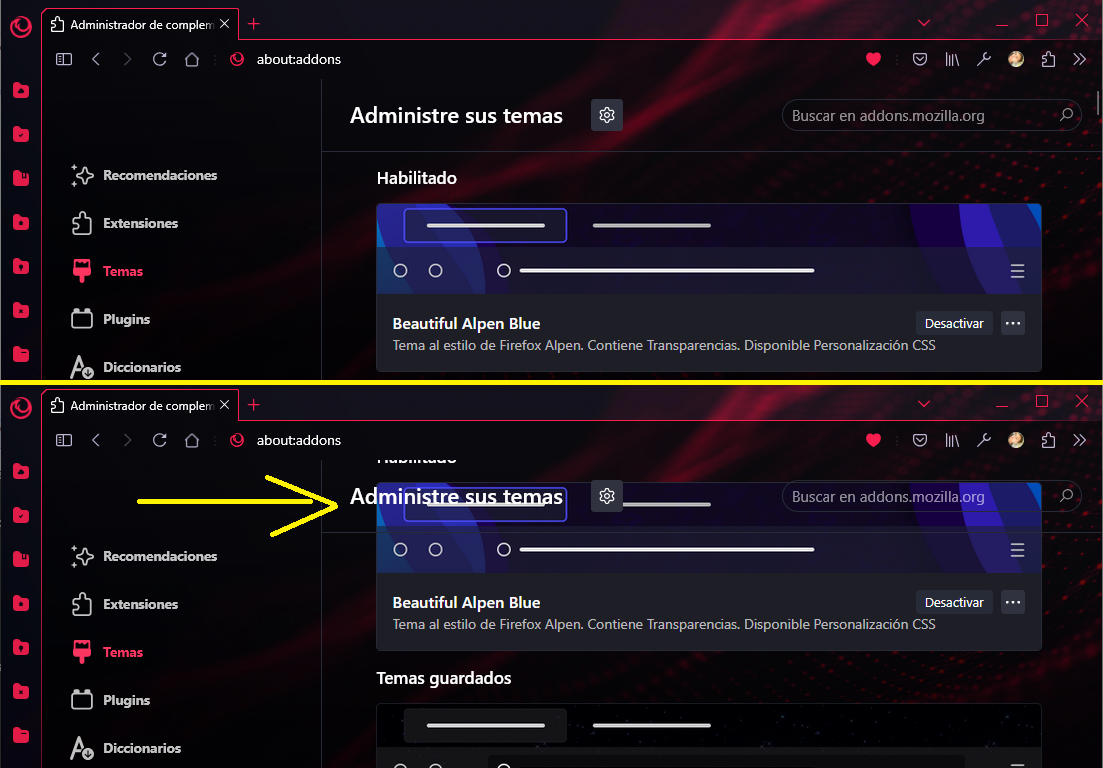
Hi, I want to solve this behavior when scrolling in 'about:addons' page. I put a background-image in body using 'userChrome.css' and in 'userContent.css' I set transparency in some elements backgrounds, but when I scroll the #main element goes behind .sticky-container element, so here is my question: Can I make the #main and .sticky-container elements don't cross, I tried to set a margin, clip-path, etc but I couldn't make any progress to solve it.
Problem when using 'position: sticky' in 'about:addons' page
6 Comments
kubica@fedia.io · 1 pts · 1y
Maybe try to set "overflow: hidden" on the container of the scrolling elements?Edit: I'm not so sure about that now. I think I'm confusing it for something else.
Godie@lemmy.world · 1 pts · 1y
the element with
position: stickymakes it like float, always visible, and seems like the element don't reserve space and other elements can go behind it, I don't know how to solve it without remove that behavior (always visible on top).MrOtherGuy@lemmy.world · 1 pts · 1y
I'm not sure if you can do that, but you may be able to make the sticky-container opaque, so that it covers the scrolled contents, but assign it the same background-image that you are using on body and then try setting
background-attachment: fixedfor it and maybe play with fewbackground-positionvalues to align it to the background-image of the body. And also make sure the image is shown as same size.Godie@lemmy.world · 1 pts · 1y
hi, I had in that way in the past, but I wanted to remove the need to align the image (when menubar is on, when not, when bookmarks-bar is on, when not, where using tre-tabs and its necessary to align again). I will end removing the
position: stickyfrom.sticky-containerMrOtherGuy@lemmy.world · 1 pts · 1y
Oh I think I misunderstood what you are doing, I thought you meant you set the content document body to also have the background-image, in which case the same alignment issue would still happen. But it sounds like you have just one image at the main-window body and the content area is transparent.
With some shuffling you could achieve pretty much the same result visually - so that the header sticks, but doesn't overlay the list:
Godie@lemmy.world · 1 pts · 1y
thanks you so much, the scrollbar isn't in the right position but I thinks is perfect enough solution. 💙