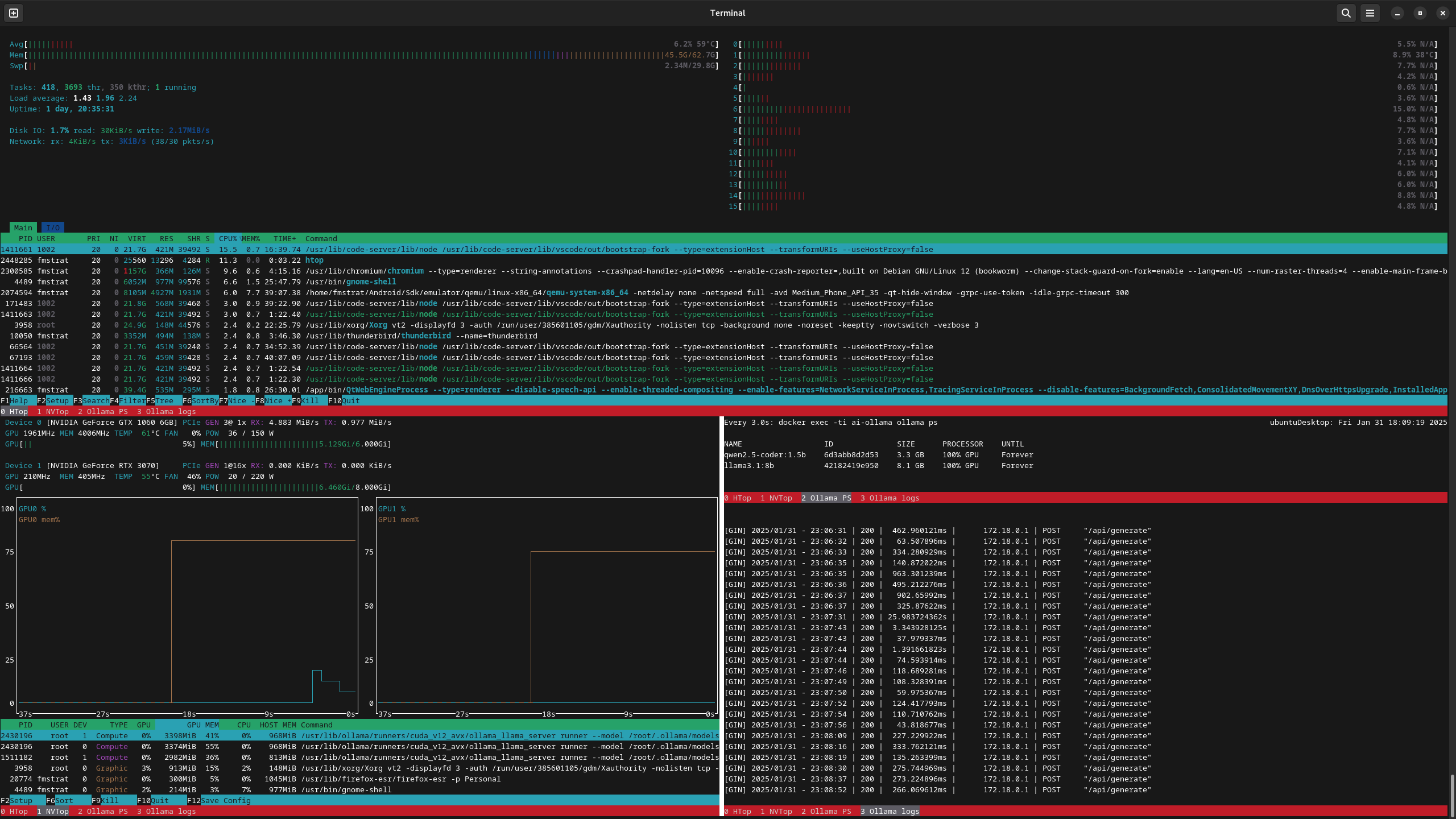
I use Ollama with continue.dev in code-server, and I wanted a way to hit Cntrl-Shift-Alt-T to get a "top" of sorts that would show CPU, IO, GPU, loaded models, and logs, all in one place quickly.
Set up the below screenrc file and created the shortcut above in Debian. Tab switches between CPU and IO, and Cntrl-a q quits all screens and closes the Gnome shell.
Screenrc:
termcapinfo xterm* ti@:te@
startup_message off
defscrollback 10000

bind q eval "kill" "quit"
caption always "%{= rw}%-w%{= KW}%n %t%{-}%+w"
defbce on

# Start htop and focus
screen -t "HTop" htop
focus

# Split horizontally to put nvtop under htop
split
focus
screen -t "NVTop" nvtop

# Split vertically to put ollama next to nvtop
split -v
focus
screen -t "Ollama PS" watch -n5 'docker exec -ti ai-ollama ollama ps'

# Split horizontally to put logs underneath ps
split
focus
screen -t "Ollama logs" bash -c "docker logs -f --tail 100 ai-ollama | grep -Ev '\"/api/ps\"|\"/\"'"

# Resize PS, then get back to logs
focus up
resize -v 6
focus down

# Get back to htop
focus
The atop script that runs with Cntrl-Alt-Shift-T:
#!/usr/bin/env bash

if [ "${1}" = "new" ]; then
    gnome-terminal --geometry=200x50+0+0 --maximize -- /data/system/bin/atop
else
    screen -c /data/system/setup/common/screenrc-status
fi
Happy to share my htop config as well if anyone wants it.
11 Comments
WhiteOakBayou@lemmy.world · 6 pts · 1y
This is really cool. Nice implementation
robinm@programming.dev · 6 pts · 1y
I've exensively used screen, tmux and zellij, and all 3 are fantastic workflow enabler. I can't recommend enough to take the time learn either one, especially if you work over ssh.
Evotech@lemmy.world · 1 pts · 1y
Screen and tmux work well together too
smoredahl@programming.dev · 2 pts · 1y
screenandparallelare my two workhorses.fmstrat@lemmy.nowsci.com · 1 pts · 1y
parallelis one of those things I never seem to find a use for. I've used it a few times for things like running two functions, but that's about it. What have you used it for that made sense?smoredahl@programming.dev · 2 pts · 1y
Well I'm a researcher, so I'm commonly running experiments on lots of inputs. I make scripts to run the experiments that take command line parameters, and then use
parallelto run all of my experiments on all of my inputs under all configurations. It's very nice when you need to try all combos of a bunch of parameters, since by default it'll run with every combination of parameters you give it.fmstrat@lemmy.nowsci.com · 1 pts · 1y
Ahhh, makes sense. I end up using python or node for similar things, so its probably just because i use multi threading there.
smoredahl@programming.dev · 2 pts · 1y
Fair enough! For what it's worth, parallel provides a lot of really nice control mechanisms to fine tune how your jobs are scheduled (e.g., only start a new job when there's X amount of memory available), saving stdout and stderr to log files, running jobs on remote hosts, even saving results to a SQL database.
fmstrat@lemmy.nowsci.com · 1 pts · 1y
Very cool. Love finding new CLI commands to use. I've been in terminals since the days of Solaris, so it's rare I find something unique to use these days. Usually it's just something slightly better than the old ways so it's switching for the sake of that. Though for some reason tmux never stuck for me.
anzo@programming.dev · 1 pts · 1y
Nice setup! You crafted like a grafana dashboard there, lol.
Btw... aren't you concerned that htop uses 10% CPU? I was, and then swirched to use
btm(cargo install bottom) because the F key freezes the metrics.fmstrat@lemmy.nowsci.com · 1 pts · 1y
Thanks! That's 10% of one of 16 threads right after it starts, so not really worried. I will take a look at
btm, though, assuming it will also do IO.