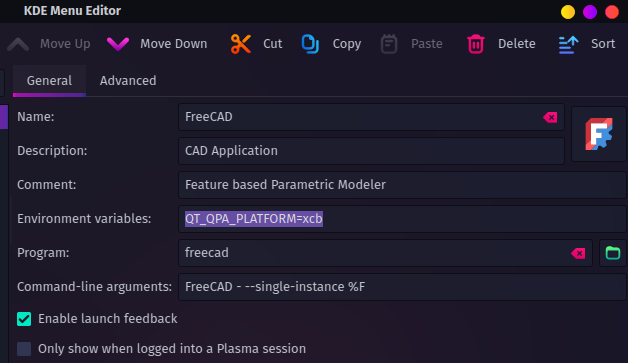
I was wondering if anyone has had this issue and knows a solution. Downloaded freecad today and have been getting a see through workspace on everything I attempt to open.
Thanks

I was wondering if anyone has had this issue and knows a solution. Downloaded freecad today and have been getting a see through workspace on everything I attempt to open.
Thanks
7 Comments
j4k3@lemmy.world · 4 pts · 1y
I think that one is a Wayland issue. I had it at one point, but I think there may be a fix in the settings or something like that. I forget the details but I'm not at a comp at the moment. Wayland doesn't follow the same ordered operations as X and the frames come up in the wrong order or something like that.
captainlezbian@lemmy.world · 2 pts · 1y
Yeah, looked it up and added this to my environment variables: QT_QPA_PLATFORM=xcb
tyrant@lemmy.world · 2 pts · 1y
I bet you're right. Wayland gave me similar issues so I left it for now
fenwickrysen@lemmy.world · 1 pts · 15d
f> > > > f- - fu4 feed~~
tyrant@lemmy.world · 1 pts · 1y
Have you restarted since install?
captainlezbian@lemmy.world · 1 pts · 1y
Just did, looks like it didn't work
captainlezbian@lemmy.world · 1 pts · 1y
Solved: added the line to my environment variables QT_QPA_PLATFORM=xcb