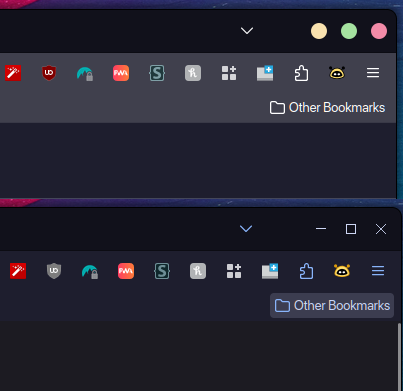
I'm running KDE Plasma, with the latest Firefox and have the titlebar turned off in the customize settings. When I set Firefox to use the "System theme - auto" it correctly uses my window decorations from the GTK theme I set in KDE's settings (top). Any Firefox theme I apply changes the window decorations to the below pic. Is there a way I can edit a theme to respect my system defined window decorations, or else I guess I'm looking for how edit the theme itself so I can define what decorations to use manually.
How can I modify a theme to respect Window Decorations?
4 Comments
MrOtherGuy@lemmy.world · 6 pts · 2y
I guess this style might fit the bill
I mean, first you need to set up using custom style sheets - some guidance here, but after you've set that up you can try the style I mentioned.
TableCoffee@lemmy.ca · 3 pts · 2y
Brilliant my friend! That did the trick. Thank you so much.
bali10050@lemmy.world · 4 pts · 2y
!firefoxcss@lemmy.world
Spudwart@lemmy.world · 1 pts · 2y
If you’re using KDE I advise using Waterfox. Waterfox supports more window decorations on KDE than standard Firefox.