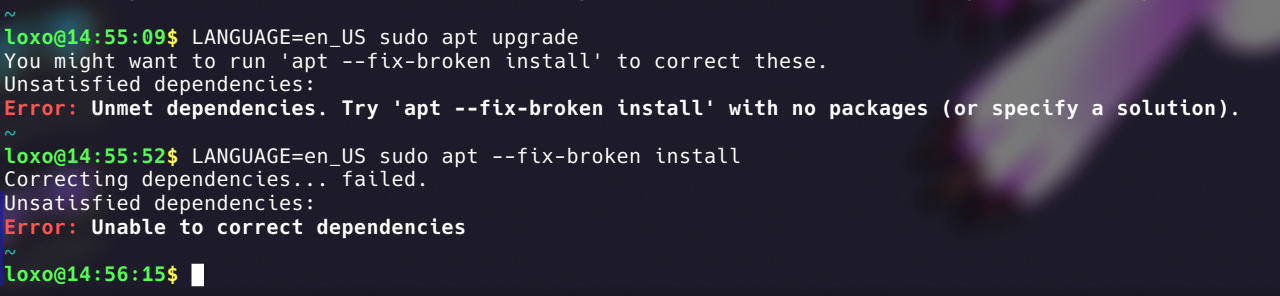
I've been trying the COSMIC store and it looks like it killed my apt somehow. Apt says that there is a version mismatch between some libc6 packages, but I checked with dpkg and it all looks correct.
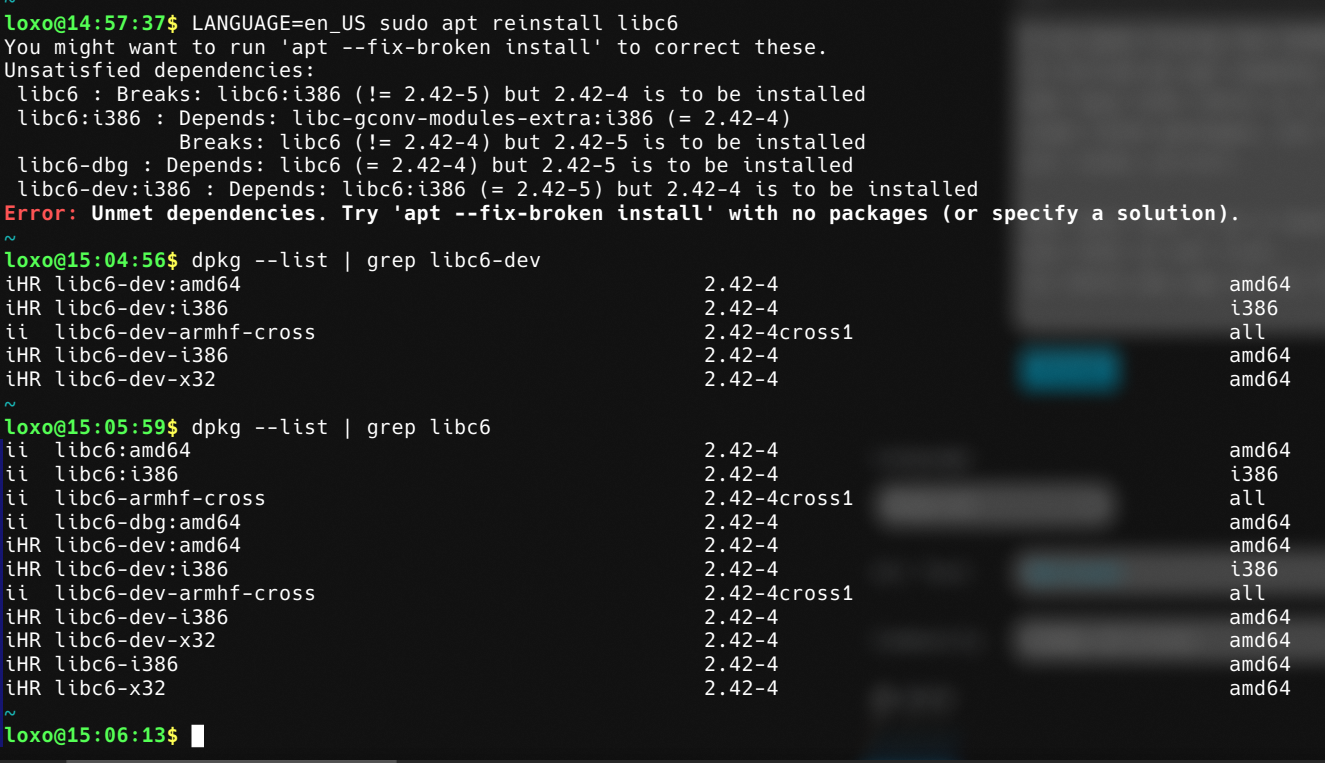
Apt says that I've a newer version of some packages but that is not true. Is there any way to fix this?
EDIT: Fixed formatting
26 Comments
markz@suppo.fi · 17 pts · 289d
Came here expecting it to be about someone listening to your package installs
cryptix@discuss.tchncs.de · 7 pts · 289d
Time for "aptitude"
monovergent@lemmy.ml · 14 pts · 289d
Can also endorse
aptitude, but hopefully OP already has it installed prior to this issue. May have to manually install usingdpkgif not. Whenever I run into issues like this,aptitudesolves it 95% of the time, makes regularaptlook like a baby helplessly crying.pewpew@feddit.it · 5 pts · 289d
Somehow I can't even install aptitude trough dpkg because it says that the filesystem is read-only
kcuf@lemmy.world · 13 pts · 289d
Sounds like your hard drive may be dying.
pewpew@feddit.it · 11 pts · 289d
No, I just figured it out. I had to enable a systemd service to test Cosmic. I have disabled it and now dpkg works and I manually installed Aptitude with its dependencies.
I tried to do an upgrade with Aptitude but it won't do anything. I'll look into it more later
pewpew@feddit.it · 4 pts · 288d
That fixed it, thank you so much!
Black616Angel@discuss.tchncs.de · 7 pts · 289d
Try all the cleanup commands, so:
Then reboot and try again.
But yes, it looks weird.
pewpew@feddit.it · 5 pts · 289d
Just did all of them and rebooted. No luck
Black616Angel@discuss.tchncs.de · 7 pts · 289d
Okay, I've read into your post a bit more and something is fishy. You have libc6 for different CPU-architectures installed.
Programs for i368 and amd64 should not be installed on the same machine. The error probably stems from that.
Run the following to find out the architecture:
If it says 'x86_64' then it's amd64 and if it's something like 'i368’ then it's that. Otherwise, your system might be really borked...
And then remove the wrong one.
TechnoCat@piefed.social · 7 pts · 289d
FWIW, installing steam used to also install both architectures on my Fedora machine. I use the flatpak version now because it kept causing conflicts years ago.
digdilem@lemmy.ml · 6 pts · 289d
Has it added repos that are conflicting with your distro's main ones?
Check /etc/apt/sources.list and all the files in /etc/apt/sources.list.d/
Move anything that looks sus to somewhere else and then "apt-get clean" and retry.
pewpew@feddit.it · 4 pts · 289d
Nope. Sources look good. I just removed some I don't use anymore and then did an
apt-get cleanbut it's still brokennil@piefed.ca · 4 pts · 288d
I suggest you install the stable version (since stability and predictability are the main features of Debian). If you need the latest packages go Arch (or any other rolling-release distro).
pewpew@feddit.it · 1 pts · 288d
I've been using Debian Unstable for about one year since I wanted Plasma 6 so bad. Even after Trixie came out I didn't switch back to Stable because it runs good and gets frequent updates.
The experience was actually quite smooth, better than what my friend has with Kubuntu, which for every distro update has a 50% chance of breaking
nil@piefed.ca · 1 pts · 288d
I once tried to backport a package on Debian stable because I really wanted to run xwayland-satellite on Niri and I ended up breaking the system. I was using stable debian as-is since then, before switching to Arch.
pewpew@feddit.it · 4 pts · 289d
My best guess is that the Debian Unstable repository doesn't have all the libc6 packages updated to the same version. I might just have to wait and see what happens
med@sh.itjust.works · 3 pts · 288d
Looks like that might have changed, libc-gconv-modules-extra has an i386 package for 2.42-5 added at like midnight UTC+1. Given the sources only update every 6 hours, might be you found an unlucky update in between?
Struggled to find a time for the release, but the changelog has one, unsure how true to package-available time that is:
bizdelnick@lemmy.ml · 3 pts · 289d
What does
dpkg --print-foreign-architecturessay?pewpew@feddit.it · 2 pts · 289d
i386taaz@biglemmowski.win · 3 pts · 289d
did you apt update beforehand ? it is weird that it's trying to install lower level libc6
pewpew@feddit.it · 2 pts · 289d
I regularly update using a macro in the terminal that just runs
sudo apt update && sudo apt upgradebut this time I decided to install an update via the COSMIC storepastermil@sh.itjust.works · 2 pts · 288d
Looks more like whatever repo you're trying out is bugged.
MonkderVierte@lemmy.zip · 2 pts · 289d
Ubuntu ppa in not-Ubuntu?
pewpew@feddit.it · 3 pts · 289d
Nope
melroy@kbin.melroy.org · -1 pts · 288d
This is a feature not a bug.