That looks like a way more involved and complex project that requires an app to function. This is just a single static HTML page.
Sender and receiver visit the same page, select the appropriate tab, sender selects the file and clicks play, receiver starts the camera and points at sender's screen.
I do wish it had a mechanism to download the generated images/video without needing to grab each frame individually, but overall it works surprisingly well for something so simple.
Based on my brief browsing of the code, it looks like it's all in the browser cache itself. The bytes are split into numbered chunks, converted to b64, and then a sequence of QR codes are generated from the b64. At the end the received data is crc32 checked for validation. There are adjustable parameters and a progress bar, making it easy to retransmit any chunk that wasn't properly received.
The code is incredibly easy to read, everything is in a single HTML file with zero obfuscation (unless you count the two minified QR code dependencies that also include links to the un-minified versions).
The data is all contained in the QR codes, but it's also contained in the cache of the sender (which is how any chunk can be arbitrarily retransmitted), and also in the cache of the receiver (which is how the data is validated).
Yes, it plays a video with an adjustable speed, or you can have it show a specific frame. The receiver has a grid that fills in as the data is received, making it easy to tell what data was or wasn't successfully received.
11 Comments
speq@lemmy.dbzer0.com · 7 pts · 89d
This was already implemented very well by:
https://github.com/sz3/libcimbar
aMockTie@piefed.world · 2 pts · 89d
That looks like a way more involved and complex project that requires an app to function. This is just a single static HTML page.
Sender and receiver visit the same page, select the appropriate tab, sender selects the file and clicks play, receiver starts the camera and points at sender's screen.
I do wish it had a mechanism to download the generated images/video without needing to grab each frame individually, but overall it works surprisingly well for something so simple.
Valmond@lemmy.dbzer0.com · 4 pts · 90d
So, anyone knows where the data is stored in between?
aMockTie@piefed.world · 11 pts · 90d
Based on my brief browsing of the code, it looks like it's all in the browser cache itself. The bytes are split into numbered chunks, converted to b64, and then a sequence of QR codes are generated from the b64. At the end the received data is crc32 checked for validation. There are adjustable parameters and a progress bar, making it easy to retransmit any chunk that wasn't properly received.
The code is incredibly easy to read, everything is in a single HTML file with zero obfuscation (unless you count the two minified QR code dependencies that also include links to the un-minified versions).
Valmond@lemmy.dbzer0.com · 2 pts · 89d
You mean it's all in the QR codes? Interesting, but also insane lol 😆
aMockTie@piefed.world · 3 pts · 89d
Well yes, but also no.
The data is all contained in the QR codes, but it's also contained in the cache of the sender (which is how any chunk can be arbitrarily retransmitted), and also in the cache of the receiver (which is how the data is validated).
Valmond@lemmy.dbzer0.com · 4 pts · 89d
Well it's kind of obvious the sender has the plain data right 😌 and temporarily stored in the receiver somewhere.
Does it play like a qrcode video, or is it more manual?
aMockTie@piefed.world · 2 pts · 89d
I suppose that's true lol.
Yes, it plays a video with an adjustable speed, or you can have it show a specific frame. The receiver has a grid that fills in as the data is received, making it easy to tell what data was or wasn't successfully received.
aMockTie@piefed.world · 2 pts · 89d
Here's a screenshot from the receiver camera pointing at the sender's screen so you can see both ends.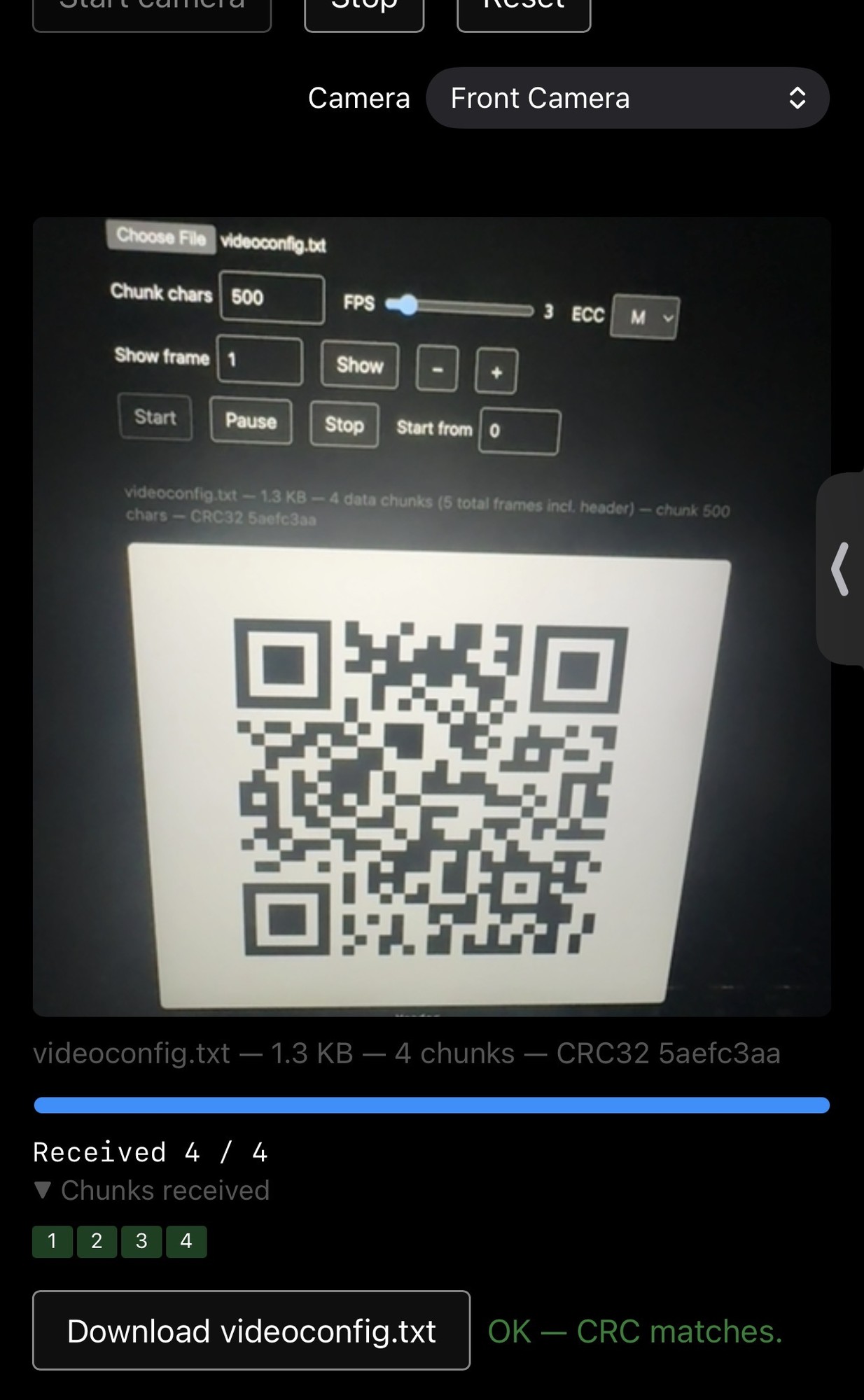
prettybunnys@piefed.social · 1 pts · 89d
Janky ass CDS
NOW implement bi-directional transport
yetAnotherUser@lemmy.ca · 1 pts · 90d
Woah! That's really cool!