RedBSD with RTFMv2

https://www.redbsd.org/

> … a FreeBSD-based distribution loaded with a curated red team and penetration testing toolkit, an XFCE-derived desktop, and VMware-ready images — built for operators who want a fast, stable alternative to Linux-based distros. …
f38152f6-9314-4558-bb86-b355630c9ca7-image.jpeg

https://greyprotocolsecurity.com/

> RTFMv2 is the offensive security operations platform that combines structured checklists, automated scan integrations, and AI-assisted reporting—everything you need to finish assessments faster and with zero gaps.

This is neither an advertisement nor an endorsement.

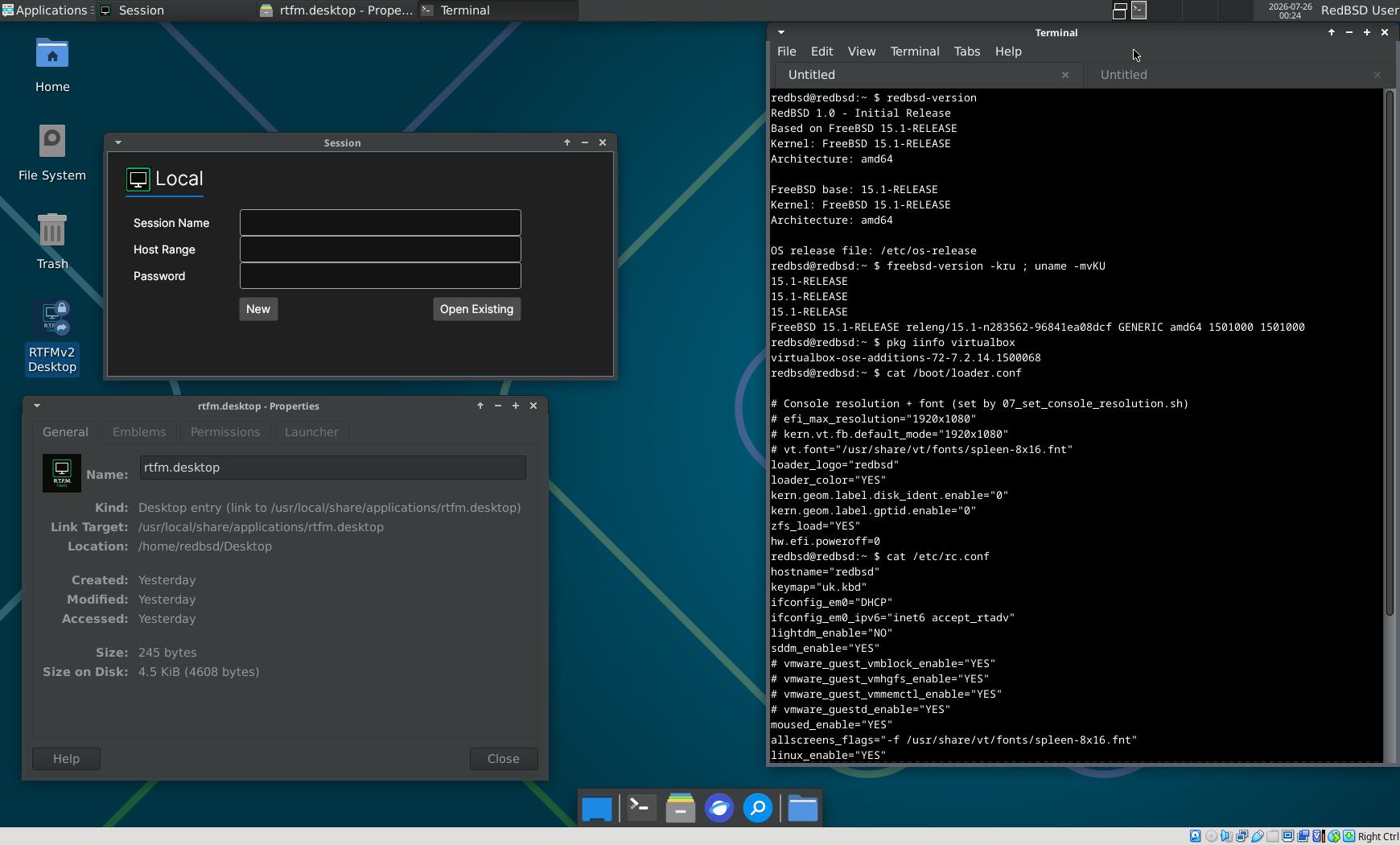
I used RedBSD-1.20260713-amd64-installer.iso with Oracle VirtualBox 7.2.14 r174565 on Kubuntu 26.04:

  1. allowed the default set of RedBSD packages
  2. shutdown -r now
  3. installed emulators/virtualbox-ose-additions-72 and enabled its two services
  4. edited /boot/loader.conf and /etc/rc.conf to make SDDM and the desktop environment work with VirtualBox instead of VMware
  5. enabled and started the two services for VirtualBox
  6. service sddm restart

Security notes

> RedBSD's provisioning scripts make choices that are convenient for an isolated lab but are not safe on an untrusted or internet-facing network: > > …

Additional background

Six Reddit posts:

  1. Red Team Oriented BSD OS : r/BSD (2026-06-15)
  2. Red BSD scam or real? : r/BSD (2026-06-16)
  3. RedBSD : r/freebsd (2026-07-10)
  4. RedBSD: Um FreeBSD para cyberseguranca : r/FreeBSD_BR (2026-07-10)
  5. RedBSD seems like only FreeBSD 15.1 : r/freebsd (2026-07-23)
  6. RedBSD continued. First Run. : r/freebsd (2026-07-24)

Thanks to @jbz@indieweb.social for the Mastodon post that sparked my interest in RedBSD.

4 points · 2 comments · view on lemmy.world

2 Comments

grahamperrin@billboard.bsd.cafe · 1 pts · 32d
redbsd@redbsd:~ $ pkg leaf
7-zip-26.02
ImageMagick7-7.1.2.25_1
aircrack-ng-1.5.2_4
apache-ant-1.10.15_2
apache24-2.4.68
automake-1.18.1
bind-tools-9.20.24_1
ca_root_nss-3.125
cherrytree-1.7.0
cmake-3.31.12
crunch-3.6_1
doas-6.4
dotnet-9.0.14
dotnet8-8.0.27
engrampa-1.28.2_1
firefox-esr-153.0,2
freerdp3-3.30.0
gcc-14_5
gdb-15.1_5
geany-2.1
git-2.54.0
go-1.25_20,2
gradle-9.6.1
hashcat-7.1.2_11,1
hs-pandoc-3.10
htop-3.5.1
john-1.9.0.j.1_1
kismet-2016.07.r1_2,1
kubectl-1.36.1_2
libtool-2.5.4_1
lighttpd-1.4.84_1
linux-rl9-libxkbcommon-1.0.3_2
linux-rl9-xcb-util-0.4.0_2
llvm-19_1,1
lsof-4.99.5,8
mariadb1011-client-10.11.18
maven-3.8.9_3
mercurial-7.1.2
nano-9.0
nginx-1.30.4,3
ninja-1.13.2,4
nmap-7.99_1
node-24.18.0_3
noto-basic-2.0_4
npm-11.18.0
open-vm-tools-13.1.0,2
openjdk17-17.0.18+8.1
openjdk21-21.0.10+7.1_1
openssl-3.0.21,1
papirus-icon-theme-20250501
pavucontrol-6.1
php83-curl-8.3.32_1
php83-mbstring-8.3.32_1
php83-mysqli-8.3.32_1
php83-pdo_sqlite-8.3.32_1
php83-zip-8.3.32_1
pixiewps-1.4.1
podman-5.8.4_1
postgresql16-client-16.14
proxychains-ng-4.17
py312-certbot-4.2.0,1
py312-podman-compose-1.5.0
py312-pwntools-4.15.0_1
py312-virtualenv-21.2.3
python3-3_4
radare2-6.1.4
reaver-1.6.6_1
redis-8.8.0
ripgrep-15.1.0_6
ristretto-0.14.0
rizin-0.9.1
rsync-3.4.4_1
ruby-3.4.9_2,1
rust-1.96.1
screen-5.0.1_6
sddm-0.21.0.36_3
socat-1.8.1.3
sqlitebrowser-3.13.1
subversion-1.14.5_1
sudo-1.9.17p2_2
tcpdump-4.99.6
thunar-archive-plugin-0.6.0
tmux-3.7b
tree-2.3.2
trivy-0.72.0_1
vim-9.2.0738
virtualbox-ose-additions-72-7.2.14.1500068
vscode-1.127.0_1
wget-1.25.0
whois-5.5.7_1
xf86-video-vmware-13.4.0
xfce-4.20_2
xfce4-screenshooter-plugin-1.11.3
xmlstarlet-1.6.1_5
xorg-7.7_3
yq-4.1.1
zig-0.16.0
zip-3.0_5
zsh-5.9.1
redbsd@redbsd:~ $ 
grahamperrin@billboard.bsd.cafe · 1 pts · 32d

Note

Without the changes to /boot/loader.conf and /etc/rc.conf:

  1. SDDM failed to start
  2. the virtual display was too large for my screens.

SDDM fails to start after installation in VirtualBox · Issue #5 · shanefarris/RedBSD

General information

redbsd@redbsd:~ $ redbsd-version
RedBSD 1.0 - Initial Release
Based on FreeBSD 15.1-RELEASE
Kernel: FreeBSD 15.1-RELEASE
Architecture: amd64

FreeBSD base: 15.1-RELEASE
Kernel: FreeBSD 15.1-RELEASE
Architecture: amd64

OS release file: /etc/os-release
redbsd@redbsd:~ $ freebsd-version -kru ; uname -mvKU
15.1-RELEASE
15.1-RELEASE
15.1-RELEASE
FreeBSD 15.1-RELEASE releng/15.1-n283562-96841ea08dcf GENERIC amd64 1501000 1501000
redbsd@redbsd:~ $ pkg iinfo virtualbox
virtualbox-ose-additions-72-7.2.14.1500068
redbsd@redbsd:~ $ 

/boot/loader.conf

redbsd@redbsd:~ $ cat /boot/loader.conf

# Console resolution + font (set by 07_set_console_resolution.sh)
# efi_max_resolution="1920x1080"
# kern.vt.fb.default_mode="1920x1080"
# vt.font="/usr/share/vt/fonts/spleen-8x16.fnt"
loader_logo="redbsd"
loader_color="YES"
kern.geom.label.disk_ident.enable="0"
kern.geom.label.gptid.enable="0"
zfs_load="YES"
hw.efi.poweroff=0
redbsd@redbsd:~ $ 

/etc/rc.conf

redbsd@redbsd:~ $ cat /etc/rc.conf
hostname="redbsd"
keymap="uk.kbd"
ifconfig_em0="DHCP"
ifconfig_em0_ipv6="inet6 accept_rtadv"
lightdm_enable="NO"
sddm_enable="YES"
# vmware_guest_vmblock_enable="YES"
# vmware_guest_vmhgfs_enable="YES"
# vmware_guest_vmmemctl_enable="YES"
# vmware_guestd_enable="YES"
moused_enable="YES"
allscreens_flags="-f /usr/share/vt/fonts/spleen-8x16.fnt"
linux_enable="YES"
# vmware_guest_vmxnet_enable="YES"
wlans_iwm0="wlan0"
sshd_enable="YES"
ntpd_enable="YES"
ntpd_sync_on_start="YES"
moused_nondefault_enable="NO"
# Set dumpdev to "AUTO" to enable crash dumps, "NO" to disable
dumpdev="AUTO"
zfs_enable="YES"
vboxguest_enable="YES"
vboxservice_enable="YES"
redbsd@redbsd:~ $ 

Bonus

This line in /boot/loader.conf is for FreeBSD to truly power off, when required, in a VirtualBox guest that uses UEFI:

hw.efi.poweroff=0

Not just VirtualBox. It's sometimes required with real hardware.