Markdown supports syntax highlighting hints on code blocks. But when I use a dark theme, PyLova seems to be rendering all code blocks that have syntax highlighting with a light background and light text. This often leads to most of the code in the block being entirely illegible because it is nearly the same color as the background. It seems that the text is being rendered in dark mode as it should, but for whatever reason, the background of the code block is using the light mode background.
Random example, here are some lines taken from https://codeberg.org/quokkau/PyLova/src/branch/main/app/instance/routes.py to use as glorified lorem ipsum to help illustrate the issue:
from collections import namedtuple

from flask import request, url_for, g, abort, flash, redirect, make_response
from flask_babel import _
from flask_login import current_user
from sqlalchemy import or_, desc, text
from collections import namedtuple

from flask import request, url_for, g, abort, flash, redirect, make_response
from flask_babel import _
from flask_login import current_user
from sqlalchemy import or_, desc, text
This is what those two code blocks look like with dark mode enabled:
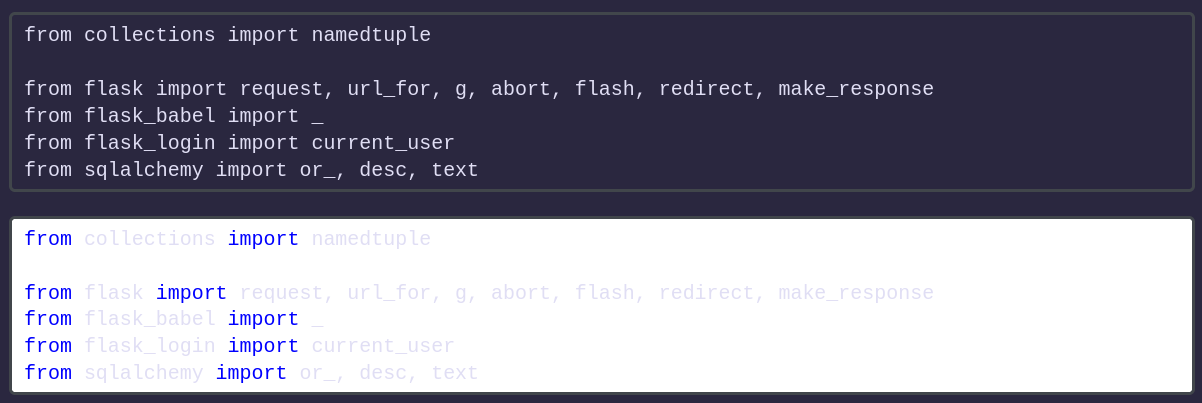
The first code block looks fine, just there is no syntax highlighting (which is not a problem at all, as that is indeed what the Markdown is). But the second code block looks illegible because I had specified that the code block is Python, which makes the code block use syntax highlighting and for whatever reason use dark mode text colors with a light mode background.
As a refresher, a code block is added in Markdown using three backticks before and after the code block:
```
code
goes
here
```
And to use syntax highlighting, you add a language hint after the first three backticks:
```py
python
goes
here
```
```c
c
goes
here
```
```rust
rust
goes
here
```
I think this is an issue that is specific to PyLova because if I check a post that has code block with syntax highlighting on here and on a PieFed instance, it looks fine on PieFed and only looks wrong here. Example:
- PieFed: https://piefed.ca/c/360cameras@piefed.social/p/905011/a-simple-script-for-viewing-panorama-images
- PyLova: https://quokk.au/c/360cameras@piefed.social/p/1143387/a-simple-script-for-viewing-panorama-images
If it helps you chase down the offending commit or anything, I think I had initially noticed this start happening suddenly a couple months or so ago.
If you think it would be worthwhile/helpful, I can make a Codeberg issue about this.
5 Comments
Quokka@quokk.au · 1 pts · 5d
Okay so this works now on (new) posts and top-level comments, apparently reply to comments is handle differently for who knows why so I'll have to finish it up tonight.
SatyrSack@quokk.au · 1 pts · 5d
I guess I also cannot use both code block syntax together. In basically every other Markdown editor I have used, I can use the "four spaces" syntax in order to demonstrate that the "three backticks" can be used to create a code block, and the "three backticks" section does not get rendered because it is within a "four spaces" section, thus it itself should be part of a code block. But as you see above, when I tried to do that here, it all rendered as a nested code block, which is not something I have ever seen before.
Not sure if that makes sense. This is how that section looks in VSCodium:
Quokka@quokk.au · 1 pts · 5d
Quokka@quokk.au · 1 pts · 5d
Thanks for the report, I'll try to sort it out tonight after work.
Quokka@quokk.au · 1 pts · 5d
Quokka@quokk.au · 1 pts · 5d
What colour scheme are you using for the code?
SatyrSack@quokk.au · 1 pts · 5d
It happens with any I tried:
Different key words may be colored differently and more visible in some syntax themes. But regardless of theme, all characters that are not "key words" are that light grey that is illegible on the white background.