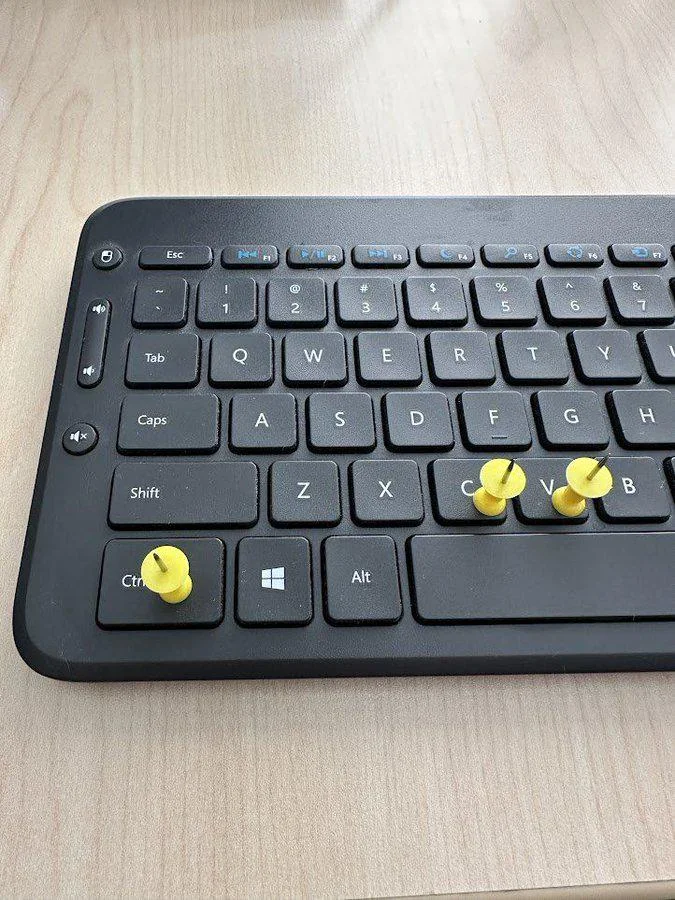
c/funny · by 0x4E4F@sh.itjust.works · 2yHow to be a pro sysadmin 130 points · 29 comments · view on lemmy.world

29 Comments
dadGPT@lemmy.world · 45 pts · 2y
c sharp has different meaning now.
Kolanaki@yiffit.net · 31 pts · 2y
jams the tacks into his fingers so he can press Ctrl+c and Ctrl+v slightly sooner because the tacks extend his finger length
Professionals know: No pain, no gain.
0x4E4F@sh.itjust.works · 3 pts · 2y
That's some BDSM shit... wonder how you handle cactuses.
Kolanaki@yiffit.net · 8 pts · 2y
You just grab 'em anywhere and put 'em where you need.
0x4E4F@sh.itjust.works · 4 pts · 2y
Simple, elegant... I like it 👍.
grrgyle@slrpnk.net · 1 pts · 2y
"hey where do you want this cactus? ... Yeah I can wait"
starts doing busker tricks with cactus, bleeding profusely, happy
ILikeBoobies@lemmy.ca · 2 pts · 2y
BSD*
grrgyle@slrpnk.net · 2 pts · 2y
Might I interest you in a career in DevOps. I think you'd be a perfect fit.
Mikufan@ani.social · 24 pts · 2y
Exactly those keys belong on the mouse.
itwasawednesday@lemmy.world · 6 pts · 2y
I do a tonne of copy paste for work and have one of these:
https://a.aliexpress.com/_mPusSb4
Works great!
Vent@lemm.ee · 5 pts · 2y
Blasphemy, this would require lifting your hands from the home row for longer than 10ms.
BigMikeInAustin@lemmy.world · 3 pts · 2y
I have them on my mouse. I'm not as fast using the mouse ones, but it lets me be lazier and only use one hand to get through a lot.
Mikufan@ani.social · 3 pts · 2y
Since i usually select code parts and not entire codes, its a lot faster for me to do it with my mouse.
azvasKvklenko@sh.itjust.works · 12 pts · 2y
CTRL + C is for terminating process occupying current terminal. How would I do sysadmin without that?
Vent@lemm.ee · 8 pts · 2y
Easy, don't run any commands you don't intend on seeing through.
grrgyle@slrpnk.net · 2 pts · 2y
Just bg everything, like I've got time to wait for an ls to get back to me when zooming around the dark infoscape
que me cd-ing back and forth between Downloads and /opt wondering why the thing isn't working
grrgyle@slrpnk.net · 1 pts · 2y
CTRL + \ crew. It's the only way to be sure
GiantRobotTRex@lemmy.sdf.org · 1 pts · 2y
Ctrl+z followed by
kill %1?BestBouclettes@jlai.lu · 10 pts · 2y
I'm a
Shift+Insertkind of guysugar_in_your_tea@sh.itjust.works · 4 pts · 2y
I use ViM, so y and p are all I need.
grrgyle@slrpnk.net · 2 pts · 2y
Sharing system clipboard with buffer 0 changed my life
grrgyle@slrpnk.net · 3 pts · 2y
Middle mouse button checking in
brianary@startrek.website · 2 pts · 2y
And
Ctrl+Insert.It can be more convenient with Dvorak.
VicksVaporBBQrub@sh.itjust.works · 9 pts · 2y
marcos@lemmy.world · 7 pts · 2y
Got it. No
catormvallowed.Also, CTRL-C and CTRL-Z just reduce your productivity by allowing multitasking.
Zachariah@lemmy.world · 6 pts · 2y
Too late: I’ve already got thick callouses on those fingers.
ZombiFrancis@sh.itjust.works · 2 pts · 2y
The tacks are for training.
m12421k@iusearchlinux.fyi · 5 pts · 2y
meanwhile yp users 😎😎
humdrumgentleman@lemmy.world · 2 pts · 2y
Vim and Emacs users both offended, but not for the same keys.
egonallanon@lemm.ee · 1 pts · 2y