After i got my Fairphone back from the repaircenter (they thought there was something wrong with it), they told me it was an intended design. However, i see other people mention they don't have it.
I noticed a white hue on the top of the screen and ONLY on the homescreen. I thought it was a Fairphone 5 issue, but now i noticed it on my Nothing Phone 2a (photo)as well. What is it?
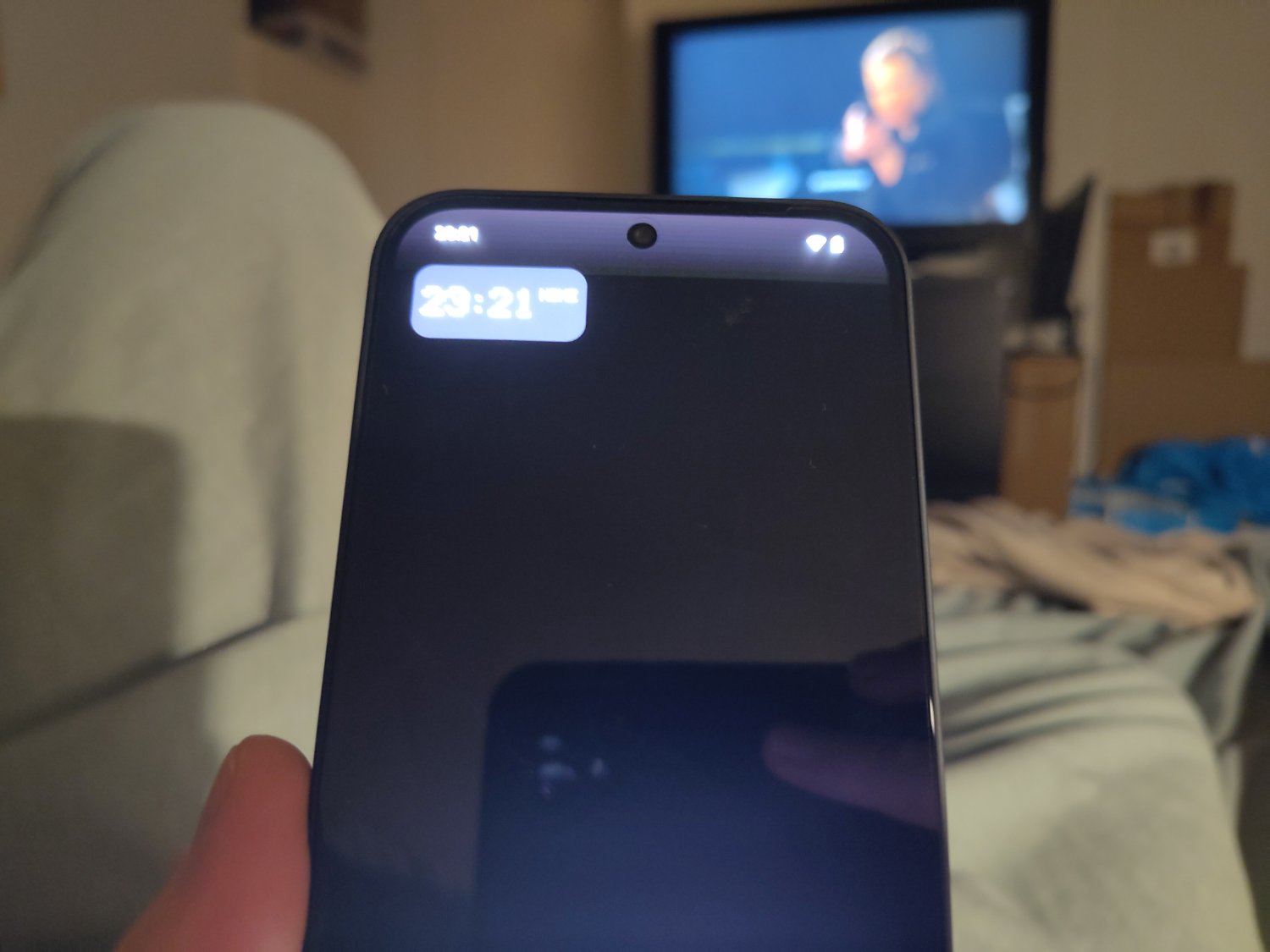
42 Comments
Xanis@lemmy.world · 21 pts · 2y
Having worked in tech, though not as familiar with phones, I want to ask a question no one else has, which may be silly of me:
It's not a background, is it?
Boeddabart@lemmy.world · 12 pts · 2y
Haha no, it is not.
Xanis@lemmy.world · 12 pts · 2y
Alright... you'd be surprised how often a power button isn't pressed, or tower/monitor is not plugged in. Sometimes the fix is the simplest possible solution.
Boeddabart@lemmy.world · 8 pts · 2y
True! And to be honest, i kinda checked it again after your comment... (With no luck)
Lojcs@lemm.ee · 16 pts · 2y
Maybe it's to improve notification bar visibility?
Boeddabart@lemmy.world · 9 pts · 2y
That is what Fairphone said. But then, why do i have it and others don't? And why does this happen when i'm using a fully black wallpaper? It should be visible enough already...
Xanis@lemmy.world · 6 pts · 2y
@PixelOrange@lemmy.world got it mostly right from my research, though their backgrounds will still have that bar. If you use a black, or near black, background, especially one not at your native resolution, that gradient will be most noticeable. Using other backgrounds that do not have a black strip along the top you might still be able to see it if you squint.
For those of you curious: Change your background to a solid black from the background menu in settings, or grab something similar elsewhere. Then crank your brightness up. Chances are it'll be there for you too if you're not running a third party launcher.
I haven't found a way to turn it off in native yet.
Boeddabart@lemmy.world · 5 pts · 2y
Yep. I've seen it happen in brighter backgrounds too: but instead the fade will be a little darker (it does not happen on a white only wallpaper tho...) I was afraid it was an actual "feature", and this all kinda comfirms it. For now, a launcher will be the only "fix".
IllNess@infosec.pub · 8 pts · 2y
Does the screenshot show the hue?
Boeddabart@lemmy.world · 8 pts · 2y
It does.
Bitswap@lemmy.world · 13 pts · 2y
I don't see the hue in the screenshot
Boeddabart@lemmy.world · 5 pts · 2y
Really? I double checked on my other phone, there it was visible as well...
bitfucker@programming.dev · 13 pts · 2y
It means it isn't there. I don't see the hue either. Which leaves, screen issue.Edit: It seems like a contrast issue? I took the screenshot and modified it contrast value -3×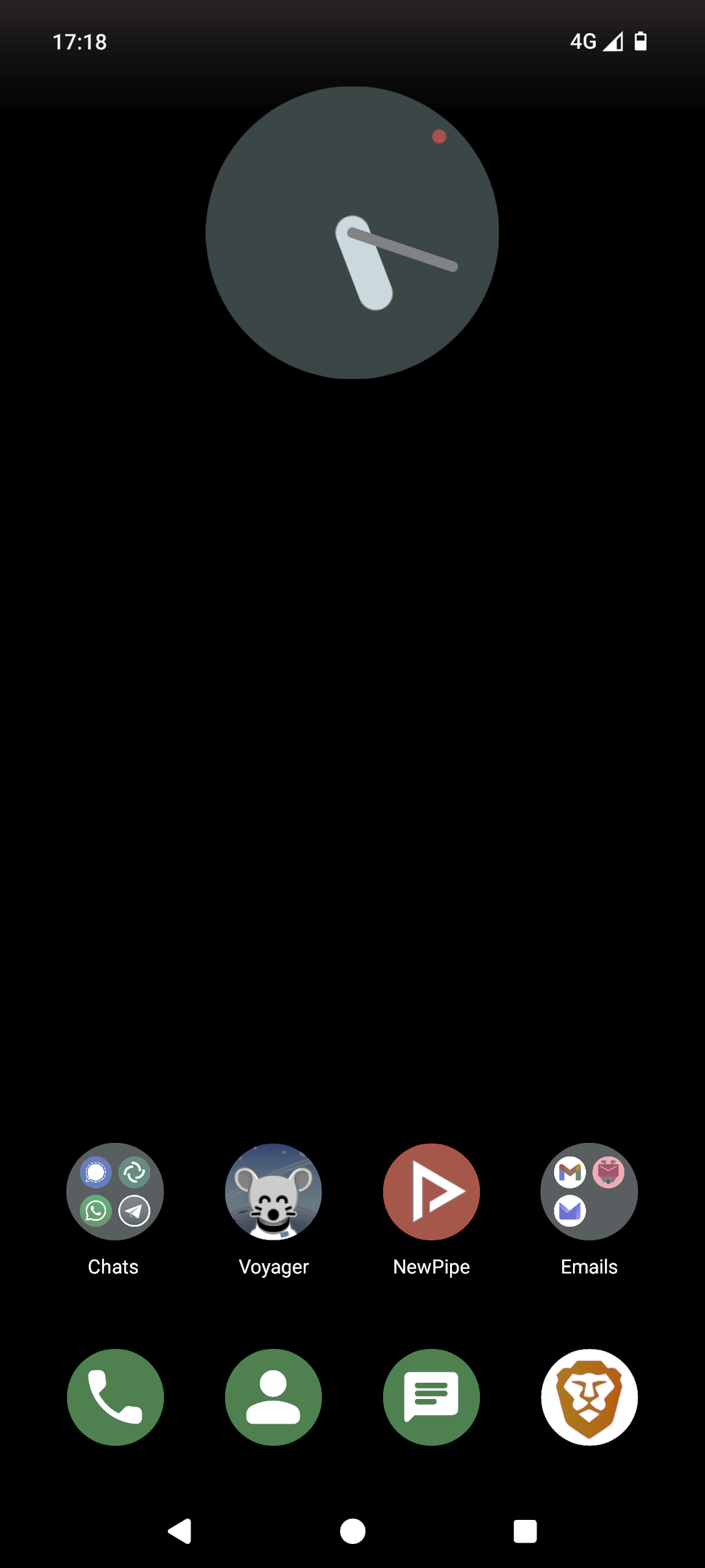
Boeddabart@lemmy.world · 3 pts · 2y
Hmm... I understand why you say that. But the thing is, my Fairphone has been send to the repaircenter for this exact reason. I got the same one back because there was no fault present in the screen or phone.
The funny thing is, the same thing happened for other people:
https://forums.androidcentral.com/threads/white-fade-at-the-top-of-home-screen.983310/page-2
Notice the guy saying: "oh, it actually shows up on a screenshot"? And i don't see it there too. Edit: actually i do, but indeed much less then when taking a actual photo.
This is just weird man...
bitfucker@programming.dev · 2 pts · 2y
Yep. Already edited my comment too
Wistful@discuss.tchncs.de · 7 pts · 2y
Yeah it is visible, but much more subtle than on your original picture in the post.
Easier to see against the black background:
bitfucker@programming.dev · 5 pts · 2y
I was curious and then trying to edit the contrast, sure enough. This is 3×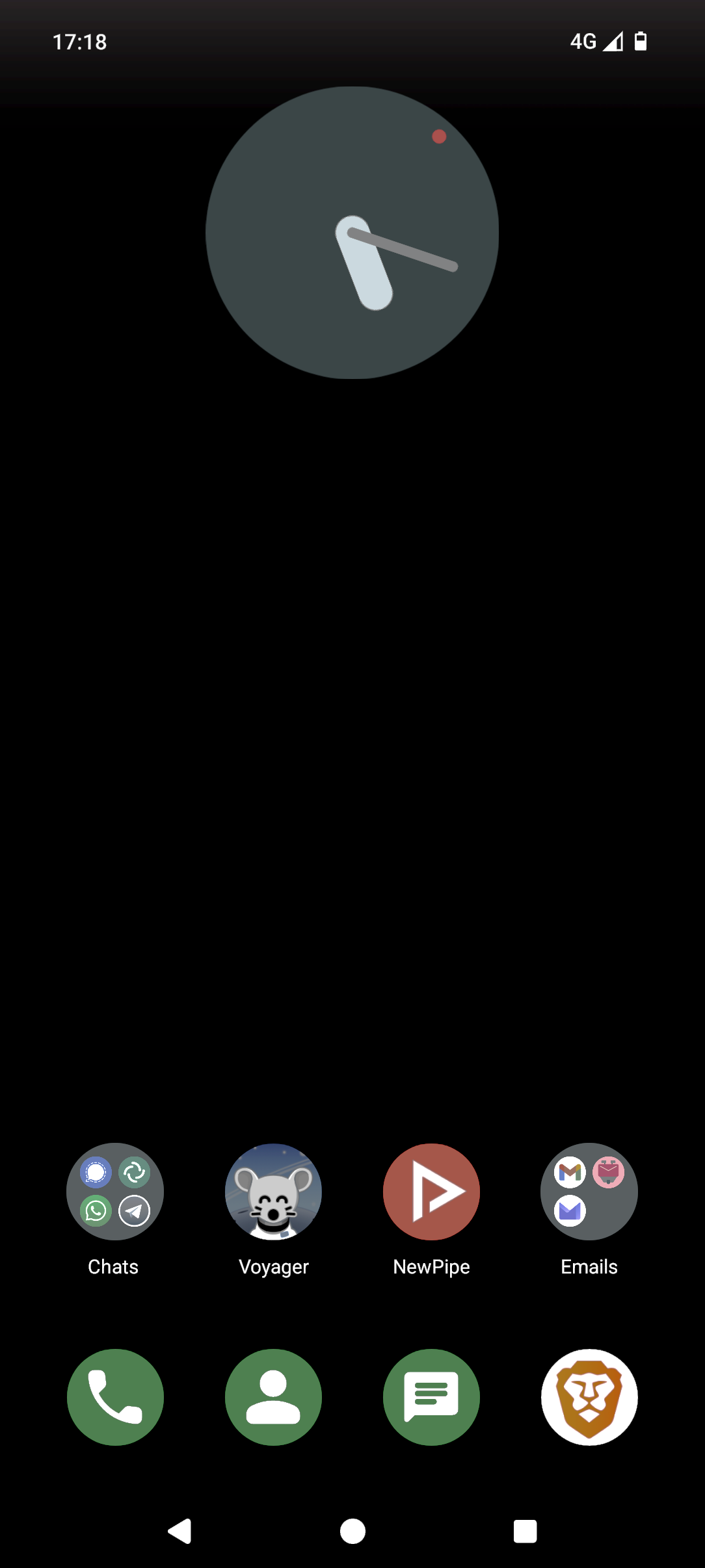
Boeddabart@lemmy.world · 3 pts · 2y
Yeah, it looks way worse on my original photo, because brightness was turned on to the max. On Fairphone it is a little worse then on my Nothing phone, but not that much.
Bitswap@lemmy.world · 3 pts · 2y
I guess I just have an ancient phone that can't display it. I see it on the photos that people posted with the contrast turned up...but can't see it at all on the original.
Trusty s10e finally showing its age...
IllNess@infosec.pub · 5 pts · 2y
I see it. At least we know it's a software issue at least.
Let's try to narrow down the issue. Did you try a different launcher?
Edit: Nevermind. Reading your other comments, it looks like it is the launcher.
Boeddabart@lemmy.world · 2 pts · 2y
Well, that's nevertheless somewhat odd. Fairphone and Nothing have different stock launchers. I think they just modified the standard launcher and thus used a "feature" that was included in the first place? All things point to an actual intended design choice which can't be changed.
IllNess@infosec.pub · 2 pts · 2y
I think the reason why some people see it and others don't is because screens have variances and are not calibrated properly. This happens even in the same batch of a phone release.
I saw the gradient but I barely saw it on my Pixel 5a. I could've easily missed.
PixeIOrange@lemmy.world · 8 pts · 2y
Seems to be an Android "Feature"
Look at this pictures, should be gone:
Edit: save them to your gallery if they dont fill the screen.
Boeddabart@lemmy.world · 5 pts · 2y
Hmm, i still notice some fade effect.. Edit: same on both devices.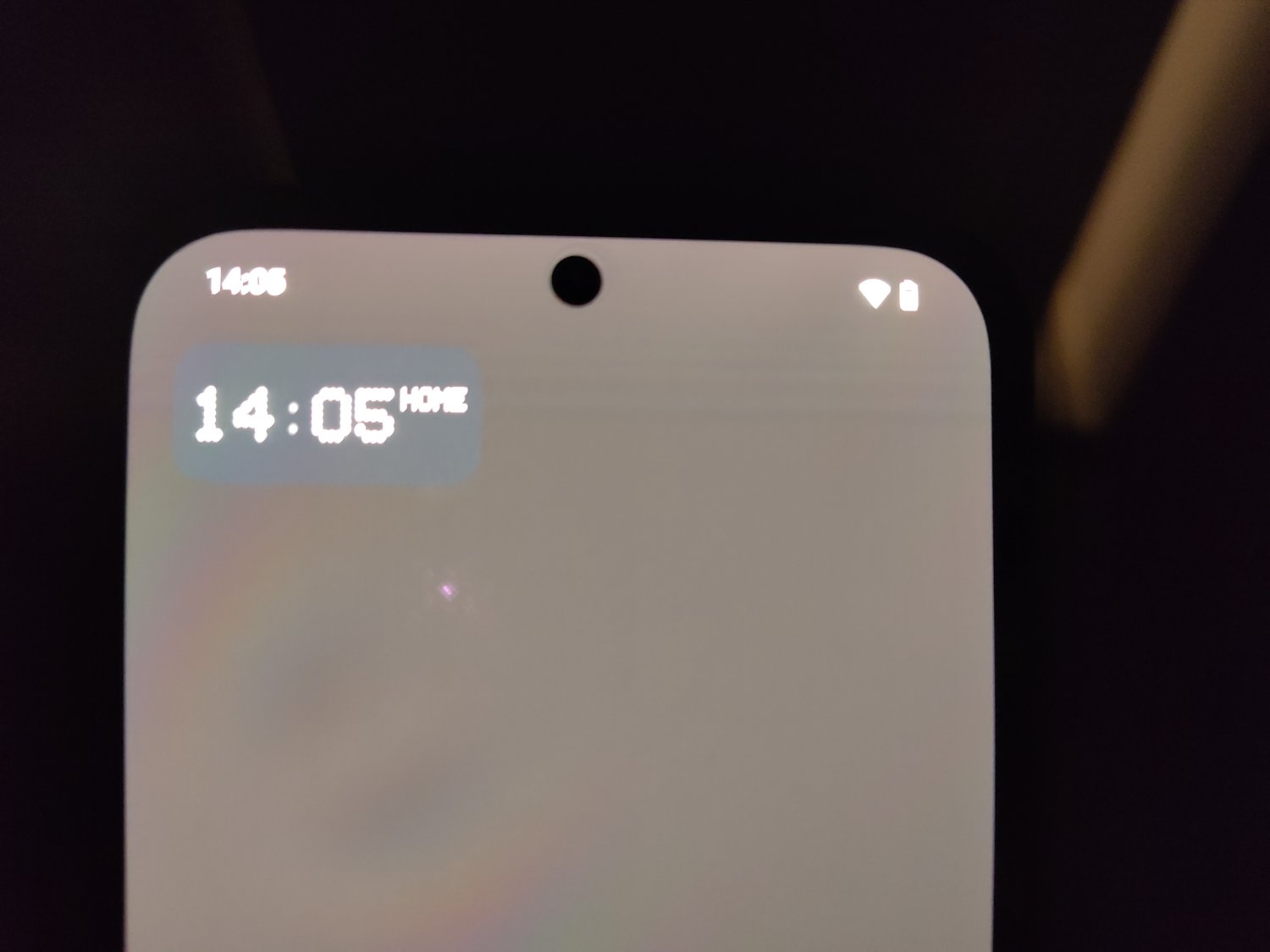
PixeIOrange@lemmy.world · 4 pts · 2y
Is that your lock screen? Try to use your gallery. If its gone there, its androids "design" element.
Boeddabart@lemmy.world · 1 pts · 2y
No, i used them as backgrounds on my homescreen. In gallery the fade is not present on your images.
Carighan@lemmy.world · 5 pts · 2y
Do you mean the lighter parts from the top side?
Boeddabart@lemmy.world · 2 pts · 2y
Yes, the white fade on the notification panel.
0oWow@lemmy.world · 5 pts · 2y
Try a different launcher like Nova Launcher or Smart Launcher.
Boeddabart@lemmy.world · 2 pts · 2y
Different launcher does indeed fix the issue, but that's such a shame because i really like the stock ones already.
0oWow@lemmy.world · 4 pts · 2y
So it might be that Fairphone is not aware how to make the notification bar transparent. It's a setting in android development they can enable. (Disclaimer: I'm not a developer.)
With that in mind, they seem to be saying it was intentional to hide their lack of knowledge. It's simply unreasonable that any developer would want such a hideous defect permanently at the top of the home screen.
On a positive note, I believe android 15 is supposed to correct this when the developer does not.
Boeddabart@lemmy.world · 3 pts · 2y
I agree. Sadly the Fairphone 5 is still running Android 13... A14 is "planned" to released this summer
Fairphone is dropping some balls when it comes to software. So much that in its current state, i can't recommend the Fairphone 5 at all. Plenty of issues. They need to hire better developers/software designers and probably more of them too.
I've had contact since november, and only a few weeks ago (after i had to sent it to the repaircenter in France, i live in the Netherlands) they could tell me it was "an intentional design choice"; so the notificationbar would be more visible. I sent it to them because of the hue, because they first said; "it looks indeed suspicious". So... Yeah...
Zelaf@sopuli.xyz · 3 pts · 2y
I'm wondering if it would be a jab at possibly trying to help burn-in issues? Having a bit of light around the pixels of static icons and text maybe would help minimize the noticeability?
Boeddabart@lemmy.world · 3 pts · 2y
That was actually one thing i also thought! But then i thought, why only do that on the homescreen? Because even the lockscreen misses that "feature".
Wistful@discuss.tchncs.de · 2 pts · 2y
OLED burn-in maybe?
Boeddabart@lemmy.world · 3 pts · 2y
Nope. My Nothing Phone 2a came in yesterday, and i've tested my Fairphone for it already.
Wistful@discuss.tchncs.de · 2 pts · 2y
Maybe it's just a temporary image retention? Was there something (bright or white) previously at that section of the screen? Like some app that you use often?
Boeddabart@lemmy.world · 1 pts · 2y
Nope. Because on the lockscreen and when i slide down the notification/quick setting panel, it is just normal, oled black.
cyrus@sopuli.xyz · 1 pts · 2y
is this everywhere on the device?
Boeddabart@lemmy.world · 1 pts · 2y
Only on the homescreen
cyrus@sopuli.xyz · 1 pts · 2y
Sorry for the late reply, that shadow is present in most launchers as a default option to create contrast between the wallpaper and status icons.
Things like Nova Launcher and Lawnchair have options to disable it.
Boeddabart@lemmy.world · 1 pts · 2y
Yeah i've noticed it recently in Lawnchair. But thanks anyway. Terrible design choice from Google if you ask me...