Hardware Information:
- Model: HP Victus by HP Gaming Laptop 16-s1xxx
- Memory: 16.0 GiB
- Processor: AMD Ryzen™ 5 8645HS w/ Radeon™ 760M Graphics × 12
- Graphics: AMD Radeon™ Graphics, NVIDIA GeForce RTX™ 4050 Laptop GPU
- Disk Capacity: 512.1 GB
Software Information:
- Firmware Version: F.13
- OS Name: Fedora Linux 41 (Workstation Edition)
- OS Build: (null)
- OS Type: 64-bit
- GNOME Version: 47
- Windowing System: Wayland
- Kernel Version: Linux 6.12.9-200.fc41.x86_64
Issue Description:
I've been experiencing persistent issues with brightness and display on my Fedora workstation. Sometimes, the brightness becomes very low, and I can't fix it without rebooting the laptop. This issue also occurred on Ubuntu, and it happened twice recently.
Just a few minutes ago, my display went completely black, and I had to hold the power button to shut down and restart the laptop. Here are the relevant errors from the log:
nvidia 0000:01:00.0: [drm] Cannot find any crtc or sizes

...

ACPI BIOS Error (bug): Could not resolve symbol [_SB.PEP.DETY], AE_NOT_FOUND (20240827/psargs-332)

...

ACPI Error: Aborting method _SB.WMID.WMAA due to previous error (AE_NOT_FOUND) (20240827/psparse-529)
These issues don't occur consistently, making it difficult to reproduce them. I can perform all tasks normally, including gaming, without encountering these problems most of the time.
If I cannot resolve this issue once and for all, I may revert to Windows 11. Any suggestions or solutions would be greatly appreciated.
15 Comments
vtoc@lemmy.world · 3 pts · 1y
See if turning off the auto brightness in the power settings help
mitexleo@buddyverse.one · 1 pts · 1y
I do not have this option.
pokexpert30@lemmy.pussthecat.org · 3 pts · 1y
/etc/modprobe.d/stop-fucking-my-brightness.confblacklist hid_sensor_hubShould fix your issues after a reboot
mitexleo@buddyverse.one · 1 pts · 1y
Blacklisted the module today. Hope it will fix the issue.
mitexleo@buddyverse.one · 1 pts · 1y
This didn't solve the issue; the display went black again today.
pokexpert30@lemmy.pussthecat.org · 2 pts · 1y
Huh, then no idea
mitexleo@buddyverse.one · 1 pts · 1y
I only experienced screen blackness once after reinstalling Fedora; I have not experienced the low brightness issue. The problem is that I do not encounter this problem frequently and do not know how to replicate it.
anon5621@lemmy.ml · 2 pts · 1y
Do u use nvidia as main card, not as 3d accerelstion only for games? I personally use for all cases Intel graphics for everything and nvidia as accelerator with switcheroo-control to call nvidia rendering.DM to me don't wanna spam in comments.
mitexleo@buddyverse.one · 1 pts · 1y
No, I use AMD iGPU as the main card.
anon5621@lemmy.ml · 2 pts · 1y
weird then,try add this parametrs
in
/usr/lib/modprobe.d/nvidia.confsave and rebootmitexleo@buddyverse.one · 1 pts · 1y
What will this do? Kindly explain. I'm new to this.
Also, the renderer seems to be the iGPU:
➤ glxinfo | grep "OpenGL renderer" OpenGL renderer string: AMD Radeon Graphics (radeonsi, gfx1103_r1, LLVM 19.1.5, DRM 3.59, 6.12.9-200.fc41.x86_64)
anon5621@lemmy.ml · 2 pts · 1y
yeah it's looks fine,it's using igpu.Tell me also which version of nvidia driver u have in system.About parameters ,we tell to nvidia driver to
General common parametrs used for nvidia on modern hardware. Also do u have installed prime-run or switcheroo-control in system?
mitexleo@buddyverse.one · 1 pts · 1y
I don't have switcheroo-control or prime-run installed. Here's the driver details: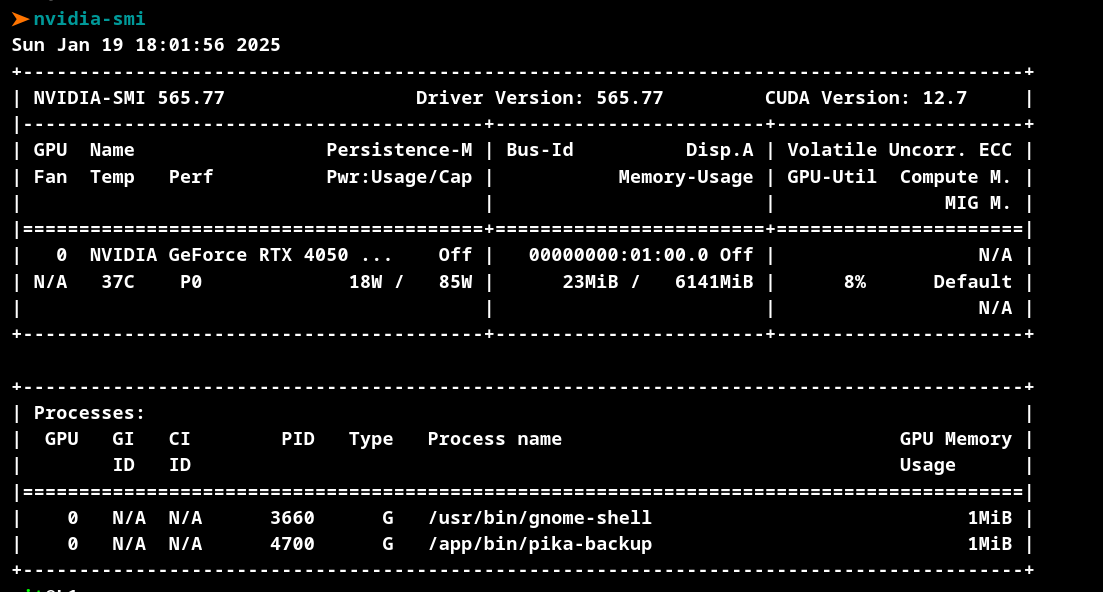
anon5621@lemmy.ml · 2 pts · 1y
Please apply options for nvidia which i provided and install switcheroo-control (if u wonder it let dynamically set enviroment variables to use nvidia for ur running app example
and if issue with brightness will persist let me know.
mitexleo@buddyverse.one · 1 pts · 1y
It looks like I have the package installed. Not sure why it didn't show up earlier.