Somebody needs to find whoever was responsible for the original NT task manager and learn a thing or two. That thing was bulletproof. I had servers over the years that were so broken nothing else would run but you hit CTRL-ALT-DEL and tada!
David Plummer, he has a YouTube channel "Dave's garage" he has a couple of videos dedicated to Taskmanager and even a look at the source for his first version. That and other cool stuff on windows and other tech.
Yeah, me to, so I decided to finally watch it and decided his channel is pretty interesting. Sure he's pretty 'microsofty' (i.e. not seeing any faults in the company) but other than that he presents his topics well.
for the love of god, for the past 27 years it's been ctrl-shift-esc (since like NT 4.0), while ctrl-alt-del opens up the security menu thing. I can't believe I'm saying this..
CTRL+SHIFT+ESC is simply a keyboard shortcut and is useless on a locked up system, it dies with the shell. CTRL+ALT+DEL throws a hardware interrupt, which contributed to the aforementioned bulletproof nature.
There is a developer setting that enables "kill task" in the task bar right-click menu. I recommend enabling it. I believe this is new since I just found out about it. It may only be in Windows Insider Dev Channel and/or Windows 11 Enterprise version, I'm not sure.
48 Comments
muddybulldog@mylemmy.win · 56 pts · 3y
Somebody needs to find whoever was responsible for the original NT task manager and learn a thing or two. That thing was bulletproof. I had servers over the years that were so broken nothing else would run but you hit CTRL-ALT-DEL and tada!
TalesFromTheKitchen@lemmy.world · 49 pts · 3y
David Plummer, he has a YouTube channel "Dave's garage" he has a couple of videos dedicated to Taskmanager and even a look at the source for his first version. That and other cool stuff on windows and other tech.
ShunkW@lemmy.world · 10 pts · 3y
I love his channel. Very informative and entertaining.
PlutoParty@programming.dev · 6 pts · 3y
One of his videos about task manager is one of those YouTube videos that just won't go away from being suggested for me.
TalesFromTheKitchen@lemmy.world · 4 pts · 3y
Yeah, me to, so I decided to finally watch it and decided his channel is pretty interesting. Sure he's pretty 'microsofty' (i.e. not seeing any faults in the company) but other than that he presents his topics well.
muddybulldog@mylemmy.win · 5 pts · 3y
TIL... Thanks for the tip. I'm going to search some of that stuff out.
ytrav@lemmy.world · 3 pts · 3y
for the love of god, for the past 27 years it's been ctrl-shift-esc (since like NT 4.0), while ctrl-alt-del opens up the security menu thing. I can't believe I'm saying this..
i thought programmers liked doing things faster
muddybulldog@mylemmy.win · 1 pts · 3y
CTRL+SHIFT+ESC is simply a keyboard shortcut and is useless on a locked up system, it dies with the shell. CTRL+ALT+DEL throws a hardware interrupt, which contributed to the aforementioned bulletproof nature.
danwardvs@sh.itjust.works · 34 pts · 3y
Install Linux
Speiser0@feddit.de · 30 pts · 3y
Steps to fix:
catalyst4472@lemmy.world · 30 pts · 3y
You can only install Linux at that point
redcalcium@lemmy.institute · 27 pts · 3y
There is a reason why the task manager was largely unchanged until windows 11.
Zorque@kbin.social · 5 pts · 3y
I dunno, the Win10 version seems pretty neutered compared to previous versions.
Eheran@lemmy.world · 3 pts · 3y
How so?
dylanTheDeveloper@lemmy.world · 22 pts · 3y
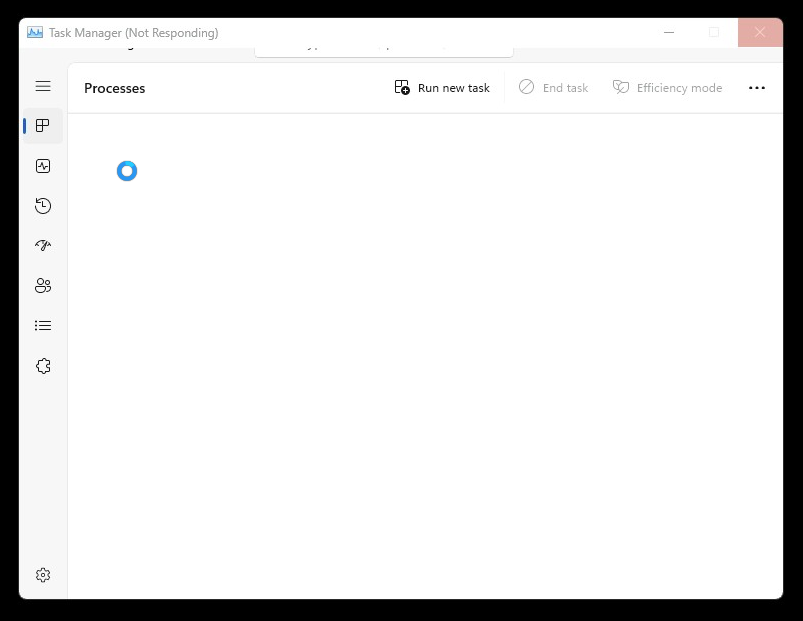
Open up task manager manager
JehovasThickness@lemmy.world · 5 pts · 3y
Wait, that's illegal
squirrel@discuss.tchncs.de · 22 pts · 3y
Install Task Manager Manager
TomMasz@lemmy.world · 21 pts · 3y
You have no tasks, there's nothing to manage. I'd say you're done for the day.
dxc@sh.itjust.works · 3 pts · 3y
Run new task? More like run away.
odium@programming.dev · 20 pts · 3y
htop
OrangeXarot@sh.itjust.works · 8 pts · 3y
top
madwifi@lemmy.world · 5 pts · 3y
op
colourlessidea@feddit.de · 4 pts · 3y
p
Number358@lemmy.world · 5 pts · 3y
Norgur@kbin.social · 7 pts · 3y
/dev/null
ImpossibleRubiksCube@programming.dev · 4 pts · 3y
flauschke@kbin.flauschke.de · 6 pts · 3y
btop
iByteABit@lemm.ee · 14 pts · 3y
What's the point of even "modernising" task manager?
Normies that would care about task manager being too ugly probably don't know it even exists.
There goes the last dependable program that Windows had to offer
lawrence@lemmy.world · 9 pts · 3y
Where is your god now?
EpicFailGuy@kbin.social · 8 pts · 3y
@dave
nothing to do here but go complain to the original developer
https://twitter.com/davepl1968
amanaftermidnight@lemmy.world · 1 pts · 3y
oh hey look, another dave!
durtuha@programming.dev · 8 pts · 3y
now install gentoo
boonhet@lemm.ee · 2 pts · 3y
Okay, I don't think Gentoo is the best OS for beginners
But
I think people new to computers (yes, I mean kids) should be handed a computer booted off a gentoo image with the handbook and wiki.
simonced@lemmy.one · 7 pts · 3y
wait a little bit, electron is still loading...
sefikkaan@feddit.de · 7 pts · 3y
Same feeling of an extinguisher catching fire
PolarisFx@lemmy.dbzer0.com · 6 pts · 3y
Start > Run > taskkill /F /IM:taskmgr.exe
42Firehawk@lemmynsfw.com · 5 pts · 3y
Power supply.... You're next option is to remove the power supply from the computer.... With a chainsaw.
I may be taking slightly drastic action.
Norgur@kbin.social · 2 pts · 3y
Nah, mate. That won't do it. You need to drive a truck into the nearest transformer station.
kogasa@programming.dev · 5 pts · 3y
There is a developer setting that enables "kill task" in the task bar right-click menu. I recommend enabling it. I believe this is new since I just found out about it. It may only be in Windows Insider Dev Channel and/or Windows 11 Enterprise version, I'm not sure.
Mikina@programming.dev · 4 pts · 3y
Have you tried turning it off and on again?
style99@kbin.social · 3 pts · 3y
Time for good ol' Ctrl-Alt-Del...
Er... I mean, time to hit the good ol' reboot button.
pineapplelover@lemm.ee · 3 pts · 3y
It took me some time to realize this was windows 11
JeanEliel@lemmy.world · 3 pts · 3y
🤣 this makes me laugh. Who watches the Watchmen?
Mportercls@lemmy.world · 2 pts · 3y
Had this myself recently, process explorer still works though. tskill taskmgr.exe would probably work too.
milkjug@lemmy.world · 1 pts · 3y
I don’t see the problem, you have such a powerful computer that there’s no process it cannot complete instantly. /s
yum13241@lemm.ee · 1 pts · 3y
Use the Windows 7 task manager at win7games.com. (ignore the name, I am NOT Winaero)
doppelgangmember@lemmy.world · 1 pts · 3y
Alt-f4
ImpossibleRubiksCube@programming.dev · 1 pts · 3y
Octopus1348@lemmy.world · 1 pts · 3y
MonkderZweite@feddit.ch · 0 pts · 3y
Third party tools. Like always.
supper_time@lemmy.fmhy.net · 1 pts · 3y
Do you have any examples or recommendations of said third party tools you prefer?
MonkderZweite@feddit.ch · 1 pts · 3y
Process Hacker. You can set it as default in the settings.