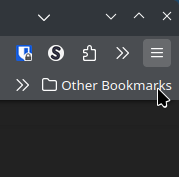
Since the update, if I snap Firefox to the top the mouse seems to be offset a number of pixels compared to where the actual cursor is. It also affects the content in sites, not just stuff in Firefox.
Edit: Looks like it's not just when it's snapped, but as soon as it passes about the top 90% of the screen. Just took a screenshot, where you can see the cursor is hovering over Other Bookmarks, but it's activating the menu above it.
9 Comments
rikudou@lemmings.world · 8 pts · 2y
It does that when using X on my computer, but not when using Wayland.
Matty_r@programming.dev · 4 pts · 2y
I found that setting Firefox to fullscreen, then resizing it from there is a bit of a workaround that worked.
b8sell@slrpnk.net · 8 pts · 2y
Installed plasma 6 this morning and noticed the same thing. Wasn't sure if it was ff or kde or some mysterious third option.
Ephera@lemmy.ml · 4 pts · 2y
If you right-click on the Firefox toolbar, select "Customize Toolbar..." and then in the bottom left corner tick the "Title Bar" checkbox, does that change anything about it?
Zadeis@lemmy.world · 3 pts · 2y
I only get this on my endeavorOS install when I use the ALHP x86-64-v3 repo as explained here:
https://somegit.dev/ALHP/ALHP.GO
When I get rid of them it went away so I've avoided them for a bit.
merthyr1831@lemmy.world · 3 pts · 2y
I believe this has been caught and fixed in the latest hotfixes. Have you got 6.0.1 available?
Matty_r@programming.dev · 3 pts · 2y
Yep, i'm on 6.0.1. Looks to be affecting Thunderbird as well.
Matty_r@programming.dev · 2 pts · 2y
https://bugs.kde.org/show_bug.cgi?id=482920
Bro666@lemmy.kde.social · 0 pts · 2y
Bugs must be reported to our bug tracker. Please read the sidebar. This thread is now locked.