Love the consent-o-matic extension on Firefox. I've got it set up to auto reject unnecessary cookies when possible, really cuts down on the annoying pop ups.
Yup. And for the rest , I've trained my muscle memory to click whichever button doesn't say 'accept', so I rejecting the dialog doesn't even require any conscious thought for me
Usually there's a carve-out in the rejection for "strictly necessary functional cookies" like logging in or remembering which options you chose in the cookie dialogue.
Seriously though if anyone doesn't know cookies are basically files added to your computer which either that site or others can check for / read in the future. Some useful like if on a stores website you can set your preferred store. Most commonly used for tracking like one airline sees you checking other airlines for prices based on your cookies and changes their price as a result.
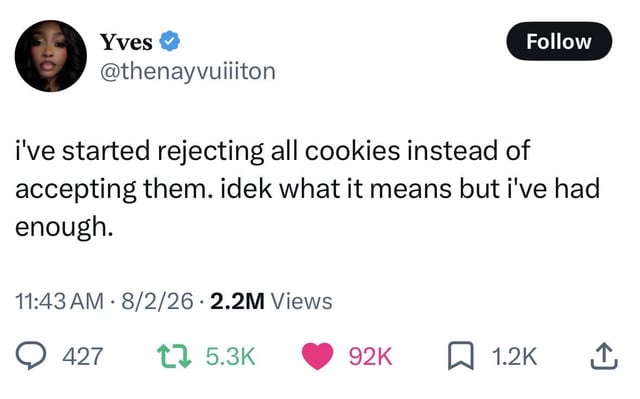
14 Comments
cymbal_king@lemmy.world · 34 pts · 2h
Love the consent-o-matic extension on Firefox. I've got it set up to auto reject unnecessary cookies when possible, really cuts down on the annoying pop ups.
Canconda@lemmy.ca · 6 pts · 2h
Defs just added that
Bluescluestoothpaste@sh.itjust.works · 5 pts · 57m
The necessary ones are bullshit too but i cant figure out how to block those
Zarobi@aussie.zone · -1 pts · 22m
Private browsing mode usually deletes cookies after you close the tab. It's a decent compromise
SubArcticTundra@lemmy.ml · 2 pts · 1h
Yup. And for the rest , I've trained my muscle memory to click whichever button doesn't say 'accept', so I rejecting the dialog doesn't even require any conscious thought for me
dudeface@lemmy.world · 9 pts · 2h
But if you don’t accept cookies the next time you visit the site they won’t have record of you rejecting said cookies
kn33@lemmy.world · 7 pts · 1h
Usually there's a carve-out in the rejection for "strictly necessary functional cookies" like logging in or remembering which options you chose in the cookie dialogue.
Darkassassin07@lemmy.ca · 8 pts · 2h
Just means more for me
Skullgrid@lemmy.world · 4 pts · 31m
Based
sik0fewl@piefed.ca · 3 pts · 1h
Welcome to the resistance.
vrek@programming.dev · 2 pts · 32m
My grandma would be disappointed...
Seriously though if anyone doesn't know cookies are basically files added to your computer which either that site or others can check for / read in the future. Some useful like if on a stores website you can set your preferred store. Most commonly used for tracking like one airline sees you checking other airlines for prices based on your cookies and changes their price as a result.
okwhateverdude@lemmy.world · 2 pts · 1h
Firefox with multi-account containers + temporary containers + consent-o-matic + ublock.
The only cookies that survive are long lived tabs and specific containers to specific sites and never shall any of their cookies be able to touch.
valar@lemmy.ca · 1 pts · 51m
Thought this was about IRL cookies before reading the comments
Kolanaki@pawb.social · 1 pts · 2h
I don't like having to log in every time I open the same page so I only keep essential ones.
Also: You can delete cookies yourself in your browser settings even if they don't have an option to opt out when you first visit.