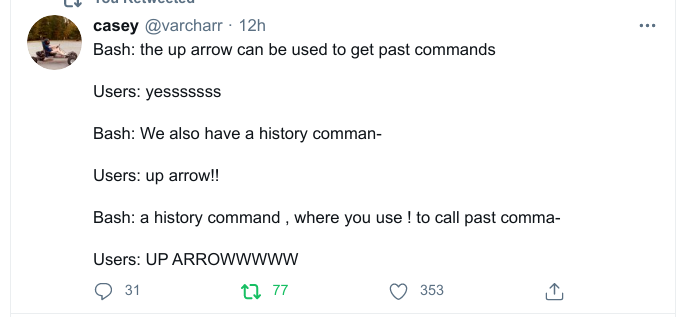
Up arrow just feels right. If I can satisfy my goal just by tapping one button repeatedly vs not doing that. I think we all know what satisfies that part of the monkey brain.
This was recently mentioned in another post, but I don’t see it here: fzf make CTRL+R much easier to use.
Bonus: in zsh you can start typing a command and then hit the up arrow to show only commands that start the same.
20 Comments
Bread@sh.itjust.works · 18 pts · 3y
Up arrow just feels right. If I can satisfy my goal just by tapping one button repeatedly vs not doing that. I think we all know what satisfies that part of the monkey brain.
alexthelion335@sh.itjust.works · 7 pts · 3y
The ! is really useful when you forget you need to run the command with sudo.
sudo !!dukk@programming.dev · 2 pts · 3y
That’s life changing shit right there.
wuddupdude@feddit.nl · 2 pts · 3y
No thanks. I'll just press the up arrow -> ctrl-a -> sudo
norawibb@sh.itjust.works · 1 pts · 3y
this is way more intuitive anyway
Aurenkin@sh.itjust.works · 2 pts · 3y
I like the argument reuse as well via
!:1and such. A bit more situational but can definitely come in handysupermurs@lemm.ee · 4 pts · 3y
Up arrow all the way!
bronzing@lemmy.fmhy.ml · 4 pts · 3y
This was recently mentioned in another post, but I don’t see it here: fzf make CTRL+R much easier to use. Bonus: in zsh you can start typing a command and then hit the up arrow to show only commands that start the same.
variouslegumes@reddthat.com · 3 pts · 3y
I always just use zsh with oh my zsh. Best of both worlds.
One thing that I still don't know how to do is go to the next result in the search with Ctrl+r. Makes it less useful lol
yote_zip@pawb.social · 3 pts · 3y
Press Ctrl+r and Ctrl+s to cycle through.
red@feddit.de · 2 pts · 3y
In Bash you just hit ctrl+r again, and again, until you found what you're looking for
VinesNFluff@pawb.social · 3 pts · 3y
[opens terminal and hits control-R]
My mind has been expanded. How come no one told me of this before? This surf-and-turfs the fuck out of mashing up.
drew_belloc@programming.dev · 3 pts · 3y
Ctrl+R just changed everything for me now, thank you
ProfessorGumby@midwest.social · 2 pts · 3y
Ctrl p is the appropriate keystroke to replace the up arrow.
Alfi@sh.itjust.works · 2 pts · 3y
history |grep
crunchypotat77@lemmy.world · 2 pts · 3y
CTRL+R is the GOAT.
lungdart@lemmy.ca · 2 pts · 3y
https://github.com/junegunn/fzf
You're welcome
lemminer@lemmy.world · 1 pts · 3y
I use fzf btw
GustavoM@lemmy.world · 1 pts · 3y
"You are late for job?"
"CTRL+R"
whodoctor11@lemmy.world · 1 pts · 3y