Both the paramore site and the new download site listed in the guide are 100% safe to download from. Same with the latest GenP versions. Anyone who says otherwise is spreading misinformation or basing it on antivirus detections which aren't always reliable for GenP.
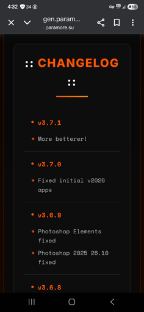
If you mean GenP v3.8.0, it's on gen.paramore.su. It was the final version from CGP before they stepped back from GenP. It's since been taken over once again by the GenP Lemmy/Stoat team. It's not listed on the guide anymore since the mods do not have access to the paramore website (which is owned by CGP) and have switched to an alternative safe download site instead for future releases.
The mods can verify on a patching level, but I'd assume it should work. Adobe lets you use any account on at least two devices logged in simultaneously. The GenP guide only mentions the account should be in no way associated with any genuine Adobe subscriptions or your real identity/details. If you do encounter issues though, it's super easy to make and verify a brand new account for your new PC. And you'll have to patch the apps with the latest GenP version regardless after installing, no matter what account you use (again, as long as it's never been associated with any genuine subscriptions)
There was a bug found in 4.0.0 that is being fixed in the next update (4.0.1) hopefully releasing soon.
This is from the Announcement's channel on GenP Stoat:
"Bugs founds:
Substance 3D apps not being found, hold fire on update, or use v3.8.0 or v3.7.2 as still good - issue fixed and ready, in new release.
Sorting and new v4.0.1 with fixes should be out within next few days."
GenP is still 100% safe. The CGP team (from the paramore site) used to maintain and update GenP, but they decided to step down. Now the GenP Lemmy/Stoat team is taking over development once again, as they used to in the past. It's that simple. GenP is still the same as always, 100% free and completely safe.
This issue is explained in the GenP Guides Troubleshoot Section:
FAILED / RETRY / ERROR CODE 304
If you encounter any of the above errors when attempting to install an app, follow these steps:
Ensure that you are logged in as an Administrator and that CC is running with Administrator privileges.
Go Menu > File > Quit Creative Cloud, then reopen CC as Administrator and attempt the installation again
Alternatively, restart your device, reopen CC as Administrator, and try installing the app again.
Check the Cloud Activity icon, if it has a red dot, this may indicate the cause of your error.
Ensure that you have enough disk space to install the required app. This means not only meeting the minimum system requirements but also allowing for additional disk space that temporary installation files will use, as well as for stored app data which Adobe places on your main C: drive regardless of the chosen installation location.
Confirm that you have the latest version of Visual C++ installed, both x86 and x64 versions must be installed. If you already have the latest versions, repair your existing installs and restart your device when prompted. Visual C++
If the issue persists, use the CC App Uninstaller Tool to either repair or uninstall and reinstall CC. CC App Uninstaller Tool
You don't need to uninstall any apps, ignore that initial part of Adobe's instructions. Instead, open the tool, select "Repair" and let it run, then restart your device and repatch CC with GenP.
If the error persists, use the Uninstall option instead. Let the process complete, restart your device, reinstall CC, and repatch CC with GenP.
I've been having the same issue on the Advanced method Host File updater, keeps saying that on the log. I made sure to change the GenP file path to where GenP is in my Downloads (C Drive) and I made sure the folder and Downloads itself has full admin access on all my admin accounts.
But the updater task works just fine when it uses the backup URLS, so I've kinda just let it be since it still works. Plus since I've now started using Wintrust on Premiere and Photoshop (Acrobat blocks popups great just patching with GenP), I've not really used the hosts file anymore anyway.
It seems like you've followed the steps in the troubleshooting section. But have you tried using Wintrust on Premiere? Or going to the GENERAL POPUPS EXCEPTION part of the guide and doing the modified config.ini steps, since After Affects can't have Wintrust applied anymore? Also, not sure if its relevant, but your GenP is out of date. The latest one is v3.7.1.
I have uBlockOrigin (mostly for YouTube, lol), and I just tried turning it off, refreshing the page, restarting my PC, and trying to download it again, but it doesn't seem to make a difference. Thanks anyway :)
Might be a stupid question, but have you tried restarting your PC or using the Creative Cloud Cleaner Tool to repair the CC app? Or has it not got as far as installing it yet?
Same here, not sure what's going on. I'm also getting .prin files alongside them (which I think are for the new Media Intelligence thing, but still seem to clutter up the project folder more). If they're normal and needed files, I'm not sure if we could move/organise them to a different folder instead. If not now, hopefully one day 🤞

Already answered here: https://lemmy.dbzer0.com/post/65356326
And here by one of the official GenP moderators: https://app.revolt.chat/server/01JT8579BEYH74E3NF416ZG9DJ/channel/01JT8579BEKH3QEDSGGG2M9A93/01KJGY4Q5TXQXZJDV48JHED08S
Both the paramore site and the new download site listed in the guide are 100% safe to download from. Same with the latest GenP versions. Anyone who says otherwise is spreading misinformation or basing it on antivirus detections which aren't always reliable for GenP.
If you mean GenP v3.8.0, it's on gen.paramore.su. It was the final version from CGP before they stepped back from GenP. It's since been taken over once again by the GenP Lemmy/Stoat team. It's not listed on the guide anymore since the mods do not have access to the paramore website (which is owned by CGP) and have switched to an alternative safe download site instead for future releases.
I think your post might’ve been deleted, link isn't working for me.
The mods can verify on a patching level, but I'd assume it should work. Adobe lets you use any account on at least two devices logged in simultaneously. The GenP guide only mentions the account should be in no way associated with any genuine Adobe subscriptions or your real identity/details. If you do encounter issues though, it's super easy to make and verify a brand new account for your new PC. And you'll have to patch the apps with the latest GenP version regardless after installing, no matter what account you use (again, as long as it's never been associated with any genuine subscriptions)
There was a bug found in 4.0.0 that is being fixed in the next update (4.0.1) hopefully releasing soon.
This is from the Announcement's channel on GenP Stoat:
"Bugs founds: Substance 3D apps not being found, hold fire on update, or use v3.8.0 or v3.7.2 as still good - issue fixed and ready, in new release. Sorting and new v4.0.1 with fixes should be out within next few days."
GenP is still 100% safe. The CGP team (from the paramore site) used to maintain and update GenP, but they decided to step down. Now the GenP Lemmy/Stoat team is taking over development once again, as they used to in the past. It's that simple. GenP is still the same as always, 100% free and completely safe.
This issue is explained in the GenP Guides Troubleshoot Section:
FAILED / RETRY / ERROR CODE 304
If you encounter any of the above errors when attempting to install an app, follow these steps:
Ensure that you are logged in as an Administrator and that CC is running with Administrator privileges.
Go Menu > File > Quit Creative Cloud, then reopen CC as Administrator and attempt the installation again
Alternatively, restart your device, reopen CC as Administrator, and try installing the app again.
Check the Cloud Activity icon, if it has a red dot, this may indicate the cause of your error.
Ensure that you have enough disk space to install the required app. This means not only meeting the minimum system requirements but also allowing for additional disk space that temporary installation files will use, as well as for stored app data which Adobe places on your main C: drive regardless of the chosen installation location.
Confirm that you have the latest version of Visual C++ installed, both x86 and x64 versions must be installed. If you already have the latest versions, repair your existing installs and restart your device when prompted. Visual C++
If the issue persists, use the CC App Uninstaller Tool to either repair or uninstall and reinstall CC. CC App Uninstaller Tool
You don't need to uninstall any apps, ignore that initial part of Adobe's instructions. Instead, open the tool, select "Repair" and let it run, then restart your device and repatch CC with GenP.
If the error persists, use the Uninstall option instead. Let the process complete, restart your device, reinstall CC, and repatch CC with GenP.
I've been having the same issue on the Advanced method Host File updater, keeps saying that on the log. I made sure to change the GenP file path to where GenP is in my Downloads (C Drive) and I made sure the folder and Downloads itself has full admin access on all my admin accounts.
But the updater task works just fine when it uses the backup URLS, so I've kinda just let it be since it still works. Plus since I've now started using Wintrust on Premiere and Photoshop (Acrobat blocks popups great just patching with GenP), I've not really used the hosts file anymore anyway.
It seems like you've followed the steps in the troubleshooting section. But have you tried using Wintrust on Premiere? Or going to the GENERAL POPUPS EXCEPTION part of the guide and doing the modified config.ini steps, since After Affects can't have Wintrust applied anymore? Also, not sure if its relevant, but your GenP is out of date. The latest one is v3.7.1.
Edit: Also happens on other browsers like Opera GX, so it isn't just Chrome. Ad-blockers being on or off makes no difference either.
I have uBlockOrigin (mostly for YouTube, lol), and I just tried turning it off, refreshing the page, restarting my PC, and trying to download it again, but it doesn't seem to make a difference. Thanks anyway :)
Might be a stupid question, but have you tried restarting your PC or using the Creative Cloud Cleaner Tool to repair the CC app? Or has it not got as far as installing it yet?
Same here, not sure what's going on. I'm also getting .prin files alongside them (which I think are for the new Media Intelligence thing, but still seem to clutter up the project folder more). If they're normal and needed files, I'm not sure if we could move/organise them to a different folder instead. If not now, hopefully one day 🤞