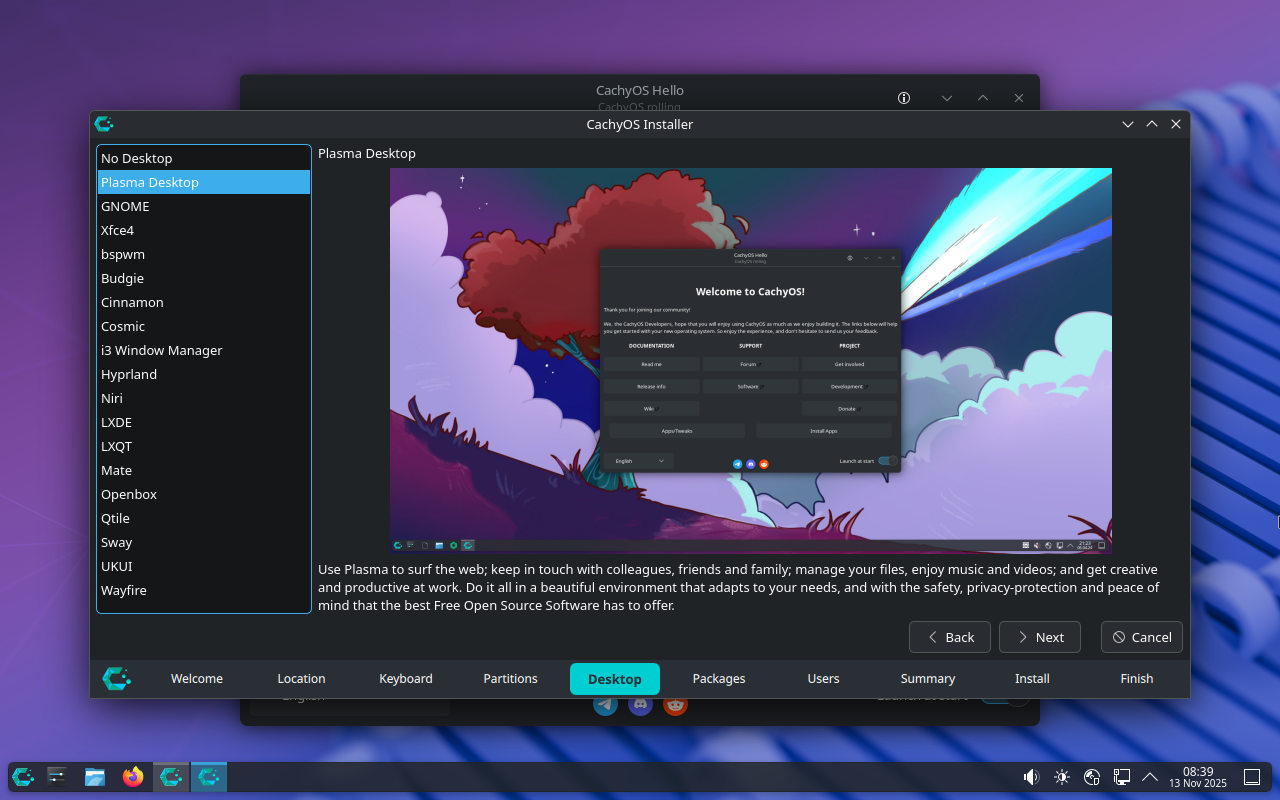
It's very nice to not have a dozen different versions of the same distro to parse through and figure out that are simply the same distro with a different DE. Moreover, very few of them offer this many options.
Cachy could be doing a better job explaining what the user is looking at here and who each of these is for. Pretty easy to sum up in 1-2 sentences...
55 Comments
texture@lemmy.world · 65 pts · 250d
this is just calamares, the most used installer across the span of linux distros.
on the question of why this approach vs dedicated desktop environment installs, well, ive always wondered about the pros and cons on that too. one pro is that with a dedicated DE iso you dont need an internet connection to install it. otherwise im not sure why people would choose one or the other.
artyom@piefed.social · 25 pts · 250d
That's a good reason. I didn't realize this one did.
4am@lemmy.zip · 13 pts · 250d
It’s not 100% true that you need an internet connection…your install media will just be unnecessarily huge since 100% of users will only be using part of it. And, you’ll have to pay to host and distribute it, most for no reason, every time.
It would be cool if they did make an “everything” image for offline installs though; as preparation when when they take away the internet…
artyom@piefed.social · 4 pts · 250d
I DLed Cachy with the torrent. Another thing I wish more distros would offer, haha! It was 2.8GB. I'm not sure if that's big or not really, I don't typically pay attention.
I had an Ethernet cable connected so I wouldn't have had to connect it manually, that's why I don't know if it was necessary.
lucas@startrek.website · 17 pts · 250d
I don't think I've ever encountered a distro that doesn't offer a torrent download option, since it saves the project expensive hosting costs.
MyNameIsRichard@lemmy.ml · 8 pts · 250d
Tumbleweed doesn't offer a torrent because there's a new iso nearly every day.
lucas@startrek.website · 3 pts · 250d
That kind of case makes sense, actually.
artyom@piefed.social · 3 pts · 250d
Well now you have. Just the first one off the top of my head.
lucas@startrek.website · 4 pts · 250d
Wow, that's wild. I guess that's what you get from being such a young/niche project, they haven't had the time/demand to come up against the problems that all the other distros had to solve years ago.
halet@programming.dev · 0 pts · 250d
You're just lying.^[Meta-joke I just had to make. If you know, you know. In actuality, you simply didn't know better.]Not on their website, but it does elsewhere: https://fosstorrents.com/distributions/bazzite/
The website for the torrents is (at least) found within Bazzite's documentation.
kumi@feddit.online · 2 pts · 250d
Debian has this (well, for sources at least) and I think it's somewhere between 20-30 DVD images for actually-everything. Maybe not something for the day-to-day but great to keep on hand for preppers and the paranoid (:
4am@lemmy.zip · 1 pts · 247d
I’m not quite there yet to the point of archiving actually-everything, but I’m getting there
Dojan@pawb.social · 2 pts · 250d
Simplicity for users and support staff.
I don't think that the average user cares for customisation far beyond wallpaper, and perhaps theme. Note I'm not saying average Linux user, I mean average person using a device. Think your aunt who can't plug in the printer. Faced with too many options people shut down.
If you have a distro and need to offer support for it, it also helps if you can write guides and instructions for a single type of scenario. With Windows you can say "right click the start menu, click device manager..." etc, but that's not quite as easy on Linux. You can always direct people to the terminal, but again, the average user is likely to balk at the idea.
Choosing a dedicated DE means you have less to maintain, and less to support, and can focus your efforts elsewhere.
D_Air1@lemmy.ml · 32 pts · 250d
The reason most distros don't do this is because they usually try to steer users to their preferred desktop. I don't mean that in a bad way, but often they call it the flagship edition. This is usually the desktop environment that they develop and test. Think Linux Mint with Cinnamon, popOS with Cosmic, Zorin, etc. Pretty much every other distro that has options do exactly what you are showing through the use of the venerable calamares installer that you see in your screenshot.
artyom@piefed.social · 6 pts · 250d
They don't though, they just offer a dozen different options that are offered as entirely different "distros" with no explanation of what they are. Look at the Linux Mint page. You click download and you're presented with 3 options with no explanation of what they are, which one you should choose or why.
yo_scottie_oh@lemmy.ml · 13 pts · 250d
Have you actually visited the download page that you linked? Because it has screenshots, explanations, whole nine yards.
artyom@piefed.social · 4 pts · 250d
How do you think I got it? There is no explanation of what they are, which one you should choose or why. Just generic information that describes every Linux distro.
Put yourself in the shoes of a new Linux user and ask yourself what good those screenshots are.
Strit@lemmy.linuxuserspace.show · 5 pts · 250d
Ho much does the screenshot you posted say, that the screenshots on the Mint download page does not? Other than giving you more options, which can overwhelm new people.
Some distro's really like doing their curated live environment for each environment, so you can test it out before actually installing it.
artyom@piefed.social · 1 pts · 250d
CachyOS only has 2 ISOs, both of which are very clear in their purpose (Desktop and Handheld). Not 4 different ISOs with no clear delineation to speak of.
If you read the OP I also said:
Strit@lemmy.linuxuserspace.show · 1 pts · 250d
Sure, but presenting DE choice inside the install will confuse the mythical new user.
But I agree with you. A lot of download bandwidth and hosting storage could be saved by doing what Cachy/Endeavour ISO's are doing.
Ulrich@feddit.org · 1 pts · 250d
artyom@piefed.social · 1 pts · 250d
The new user often has to choose their DE regardless. This just moves it from the webpage where they're presented with 3 or 4 different "distros" with different names for some reason, all under the same ISO, which I would argue is far less confusing (especially if presented with the relevant information during the install).
yo_scottie_oh@lemmy.ml · 5 pts · 250d
One of the great things about Linux is that if the user is still undecided after reading the paragraphs and looking at the screenshots, they can boot into the live environments and see for themselves which one is right for them.
artyom@piefed.social · 7 pts · 250d
You're expecting way too much of a new user. There's already 309534 distros to choose from, now you want them to boot into a dozen live environments of each one?
fhein@lemmy.world · 5 pts · 250d
I think a new Linux user shouldn't have to choose a DE, so starting with a distro which makes this choice for them is most likely better. Unless the CachyOS installer does a good job at explaining what a desktop environment is, there's a risk that a new user thinks they're just selecting a skin for the OS and don't understand how it will affect their desktop experience. If they for example choose an extreme light weight DE for their brand new gaming PC, their first impression of Linux might be that it looks dated.
Having a DE chooser built into more distro installers could be a good thing for us more experienced users though.
artyom@piefed.social · 2 pts · 250d
I mean that's a fair point but most don't do that either. Even supposedly-beginner-friendly distros (which this is not) like Mint don't do that.
Schmuppes@lemmy.today · 1 pts · 250d
Jayjader@jlai.lu · 21 pts · 250d
Then by all means, give them your 1-2 sentences per DE so that they "only" need to include them!
Frankly, I think it's a lot harder than you're making it out to be, especially over such a large range of DEs. Not that the suggestion is without merit, just that the assumed difficulty of making it work as intended (i.e. actually helping a new Linux user pick the "right" desktop environment for them) seems underestimated.
Maybe Cinnamon can get away with "it's like windows 95", but Gnome and i3 are quite different from anything the target audience has ever experienced.
Ulrich@feddit.org · 2 pts · 250d
N0x0n@lemmy.ml · 0 pts · 249d
Gnome: It's like MacOS
hobata@lemmy.ml · 2 pts · 249d
Is MacOS also full of shit and they break or remove a random thing that was somehow useful every year?
ms_lane@lemmy.world · 1 pts · 248d
It's not at all like MacOS.
KDE is closer to finder than Gnome Shell.
placebo@lemmy.zip · 21 pts · 250d
lime@feddit.nu · 14 pts · 250d
i think that's calamares, so any distro that uses it can technically do this. the reason most don't is that you can just add more DE's after install. i know endeavourOS and openSUSE do this, and i think fedora has something like this too?
but the main reason is to keep install size to a minimum. if you want your system to be installable without an internet connection you can't just ship every DE known to man.
artyom@piefed.social · 12 pts · 250d
You sure can but that involves:
Knowing the option exists
knowing where it is
Not screwing it up
lime@feddit.nu · 4 pts · 250d
reading the manual is sort of compulsory if you want to do stuff like changing DEs, and for most people (read: the 99% that don't know what "operating system" means) the mere existence of a choice is enough to cause paralysis.
i really do like the new wave of "opinionated" distros like kalpa, cachy and aeon where the system takes care of most issues rather than the user having to deal with them. shows maturity. but this selector screen sort of runs contrary to that. either be opinionated or be fully free, imo.
artyom@piefed.social · -1 pts · 250d
You don't need to read anything to use the system in OP.
Paralysis is solved by a simple explanation and recommendations.
lime@feddit.nu · 12 pts · 250d
idk if you've ever tried to guide people unfamiliar with computers through troubleshooting over the phone, but my experience is that the more explanations are given the more they despair, and the more choices are given the more confused they get.
artyom@piefed.social · 1 pts · 250d
I mean that's fair but they have to make this choice regardless. Open up the Fedora website or uBlue or Mint and see how are these DEs are presented much less clearly there.
lime@feddit.nu · 4 pts · 250d
yeah but that's a step removed. if i'm helping someone set up a machine i will usually make the media beforehand, but they need to be present to set up their name and password.
artyom@piefed.social · 2 pts · 250d
Well then you can choose a DE for them, as well?
JasonDJ@lemmy.zip · -6 pts · 250d
Lol nobody Rs TFM anymore. I'm in the middle of having ChatGPT teach me terraform lol.
lime@feddit.nu · 7 pts · 250d
cringe
BananaTrifleViolin@piefed.world · 6 pts · 250d
During the OpenSuSE install you can choose custom package collections (or packages). So you can install any of the DEs available and multiple DEs if you want. You can deselect the default DE and chose something else entirely.
It's not put front and centre as an option like CachyOS seems to be doing but is easily accessed in a submenu.
adarza@lemmy.ca · 4 pts · 250d
it looks like cachyos just makes available anything in arch's repos that worked for them at that time.
smeg@feddit.uk · 2 pts · 250d
lime@feddit.nu · 3 pts · 250d
when you install a DE as part of system setup it's usually preconfigured by the distro maintainers. otherwise you need to do that configuration yourself, which is more difficult.
MonkderVierte@lemmy.zip · 10 pts · 250d
Maintenance burden.
artyom@piefed.social · 1 pts · 250d
Sorry, what burden?
MonkderVierte@lemmy.zip · 9 pts · 250d
Maintenance. Your distro has to support all the provided desktops, which includes a multitude of display managers ("login mask") doing their own opiniated session thing.
For example, Gnome is no longer supported by Artix, because they have now a hard requirement on Systemd.
artyom@piefed.social · 1 pts · 250d
It seems very unlikely to me that these are all "fully supported". Probably just 1 or 2 and then the rest are just like "yeah I mean you can try them", but I can't find any further info on their site.
MonkderVierte@lemmy.zip · 3 pts · 250d
But then they are not supported (shipped with them).
artyom@piefed.social · 2 pts · 250d
Being shipped with the distro is not the same as being fully supported.
Evil_Shrubbery@thelemmy.club · 6 pts · 250d
It's nice, but how much can this help you chose a DE without further research? Just by desktop pic that you can often change the layout?
Anyway, at least openSUSE (outside of Proxmox Tumbleweed is the only thing I've installed for years now) offers this (with less options) on install too, but mostly I feel like anyone done choosing a distro also knows a bit about DEs. That's why the des on your pic is just a generic promo that can't explain how the DE feels or how it compares to others.
I see this as a very nice & pleasant UI (Calamares?) feature tho & it's nice if it's getting traction - but I'm not sure how much it helps new users - what guides them? Or for that matter how to switch between DEs if you install more than one?
mub@lemmy.ml · 9 pts · 250d
I always thought they should have a 15 second gif for each DE showing off the general form factor. That looks and feel is all most people care about.
Evil_Shrubbery@thelemmy.club · 1 pts · 250d
Yes, this would be the real deal!
Maybe a few smaller ones bcs full-screen-res gifs would be very hw intensive, but this would def help me to give me a general vibe of how this distro with that DE would feel like.
(Then again, websites are kinda made for this purpose, tho a few MBs more in the boot/installer iso wouldn't hurt. Minimal versions of distros are usually separate either way.)
artyom@piefed.social · 3 pts · 250d
It's not supposed to. If they did this the way most do, they would have 20 different distros listed on their webpage.
Floopquist@lemmy.org · 2 pts · 247d
It just happens that I tried to install a few of them the last 2 days.
That time with Ubuntu 25.10 and it worked, except selecting the default program for .txt files (I wanted to use Kate, but it throws an error)("Find new application" > Error > Failed to execute child process "gnome-software" (no such file or directory)).
All in all, it's nice to get an overview of what may be possible, but to test all of this is nearly impossible. I selected most installer options out of the box. Always chose disk encryption if possible. Over half of my installations in the last 2 days failed.
artyom@piefed.social · 0 pts · 247d
Yeah, I tried Cachy previously on my desktop and it was honestly an awful experience. But not really anything to do with the DE(s).