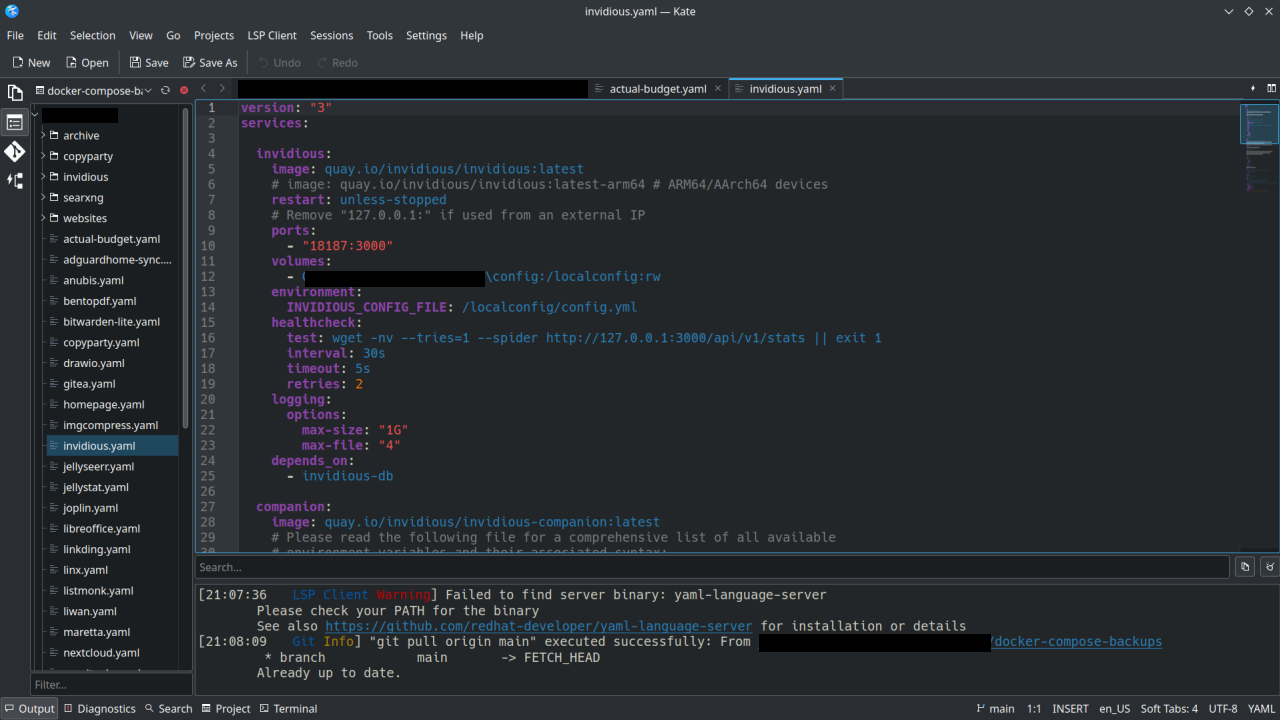
I have been using KDE via Kubuntu for about 2 years now, other distros with Gnome before that. Based upon the name (KDE Advanced Text Editor, K.A.T.E.) I always thought of Kate as an alternative to Notepad++ or something like that. Like a highend note-taking app.
I recently started using Kate for managing my Docker-Compose yaml files on my homelab, using the Git functionality to sync to my repos and doing some web development. It's basically an alternative to VSCode or Codium.
Thanks to the devs who work on Kate . If you don't hear it enough we appreciate you!
43 Comments
Assassassin@lemmy.dbzer0.com · 57 pts · 179d
God I love Kate. Being able to just randomly open any file and get syntax highlighting and tabs makes dealing with system files so much easier
watson387@sopuli.xyz · 38 pts · 179d
Yeah, Kate is excellent. I use it on my Linux stuff at home but I use it on Windows at work also.
OwOarchist@pawb.social · 16 pts · 179d
Huh... And here I was, never even considering that somebody may have ported Kate to Windows. I should try it, for the rare instance I'm editing something on Windows!
jahtnamas@slrpnk.net · 19 pts · 179d
tons of KDE software is on the windows store, from KDE themselves, even (i can't link the platform filter directly, just change the "all platforms" dropdown to "windows")
eli@lemmy.world · 8 pts · 179d
God damnit. I never knew Konsole was available on windows.
maniacalmanicmania@aussie.zone · 1 pts · 178d
I think you mean Kwindows.
SubArcticTundra@lemmy.ml · 5 pts · 179d
KDE connect works too
needanke@feddit.org · 3 pts · 179d
Me too, it's been such a blessing!
natecox@programming.dev · 24 pts · 179d
Kate was my first “real” code editor coming from windows notepad back in the 90’s. It was my first taste of syntax highlighting.
Fond memories.
justlemmyin@lemmy.world · 17 pts · 179d
Ctrl + Shift + B is what converted me to a kate worshipper!
yodeljunkmanenvy@piefed.social · 12 pts · 179d
TIL about Block Select!
56_@slrpnk.net · 10 pts · 179d
Also Alt+click to add multiple cursors.
justlemmyin@lemmy.world · 3 pts · 179d
Indeed. It lets you do so much with that little feature. Not just select but edit also. My mind was blown. Made adding prefixes to each new line a piece of cake.
Hominine@lemmy.world · 17 pts · 179d
Kate is awesome I use it every day; if not as a scratch pad, as an editor.
MentalEdge@sopuli.xyz · 17 pts · 179d
I just took to using it since it was the default pre-installed editor when I went KDE.
I've been able to do everything I needed in it, all the way up to writing fairly complex python.
No complaints. In fact I quite like it.
rimu@piefed.social · 11 pts · 179d
It's my fave too. It handles opening files over the network very well and I like the scrolling system on the right.
Featherpad is my alternative when I want something I can paste into on the screen right now as Kate loads a little slowly.
OwOarchist@pawb.social · 13 pts · 179d
Fun fact I just learned recently: If you have text in your clipboard, you can paste that directly into the file manager (or the desktop background). It will prompt you for a filename, and then create a file with the pasted text in it.
If all you want to do is paste some text, you can actually do that without using any text editor at all.
NeilBru@programming.dev · 10 pts · 179d
I use Zed these days, but I'll never uninstall Kate.
j5906@feddit.org · 1 pts · 179d
Zed is quite impressive, it opens like instantly when you double click it.
VS Codium on the other hand takes a few seconds to display everything correctly. Yes once its open it speeds up and is not that slow anymore, but compared to Zed it does still feel very heavy.
hayvan@piefed.world · 9 pts · 179d
I met Kate back in 2003 or so, immediately fell in love, and still use it (no longer my primary code editor, but primary for everything else.)
Dave@lemmy.nz · 7 pts · 179d
One thing I miss from Notepad++ that I've never found in a Linux text editor is the ability to just open it and type stuff and it stays there even if you close it and open it again.
yodeljunkmanenvy@piefed.social · 13 pts · 179d
Have you tried using the Sessions feature in Kate? It allows you to pick up where you left off, even between multiple projects.
Dave@lemmy.nz · 6 pts · 179d
I haven't! But the main advantage of the Notepad++ way is the files aren't actually saved anywhere, it saves them temporarily until you choose where to properly save them. You can just keep opening new tabs and putting stuff in them and it remembers even if closed, but you don't have to actually save them.
SpaceNoodle@lemmy.world · 3 pts · 179d
Sublime Text supports this, but it's not FOSS.
redbr64@lemmy.world · 3 pts · 179d
For this reason, Sublime Text is to me basically a gigantic scratchpad with dozens of tabs open at all times 😂
diazona@techhub.social · 3 pts · 179d
@Dave @yodeljunkmanenvy Hmm interesting... I personally tend to think of that as a feature of a notetaking app rather than a text editor. But I see how it could come in handy in a text editor too, sometimes.
Dave@lemmy.nz · 3 pts · 179d
Maybe I should be looking for a note taking app, but I want it for storing everything from to do list items to quick edits of code snippets so I kind of want the text editor features.
Ephera@lemmy.ml · 2 pts · 174d
I have a tiny program/script that creates a file in a folder underneath
~/.local/sharewith basically just a timestamp in the file name and then it opens it in Kate. Certainly somewhat of a workaround, but it works quite well for me.Dave@lemmy.nz · 1 pts · 174d
What does the workflow look like for that? Do you run it in the terminal each time, or do you bind it to a keyboard combo or have an icon on your dock/taskbar or something?
Ephera@lemmy.ml · 2 pts · 174d
Well, I have it bound to
Super+X, but you could do any of those. I just create a .desktop file for it and then it can be used like a normal application. And well, it is intentionally built so you don't have to pass command-line flags or see the command output for creating the file.So, this is the program I use: https://codeberg.org/trem/jot
It has basically three larger features, which is adding a file, removing empty files (because you sometimes might end up creating a file, but not using it) and then searching through empty files.
Honestly, none of these are particularly difficult to throw together in a Bash script yourself, if you don't feel like using a random program off the internet.
Basically, for adding a file, this is a crappy version of it:
And for searching through the created files,
grep -iR -C2 $data_diris virtually just as good, too. 🫠ZILtoid1991@lemmy.world · 7 pts · 178d
KATE replaced VSCode and Codium for my open source development work.
dosse91@lemmy.trippy.pizza · 6 pts · 179d
I absolutely love Kate, I've been using it since 2019 when I switched to Linux and I needed a replacement for Notepad++, and I prefer it to more sophisticated editors like VS Code.
Kazumara@discuss.tchncs.de · 5 pts · 179d
I used kate for my algorithms class, it was so nice, the syntax highlighting and symbol referencing worked out of the box.
This was in contrast to ctags that confused me at the time.
I should actually install kate on my work mac, I just kind of defaulted to VS Code since the colleagues were doing that, but seeing now that Kate is crossplatform that should be nice.
SaharaMaleikuhm@feddit.org · 5 pts · 179d
Yeah, its great. I use it daily.
Tomassci@sh.itjust.works · 4 pts · 178d
Currently learning Python. Kate is awesome for that.
possiblylinux127@lemmy.zip · 3 pts · 178d
I love Kate
I use it on gnome and it is simply fantastic
boredsquirrel@slrpnk.net · 3 pts · 178d
I also really like it, it is fast, OS native, has polkit integration for system files, LSP and linting works too, for example shellcheck for posix sh or bash scripts.
Have not used some of the features yet
jlow@discuss.tchncs.de · 3 pts · 178d
+1
Gonzako@lemmy.world · 3 pts · 178d
Kate looks a lot like Godots editor no? Maybe its just me
aesopjah@sh.itjust.works · 2 pts · 179d
Curious if anyone knows this, does it use the same buffering system as N++? Meaning, if I open a log file in N++ that is still being written to it never has an issue with blocking the program writing to the file since (it seems) to open it in a separate buffer that can get updated as the file does. A very handy feature for the logs I use, and if Kate can do that I'm all in.
I will test it myself obv, but perhaps someone will be able to answer before I'm able to test, and then also the information will be here :)
Ephera@lemmy.ml · 3 pts · 174d
Hmm, if I understand you correctly, this is about Windows blocking access to files while they're being accessed by other processes. Kate is primarily built for Linux where this would not be a problem to begin with, so it is well-possible that it does not handle this gracefully.
But it does actually keep its own buffer for files. By default, you have to actively click in the UI before it will load the changes from the file. It does watch the file for file changes, but I don't think, it has to keep the file open for that, since there's kernel APIs to be notified for file changes on all mainstream operating systems these days.
So, uh, TL;DR: I don't actually know, but I'm somewhat optimistic. 🫠
aesopjah@sh.itjust.works · 2 pts · 173d
I can verify that it appears to work similar to N++ on a Windows install. Another program can 'own' the file being open and Kate will be able to have it open and read in new changes. Very cool! New tool for the toolbox
carotte@lemmy.blahaj.zone · 1 pts · 179d
synnackk@timesink.p3nguin.org · 1 pts · 179d
https://youtu.be/R7BUG8LOd8A