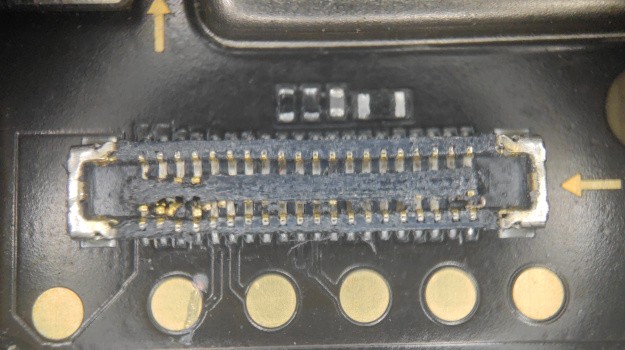
My phone gave up the ghost, today, due to damage to the socket where the flex cable goes that transmits USB, audio and charging. Obviously I need at least to charge it somehow, so without the socket, I don't see a way to keep the phone. I also don't know how a new socket could be soldered into the motherboard.
I'm sorry it had to be this way - I'd have preferred something dramatic like falling into a volcano, burning up during reentry, or such. This phone has drowned in a half-frozen river (together with me) (sorry for non-dull), been dropped about a million times, and had the following bits swapped due to grievous damage:
- screen, 8 times (I had to count them in purchase history in AliExpress)
- the 1st screen drowned
- one just didn't work
- one was damaged when I ripped it off to change the proximity sensor
- the rest just were broken during drops
- flex cable between daughterboard and motherboard (the phone didn't charge)
- charging/speaker/audio jack daughterboard (the phone didn't charge, but the culprit was the flex cable)
- battery (the phone didn't charge, but the culprit was the flex cable)
- proximity sensor (collateral damage of screen swap)
- fingerprint reader (because I tore its cable during a screen swap
28 Comments
YeahToast@aussie.zone · 27 pts · 13d
fubarx@lemmy.world · 23 pts · 13d
BoxOfFeet@lemmy.world · 18 pts · 13d
It's admirable you kept it going that long. My last phone went through two screens, a battery, a camera, and three glass backs. It was a Galaxy S10. The camera was the worst repair. What was your phone?
dihutenosa@piefed.social · 4 pts · 13d
Xiaomi Poco X3 Pro. I removed the camera multiple times, it's really easy - unglue the back cover (ok that bit is non-easy), unscrew the mobo cover, unsnap the 3 cables. I needed to remove it because the UART pads are under it (for porting PostmarketOS).
BoxOfFeet@lemmy.world · 1 pts · 13d
Lucky. Look at this BS. I'm glad I only had to do it once.
https://www.ifixit.com/Guide/Samsung+Galaxy+S10+Rear-Facing+Camera+Module+Replacement/121825
Romkslrqusz@lemmy.zip · 10 pts · 13d
Ready for a new and expensive hobby?
Time for SMD rework!
AllHailTheSheep@sh.itjust.works · 6 pts · 13d
those fpcs are really damn hard to replace. possible, but difficult. if you have a microscope and really fine jump wire you can remove the old port and solder the cable directly to it. just be careful not to rip any pads while taking it off.
if you consider it dead anyways, there's nothing to be lost trying!
JustEnoughDucks@feddit.nl · 1 pts · 11d
Easiest is solder paste + flux + heat gun. No broken pads
aramis87@fedia.io · 6 pts · 13d
Can you do wireless charging? If that's something that's possible with your phone, make sure that the wireless charging option is enabled in your settings before your phone runs out of power. I don't know that it's an option that must be enabled on all phones, but I know it's something you can turn on/off on some phones. And at least enabling it before you run our of power will give you the option for wireless charging if you decide to pursue it, even if it's just to get photos and data off your current phone later.
dihutenosa@piefed.social · 1 pts · 13d
Nope, there's no wireless charging in this phone.
pelespirit@sh.itjust.works · 4 pts · 13d
My port doesn't work and I use a charging pad. Is your phone too old for that? Mine is about 6 years old and it works. https://www.amazon.com/cellphone-charging-pad/s?k=cellphone+charging+pad
dihutenosa@piefed.social · 2 pts · 13d
Nope, there's no wireless charging in this phone.
Kolanaki@pawb.social · 4 pts · 13d
It looks like a zipper that's missing the thing that zips the two sides together. Maybe zip that part back together and it'll work.
dihutenosa@piefed.social · 4 pts · 13d
It looks worse than it used to. It just didn't snap, do what you might. Eventually I screwdrove it to this condition (can't get any worse than dead, right?)
Kolanaki@pawb.social · 1 pts · 13d
You could end up making a short that causes the battery to burst into flames if it was still connected (I assume it's removed at this point tho) 🤷♂️
wreckedcarzz@lemmy.world · 1 pts · 13d
Samsung Note 7's head technical advisor over here, still doing what they know best
twinnie@feddit.uk · 3 pts · 13d
Might be able to clean that up with acetone? If you just need to charge it could you save some of those pins or see what those pads beneath it do?
dihutenosa@piefed.social · 9 pts · 13d
Charging is not "just". There's lots of negotiation and chatter between the charger and phone. https://en.wikipedia.org/wiki/USB_hardware#USB_Power_Delivery
gartheom@lemmy.world · 5 pts · 13d
If you are wanting fast charge, yes.
The phone should be able to charge more slowly with just 5V power using just the + and - lines connected. No negotiation needed for that.
RheumatoidArthritis@mander.xyz · 1 pts · 13d
If this is for data recovery, you can just hook, say, 4.1V 0.1A directly to the batrery to charge it. Unless you want to keep the phone of Theseus afloat.
charade_you_are@sh.itjust.works · 3 pts · 13d
soak it in rice
ag10n@lemmy.world · 3 pts · 13d
You could probably replace that, if you have a microscope and solder gun.
You already have a high-res photo, might cost 40$ in shipping and parts
Flyswat@lemmy.dbzer0.com · 3 pts · 13d
I need to do the exact same repair on a phone but I'm afraid I might melt the plastic. Maybe I should blast the heat from the other side of the board...
Romkslrqusz@lemmy.zip · 2 pts · 13d
These things survive high temperatures during assembly.
For rework, the key is to use flux and add leaded solder to the existing lead-free solder.
Ultimately, you don’t need to care too much about the part that you’re removing anyways.
Infynis@midwest.social · 2 pts · 13d
She was a true soldier. Rest in peace 🫡
CaptainMan251@lemmy.world · 1 pts · 12d
Just blw on it. Worked for my Nintendo once.
redlemace@lemmy.world · 1 pts · 9d
My phone
diedfriedftfy ;)
LadyButterfly@piefed.blahaj.zone · 0 pts · 11d
F