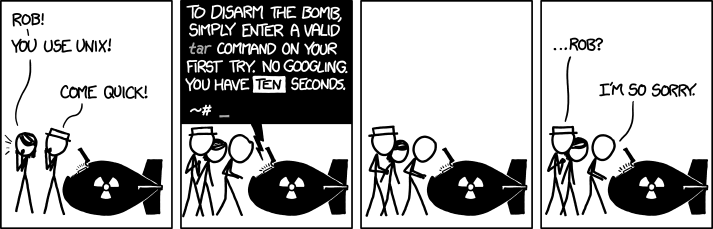
img title="I don't know what's worse--the fact that after 15 years of using tar I still can't keep the flags straight, or that after 15 years of technological advancement I'm still mucking with tar flags that were 15 years old when I started."
tar -vczfx123 ought to do it
84 Comments
dotslashme@infosec.pub · 136 pts · 2y
Wouldn't tar --help suffice? Afaik, it returns exit code 0.
SpaceCadet@feddit.nl · 46 pts · 2y
Depends. Is it GNU tar, BSD tar or some old school Unix tar?
Double hyphen "long options" are a typical GNU thing.
paraphrand@lemmy.world · 12 pts · 2y
That’s why those commands have two?
SpaceCadet@feddit.nl · 10 pts · 2y
Yes, the terse Unix version, which needs to be supported for compatibility, and the more readable GNU long option
MonkderZweite@feddit.ch · 9 pts · 2y
tar -h?
SpaceCadet@feddit.nl · 34 pts · 2y
MonkderZweite@feddit.ch · 4 pts · 2y
Ugh. Bsdtar:
But it has --help too.
gravitas_deficiency@sh.itjust.works · 2 pts · 2y
tkk13909@sopuli.xyz · 106 pts · 2y
A little trick I learned on here was to imagine yourself as a little evil man saying "Extract ze files!" in a German accent. Extract ze files >>> xzf.
ziixe@lemmy.dbzer0.com · 7 pts · 2y
That sounds a lot like Czech, "ze" means "from" if you translate it into English
ChaoticNeutralCzech@feddit.de · 8 pts · 2y
Looks, not sounds. Ahoj!
art@lemmy.world · 3 pts · 2y
I still use that. 😅
Blackmist@feddit.uk · 80 pts · 2y
tar --help
aurelian@lemmy.ml · 4 pts · 2y
Exactly what I would have done !
cerulean_blue@lemmy.ml · 3 pts · 2y
This is the way
PlexSheep@feddit.de · 75 pts · 2y
tar -xzvf archive.tar.gzeXtract Zhe Vucking File
Emma_Gold_Man@lemmy.dbzer0.com · 41 pts · 2y
Sorry, it was Solaris - you just blew it up (the minus is invalid on many Unix versions of tar)
PlexSheep@feddit.de · 12 pts · 2y
Oh come on!
excitingburp@lemmy.world · 9 pts · 2y
Inadvertent oracle attack.
olsonexi@lemmy.world · 71 pts · 2y
xtract ze vucking file
chellomere@lemmy.world · 28 pts · 2y
Then comes a .tar.bz2 file along and you're screwed. xtract je vucking file?
Pro tip: -z, -j are not needed by tar anymore since many years, tar will autodetect what compression was used if your distro is anything remotely modern.
allywilson@sopuli.xyz · 21 pts · 2y
😵
aard@kyu.de · 5 pts · 2y
You still might want to do something like alias pbtar='tar --use-compress-prog=pbzip2 to easily use pbzip2 - unless you have an ancient system that'll speed things up significantly. And even if you don't it'd be nice to use it for creation - to utilize more than one core the archive needs to be created for parallel extraction.
victorz@lemmy.world · 2 pts · 2y
Yeah I usually just do xf. 🤷♂️
victorz@lemmy.world · 10 pts · 2y
v is just verbose, right?
IHateFacelessPorn@lemmy.world · 9 pts · 2y
Yep.
TheSealStartedIt@lemmy.world · 5 pts · 2y
I'm so proud of me when I remember this. Hackerman!
fubo@lemmy.world · 50 pts · 2y
If you can't tar to a pipe into ssh to a remote host and untar into an arbitrary location there, are you really using Unix?
LostXOR@fedia.io · 29 pts · 2y
MonkderZweite@feddit.ch · 12 pts · 2y
Useless Use Of dd
JustUseMint@lemmy.world · 10 pts · 2y
What the fuck lmao I didn't know that was possible
Oha@lemmy.ohaa.xyz · 48 pts · 2y
I remember those 2 and thats all I need.
tar -extrakt ze file
tar -compress ze file
noli@programming.dev · 26 pts · 2y
Tar Xtract Ze Vucking File
Edit: apparently someone else already mentioned this, oops
SirQuackTheDuck@lemmy.world · 13 pts · 2y
tar -extract -any -file is easier, auto detect the compression based on filename.
exu@feditown.com · 7 pts · 2y
I think GNU tar automatically detects the compression, making
-aunnecessary in that case.kevincox@lemmy.ml · 3 pts · 2y
And
-z.tar -xf foo.tar.{gz,xz,zstd,...}will work perfectly fine.Emma_Gold_Man@lemmy.dbzer0.com · 4 pts · 2y
Nope - it was Unix not Linux. The minus makes the command invalid on many Unix versions of tar (though most modern BSD versions allow it)
Oha@lemmy.ohaa.xyz · 5 pts · 2y
Gonna blow up then I guess
MonkderZweite@feddit.ch · 1 pts · 2y
tar -extract -file
tar -compress -xz -file
ShaunaTheDead@fedia.io · 43 pts · 2y
tar --helpis a valid commandAganim@lemmy.world · 18 pts · 2y
For GNU
tarit is, for any other version I would not be so sure. Especially when disabling an atomic bomb.flambonkscious@sh.itjust.works · 5 pts · 2y
More of a request than a command, I'd have argued
skulblaka@startrek.website · 15 pts · 2y
I command you to show me the manual
owatnext@lemmy.world · 32 pts · 2y
tar xvf somearchive.tar
Is that right? )= I'm scared I lost.
bdonvr@thelemmy.club · 29 pts · 2y
user@server:~> tar xvf somearchive.tartar: somearchive.tar: Cannot open: No such file or directorytar: Error is not recoverable: exiting nowowatnext@lemmy.world · 33 pts · 2y
Scheiße...
Shadow@lemmy.ca · 9 pts · 2y
Yep that's valid.
meteokr@community.adiquaints.moe · 31 pts · 2y
Surely
tar --helpis a valid tar command, right?Scipitie@lemmy.dbzer0.com · 30 pts · 2y
tar
Done. That's a valid command, no error code, nothing. KISS!
backhdlp@iusearchlinux.fyi · 52 pts · 2y
false
Huschke@lemmy.world · 25 pts · 2y
💥
Scipitie@lemmy.dbzer0.com · 7 pts · 2y
OK now I have to escape to really smart assery and assume that's what I meant the whole time ;)
Edit code 2 describes something that went wrong - but that something telling you that it went wrong was the tar binary which therefor most have been valid to evaluate that!
Under no circumstances did I assume that the hint towards help itself would've been an exit code 0, no sir!
To be honest: if I'd designed that bomb it would've exploded in my face for trying to be too clever.
TheRealKuni@lemmy.world · 5 pts · 2y
tar --help
TheRealKuni@lemmy.world · 1 pts · 2y
kevincox@lemmy.ml · 29 pts · 2y
I know this is a meme, but I actually find
tarfairly easy to remember.tar -xf $archiveis extract filetar -czf $archive dir/is create zipped (compressed) file and the positional arguments are the files to add to the archive.And this is 99% of my usage. You can skip
-f $archiveto use stdin/stdout or use-Cto change directory (weird name but logically tar always extracts to the current directory). There is also a flag to list which I always forget and lookup each time, but I list much less often.-vis useful for verbose.Overall there are much harder commands to remember.
findalways gets me if I go beyond-name.ps,treeandls(beyond-Al) always get me to open the man page.russjr08@bitforged.space · 10 pts · 2y
That would be
-t, which I tend to remember as "test", as in testing to see what is inside the archive!tealdeer is a great program to have installed for easily getting a breakdown of the flags of pretty much any CLI app that at least I can ever think of!
kautau@lemmy.world · 27 pts · 2y
man tar“Yeah nvm, we’re fucked”
person@lemm.ee · 13 pts · 2y
tldr tarand you might have a chancekautau@lemmy.world · 7 pts · 2y
Haha yeah that was my second comment on this post
SteveDinn@lemmy.ca · 20 pts · 2y
The command that I can never get right the first time is
ln. I always end up creating a dead link inside my target folder, even when I read the man page directly prior.csm10495@sh.itjust.works · 20 pts · 2y
Normally I would say view the man page (as a command). Though for some reason when making the thinnest distro possible, the OS team at my job got rid of man.
Wtf man.
JasonDJ@lemmy.zip · 8 pts · 2y
man wtf
jpablo68@infosec.pub · 13 pts · 2y
tar xzvf file.tar.gzI got it memorized after installing gentoo over and over again from stage 3 back in 2005drivepiler@lemmy.world · 1 pts · 2y
Same, but it all goes to shit when I need to create an archive
CanadaPlus@lemmy.sdf.org · 12 pts · 2y
I find it's a lot easier if you think of it in term of tapes, which is what it was originally designed for (Tape ARchiver). It's up there with makefiles for an actually really cool concept that nobody appreciates or even necessarily understands now.
(Well, I guess filesystems are the actual cool concept, from the historical perspective, but seeing the interplay with just tapes is the novel part to me)
davel@lemmy.ml · 12 pts · 2y
you wouldn’t tarball a bomb
RandomVideos@programming.dev · 12 pts · 2y
What if i use bing instead of google
baseless_discourse@mander.xyz · 16 pts · 2y
straight to hell.
charonn0@startrek.website · 7 pts · 2y
To the boiler room of hell. Allll the way down.
MaxHardwood@lemmy.ca · 6 pts · 2y
I think they're already there though
Bishma@discuss.tchncs.de · 11 pts · 2y
tar -tvfis a favorite of mine.Ephera@lemmy.ml · 11 pts · 2y
At some point, I realized
tar xfis enough for extracting a file, so that's what I'm always using now.HogsTooth@lemmy.world · 11 pts · 2y
I wish more people knew about dtrx (Do The Right eXtraction).
acid_falcon@lemmy.world · 6 pts · 2y
Ayy Debian has been my main for like ten years. Dtrx is one of the ten things I apt immediately every time I have a re install
Deebster@programming.dev · 6 pts · 2y
I didn't know about
-d.explainshell.com to the rescue!
chellomere@lemmy.world · 3 pts · 2y
They meant the command dtrx, the combination of dtrx as parameters to tar make no sense. Extract AND append?
Deebster@programming.dev · 1 pts · 2y
haha, ok thanks. So https://github.com/dtrx-py/dtrx
I'd initially assumed that it was a mnemonic but yes, listing and appending and extracting together is nonsensical, as tar notes:
tar: You may not specify more than one '-Acdtrux', '--delete' or '--test-label' optionkautau@lemmy.world · 4 pts · 2y
Or in this case, https://github.com/tldr-pages/tldr
And it’s fast implementation, https://github.com/dbrgn/tealdeer
NegativeLookBehind@lemmy.world · 8 pts · 2y
riodoro1@lemmy.world · 7 pts · 2y
I just remember zxvf, but if I have to do anything else then extract a tar.gz we’re fucked.
lefixxx@lemmy.world · 5 pts · 2y
tldr tar | head -n 1
Johanno@feddit.de · 3 pts · 2y
7zz x *
baseless_discourse@mander.xyz · 4 pts · 2y
Or just double click.
Dehydrated@lemmy.world · 3 pts · 2y
tar -xvf is the only one I know
And I think it was tar -cvf for creating .tar files?
toastal@lemmy.ml · 2 pts · 2y
I always liked
dtrx(do the right extraction)MonkderZweite@feddit.ch · 2 pts · 2y
Btw, GNU tar has long options.
Socsa@sh.itjust.works · 1 pts · 2y
I'll take my award in all ones please