I was scared of reflog too. Had to use it for the first time recently after I accidentally'd a branch that I hadn't pushed to remote yet. I was so glad that I could recover it all in <5 commands.
Title text: If that doesn't fix it, git.txt contains the phone number of a friend of mine who understands git. Just wait through a few minutes of 'It's really pretty simple, just think of branches as...' and eventually you'll learn the commands that will fix everything.
I was looking for this comment. PHP storm and git are like best friends. I very very rarely need to resort to the CLI and generally that's for hard resetting after I screw something up
Good luck doing anything remotely complicated/useful in git with an IDE. You get a small fraction of what git can do with a tool that allows absolutely 0 scripting and automation.
IDE git is less powerful than CLI git. However I'm pretty confident that most people use more features of git by using a GUI.
CLI feature discoverability is pretty awful, you have to go out of your way and type git help to learn new commands.
With a GUI though, all the buttons are there, you just have to click a new button that you've been seeing for a while and the GUI will guide you how to use it.
It sounds like you don't speak from experience. I have all the automation I need. It supports git hooks on top of IDE-only features like code checking.
If I have to fire up my CLI for some mass history rewriting (like changing an author for every commit), or when the repo breaks - so be it. But by not using the CLI I save my fingers and sanity, because committing a bunch of files is several click away with little to no room for error.
I can rebase, patch, drop, rename, merge, revert, cherry pick, and solve conflicts with a click of a button rather than remembering all the commands and whatnot.
I wish! The best Linux git gui I have found is SmartGit. I like it, but it's just a little goofy and not free. Fork is better for its ability to very easily stage and/or stash a subset of the current changeset.
Anyone got any suggestions? I tried git-cola and gitkraken. The former I found obtuse and limited, and the latter is not free in addition to somehow making git harder with a pretty gui.
Gitkraken is free as long as the repository is public, which seems like an alright compromise to me. The only problem I had with it was that it was electron. What did it make harder for you?
The best ones I have found for Linux are SmartGit and Sublime Merge, but neither are free in any sense. Sublime Merge is slightly cheaper. SmartGit offers a free "hobby license" but it limits which kinds of repos you can work with.
Gitkraken looks like it might be good but I haven't used it.
I hate coding on Windows, maybe I'll check that out. (My only option is Windows for my work laptop because I need to use a few Windows-only softwares and IT says I'm not allowed to dual boot)
After the last windows update WSL gives me a BSoD every time 😭
Pretty sure IT wouldn't appreciate me running Ubuntu off a USB drive but that's a good idea.
I'd love to like the desktop app, but I just don't understand what it's doing under the hood when I click a button. When I click an icon, is it syncing my changes up as it pulls down, it just pulling down? I guess point and click is more scary to me when prod is on the line.
If I may shill for a moment, that's something I like about sublime merge - the buttons mostly map to git commands, and it has a nice log showing the commands it ran and their output.
Freaking love TUIs, it’s like they took the convenience of a GUI and the efficiency of the CLI and merged them. As a Neovim and Lazygit user myself it’s amazing what I can accomplish in but a few keypresses.
I think for most people it's whatever you got used to first. I agree the hatred the GUIs get is overblown. I would always recommend people learn the command line but if you want to use a GUI, go for it, doesn't affect me unless your commits are bad, in which case the CLI wouldn't have helped anyway.
I'd use Desktop if it worked, unfortunately recently it decided that I don't have read/write access to a repo I'm working on. Works fine in git CLI so idk what the problem there is.
Are you able to fall back to normal git commands if you don't know the shortcuts? This sounds awesome until I can't remember the syntax to do something I don't do everyday.
I switched to gitextensions, sourcetree had so many bugs that it was getting on my nerves. Gitextensions has a similar layout, it also has the history view. It's not prefect (recently they removed the dark theme because they upgraded some dependency and it didn't work anymore) but it's the best alternative I've found
Tower is pretty nice for mac user too. I paid for it for a few versions back when I was coding full time. Now I just stuck to source tree for occasional freelance and personal projects.
Yup! Been using it for years, it looks nice, has a good UI and works well. I’ll use the CLI if I need to but 99% of the time Desktop is the better choice (for me).
No matter the GUI you use, you're leaving a lot of useful functionality on the table. By their nature, you only get a small fraction of git's features. There are many useful commands I use regularly that are impossible to replicate using GUIs.
I use the right tool for the job, always. If all I need is to push a branch, then I’d rather use a UI that quickly shows me the changes in a nice diff layout. If I’m doing a pull request review and want to run it locally, I select the branch, pull, and go.
That said, when there are conflicts or tricky merges, or I want to squash a bunch of commits, anything like that, I’ll use the CLI.
It’s not about being above GitHub desktop or being an enlightened CLI user. It is about using the tool that is needed.
I’ve only been writing and releasing software for 15 years, what do I know.
That said, use whatever workflow fits you best! If that’s your hands never leaving the keyboard, rock on! If you instead write code like you’re playing an FPS, enjoy! We all do this because we like it, right? 😊
131 Comments
backhdlp@lemmy.blahaj.zone · 36 pts · 2y
I don't understand git anyway
fckreddit@lemmy.ml · 69 pts · 2y
Well, you learn four commands and hope for the best.
Valmond@lemmy.mindoki.com · 17 pts · 2y
fetch, reset --hard, checkout -b and cherry-pick?
:-D
xmunk@sh.itjust.works · 13 pts · 2y
Nah,
rebase -i,squash,fsckandreflogrikudou@lemmings.world · 11 pts · 2y
Must be an interesting work if you never
add,commitorpush.Edit: How the hell did you get the repo without
clone?xmunk@sh.itjust.works · 11 pts · 2y
Pshaw, real programmers write out the contents of
.gitby hand.(Also, it was a joke, the last two commands I listed are ones you'll ideally never need in your life)
overcast5348@lemmy.world · 3 pts · 2y
I was scared of reflog too. Had to use it for the first time recently after I accidentally'd a branch that I hadn't pushed to remote yet. I was so glad that I could recover it all in <5 commands.
Valmond@lemmy.mindoki.com · 5 pts · 2y
reflog saved my life once after a stupid misshap.
All rebase are belong to us (onto, rebase, and ofc interactive) but what's fsck (I don't squash personally)?
xmunk@sh.itjust.works · 4 pts · 2y
Fsck is File System Check - realistically you should never need to use it.
muix@infosec.pub · 10 pts · 2y
More like clone, pull, commit, and push --force
>:-D
Valmond@lemmy.mindoki.com · 3 pts · 2y
push origin head
^^
traches@sh.itjust.works · 53 pts · 2y
Title text: If that doesn't fix it, git.txt contains the phone number of a friend of mine who understands git. Just wait through a few minutes of 'It's really pretty simple, just think of branches as...' and eventually you'll learn the commands that will fix everything.
popcar2@programming.dev · 10 pts · 2y
git pull
git add *
git commit -m "Some stuff"
git push
And occasionally when you mess up
git reflog
git reset HEAD@{n} (where n is where you wanna roll back to)
And occasionally if you mess up so hard you give up
And there you go. You are now a master at using git. Try not to mess up.
derpgon@programming.dev · 32 pts · 2y
JetBrains IDEs, I don't remember the last time I used the CLI.
caseyweederman@lemmy.ca · 36 pts · 2y
you have forgotten the face of your father
QuazarOmega@lemy.lol · 9 pts · 2y
Linus Torvalds?
eluvatar@programming.dev · 3 pts · 2y
This is the way
CodingCarpenter@lemm.ee · 2 pts · 2y
I was looking for this comment. PHP storm and git are like best friends. I very very rarely need to resort to the CLI and generally that's for hard resetting after I screw something up
expr@programming.dev · -5 pts · 2y
Good luck doing anything remotely complicated/useful in git with an IDE. You get a small fraction of what git can do with a tool that allows absolutely 0 scripting and automation.
calcopiritus@lemmy.world · 14 pts · 2y
IDE git is less powerful than CLI git. However I'm pretty confident that most people use more features of git by using a GUI.
CLI feature discoverability is pretty awful, you have to go out of your way and type
git helpto learn new commands.With a GUI though, all the buttons are there, you just have to click a new button that you've been seeing for a while and the GUI will guide you how to use it.
derpgon@programming.dev · 9 pts · 2y
It sounds like you don't speak from experience. I have all the automation I need. It supports git hooks on top of IDE-only features like code checking.
If I have to fire up my CLI for some mass history rewriting (like changing an author for every commit), or when the repo breaks - so be it. But by not using the CLI I save my fingers and sanity, because committing a bunch of files is several click away with little to no room for error.
I can rebase, patch, drop, rename, merge, revert, cherry pick, and solve conflicts with a click of a button rather than remembering all the commands and whatnot.
GBU_28@lemm.ee · 3 pts · 2y
I use the cli, but my main goal is to never have to do anything remotely complicated with git. Does it happen sometimes? Of course.
art@lemmy.world · 29 pts · 2y
Learning git will give you the tools to work on projects on any git platform. It doesn't matter if I'm in Forgejo, Gitlab, or Github.
bellsDoSing@lemm.ee · 6 pts · 2y
And it will find you the most answers online in case you have a git related question.
criticalimpact@lemm.ee · 27 pts · 2y
CLI
Though I will admit it took me a while to get there
git add -i is where the true magic begins
stepanzak@iusearchlinux.fyi · 9 pts · 2y
TIL!
FiskFisk33@startrek.website · 2 pts · 2y
git log --graph --oneline --all
hakunawazo@lemmy.world · 1 pts · 2y
Also part of the Cli magic is a pretty git log tree like that:
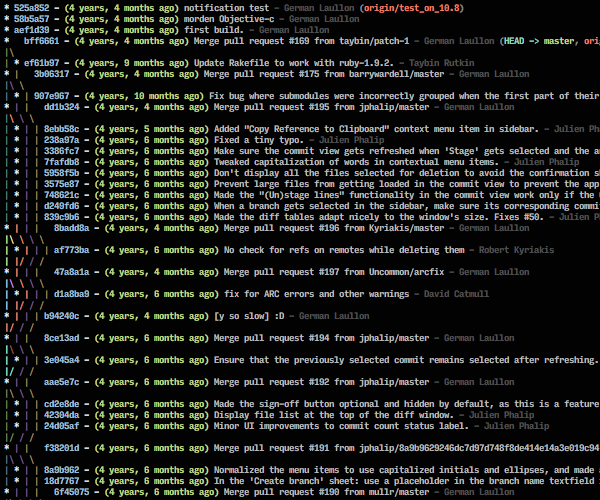
https://stackoverflow.com/questions/1838873/visualizing-branch-topology-in-git/34467298#34467298
And a proper diff tool like vim:
git config --global diff.tool vimdiff git config --global difftool.prompt false(Current diff could be closed with :qa. All diffs could be closed with :cq).
hightrix@lemmy.world · 23 pts · 2y
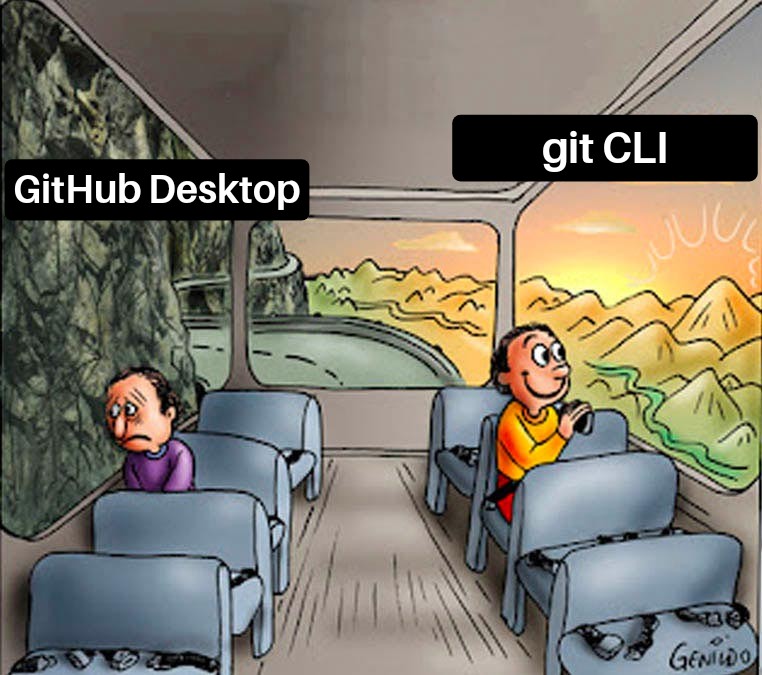
GitHub desktop Stan here. Been a software engineer for over a decade and still love my UI tools. GitHub desktop is good enough 99% of the time.
pimeys@lemmy.nauk.io · 22 pts · 2y
Magit
akkajdh999@programming.dev · 4 pts · 2y
RePierre@feddit.ro · 4 pts · 2y
I was looking for someone to mention Magit. It just rocks!
h_a_r_u_k_i@programming.dev · 2 pts · 2y
This + org-mode are enough for me to switch to Emacs.
cupcakezealot@lemmy.blahaj.zone · 19 pts · 2y
Fork
Aatube@kbin.social · 12 pts · 2y
Any windows screenshots?
(Fork is also an awful name in terms of searching for it btw)
cupcakezealot@lemmy.blahaj.zone · 7 pts · 2y
(there's also a couple more here: https://git-fork.com/)
caseyweederman@lemmy.ca · 5 pts · 2y
You have my attention
Do they have a Linux client though?
TrickDacy@lemmy.world · 3 pts · 2y
I wish! The best Linux git gui I have found is SmartGit. I like it, but it's just a little goofy and not free. Fork is better for its ability to very easily stage and/or stash a subset of the current changeset.
Anyone got any suggestions? I tried git-cola and gitkraken. The former I found obtuse and limited, and the latter is not free in addition to somehow making git harder with a pretty gui.
Aatube@kbin.social · 3 pts · 2y
Gitkraken is free as long as the repository is public, which seems like an alright compromise to me. The only problem I had with it was that it was electron. What did it make harder for you?
TrickDacy@lemmy.world · 3 pts · 2y
I just really detest the UI. And I have private repos I have to work with as well.
BaardFigur@lemmy.world · 2 pts · 2y
TrickDacy@lemmy.world · 2 pts · 2y
Right and that is how I currently use it
floofloof@lemmy.ca · 2 pts · 2y
The best ones I have found for Linux are SmartGit and Sublime Merge, but neither are free in any sense. Sublime Merge is slightly cheaper. SmartGit offers a free "hobby license" but it limits which kinds of repos you can work with.
Gitkraken looks like it might be good but I haven't used it.
cupcakezealot@lemmy.blahaj.zone · 3 pts · 2y
sadly no and i don't think it works through wine
but technically they have a mac client which is basically an expensive version of linux
Aatube@kbin.social · 3 pts · 2y
Not really. It’s BSD, and even then the layout of the OS is quite far from BSD. Besides that you have a lot more technical stuff. Just use wine.
BaardFigur@lemmy.world · 3 pts · 2y
eluvatar@programming.dev · 3 pts · 2y
Been using it for years it's great
ramenshaman@lemmy.world · 3 pts · 2y
I hate coding on Windows, maybe I'll check that out. (My only option is Windows for my work laptop because I need to use a few Windows-only softwares and IT says I'm not allowed to dual boot)
jadedwench@lemmy.world · 3 pts · 2y
Is running Linux off a USB drive possible? It isn't ideal, but you can still have persistence if needed? There is also WSL, if you don't need a GUI.
ramenshaman@lemmy.world · 1 pts · 2y
After the last windows update WSL gives me a BSoD every time 😭 Pretty sure IT wouldn't appreciate me running Ubuntu off a USB drive but that's a good idea.
JonsJava@lemmy.world · 16 pts · 2y
I'd love to like the desktop app, but I just don't understand what it's doing under the hood when I click a button. When I click an icon, is it syncing my changes up as it pulls down, it just pulling down? I guess point and click is more scary to me when prod is on the line.
Feathercrown@lemmy.world · 9 pts · 2y
Why are you syncing directly to prod
JonsJava@lemmy.world · 1 pts · 2y
I'm not? I just don't like UIs
JonsJava@lemmy.world · 2 pts · 2y
Prod being on the line meant "I'm on main".
Yeah, I set up branch protection, but I hate the fact that some UIs are all "I know you just want to pull, but let's push while we're at it".
kuberoot@discuss.tchncs.de · 3 pts · 2y
If I may shill for a moment, that's something I like about sublime merge - the buttons mostly map to git commands, and it has a nice log showing the commands it ran and their output.
Fades@lemmy.world · 1 pts · 2y
How about you utilize proper CICD
JonsJava@lemmy.world · 2 pts · 2y
I do. I just don't like leaving the terminal
muntedcrocodile@lemmy.world · 16 pts · 2y
Vscode plugins?
akkajdh999@programming.dev · 12 pts · 2y
dukk@programming.dev · 4 pts · 2y
Freaking love TUIs, it’s like they took the convenience of a GUI and the efficiency of the CLI and merged them. As a Neovim and Lazygit user myself it’s amazing what I can accomplish in but a few keypresses.
amotio@lemmy.world · 11 pts · 2y
Sublime-Merge
narc0tic_bird@lemm.ee · 4 pts · 2y
I love Sublime Merge. Worth every penny.
infinitepcg@lemmy.world · 11 pts · 2y
GitKraken!
BaardFigur@lemmy.world · 11 pts · 2y
Xanvial@lemmy.world · 1 pts · 2y
This is what I currently use, although I don't really like the branch name color in last few versions, so kinda keep using the old version
Piatro@programming.dev · 1 pts · 2y
I think for most people it's whatever you got used to first. I agree the hatred the GUIs get is overblown. I would always recommend people learn the command line but if you want to use a GUI, go for it, doesn't affect me unless your commits are bad, in which case the CLI wouldn't have helped anyway.
Jesus_666@feddit.de · 10 pts · 2y
Fork.
Jocarnail@lemmy.world · 5 pts · 2y
Fork is great. I just wished there was a linux version
zarlin@lemmy.world · 3 pts · 2y
Fork is great!
syd@lemy.lol · 5 pts · 2y
TIL. Looking great but no Linux support 😐
simonced@metalhead.club · 1 pts · 2y
simonced@metalhead.club · 1 pts · 2y
@syd @zarlin I also wish Linux were supported, I'd buy a license in a heartbeat!
scottyjoe9@sh.itjust.works · 3 pts · 2y
All hail the fork!
Metype@lemmy.world · 10 pts · 2y
I'd use Desktop if it worked, unfortunately recently it decided that I don't have read/write access to a repo I'm working on. Works fine in git CLI so idk what the problem there is.
Fades@lemmy.world · 10 pts · 2y
CLI + IDE for git
sloppy_diffuser@sh.itjust.works · 3 pts · 2y
LazyGit with lazygit.nvim checking in.
unagi@feddit.nl · 3 pts · 2y
This is the way
beefsquatch@programming.dev · 9 pts · 2y
Sublime Merge, for most items in the UI it tells you the git command it will use
lseif@sopuli.xyz · 9 pts · 2y
using LazyGit in tmux has changed my workflow.
instead of:
git add . git commit -m 'foo' fgi just:
g ac foo qand it displays everything neatly
Edit: apparently greater/less than symbols dont render properly on lemmy. so imagine a few
(CR)'s and(C-b)'s sprinkled inalphabetsheep@lemmy.world · 4 pts · 2y
Are you able to fall back to normal git commands if you don't know the shortcuts? This sounds awesome until I can't remember the syntax to do something I don't do everyday.
lseif@sopuli.xyz · 2 pts · 2y
you can run shell commands with
:, and there may be a nicer way for git-specific commands which i dont know about.each 'pane' (such as 'changed/staged files', 'commit log', etc) has its own keybinds, which you can see with
?lordnikon@lemmy.world · 8 pts · 2y
SVN?
los_wochos@feddit.de · 1 pts · 2y
CVS?
SpaceNoodle@lemmy.world · 2 pts · 2y
Rite-Aid?
Coldus12@reddthat.com · 2 pts · 2y
ClearCase?
xmunk@sh.itjust.works · 1 pts · 2y
Visual Source Safe!
lars@lemmy.sdf.org · 1 pts · 2y
SCCS
lowleveldata@programming.dev · 7 pts · 2y
Why am I not allowed to login to 2 GitHub remote at the same time? Answer me Microsoft
TheFerrango@lemmy.basedcount.com · 7 pts · 2y
Laughs in Sourcetree
KeepFlying@lemmy.world · 3 pts · 2y
Sourcetree is still best by far for history browsing, and I'll die on that hill.
FoolHen@lemmy.world · 4 pts · 2y
I switched to gitextensions, sourcetree had so many bugs that it was getting on my nerves. Gitextensions has a similar layout, it also has the history view. It's not prefect (recently they removed the dark theme because they upgraded some dependency and it didn't work anymore) but it's the best alternative I've found
xmunk@sh.itjust.works · 2 pts · 2y
I'm a huge fan of GitExtensions, especially because it does so little magic.
TrickDacy@lemmy.world · 1 pts · 2y
Looks like it's windows only?
FoolHen@lemmy.world · 2 pts · 2y
Yeah unfortunately it is
nilloc@discuss.tchncs.de · 1 pts · 2y
Sourcetree best for free, thanks bit bucket.
Tower is pretty nice for mac user too. I paid for it for a few versions back when I was coding full time. Now I just stuck to source tree for occasional freelance and personal projects.
vsh@lemm.ee · 7 pts · 2y
tahoe@lemmy.world · 6 pts · 2y
Yup! Been using it for years, it looks nice, has a good UI and works well. I’ll use the CLI if I need to but 99% of the time Desktop is the better choice (for me).
Benaaasaaas@lemmy.world · 6 pts · 2y
Vim Fugitive
xmunk@sh.itjust.works · 6 pts · 2y
Personally, GitExtensions... github desktop is a pile of turds but git CLI introduces unnecessary stress precisely when I don't want it.
SketchySeaBeast@lemmy.ca · 5 pts · 2y
Yup. I don't care if my workflow is suboptimally slow, I can easily see exactly I'm doing with git extensions.
CmdrKeen@lemmy.today · 6 pts · 2y
GitLens?
GitHub Desktop is literally "Baby's first git GUI".
Phoenix3875@lemmy.world · 6 pts · 2y
Why are they even on the same bus?
MangoPenguin@lemmy.blahaj.zone · 5 pts · 2y
I really like Sourcetree, been using that for a long time.
Fades@lemmy.world · 3 pts · 2y
Source tree has always been horribly optimized to point of uselessness. Wonder if it’s still shit
Hagdos@lemmy.world · 2 pts · 2y
What do you mean by this? It works fine for me so far, though I'm not a heavy user.
ohlaph@lemmy.world · 1 pts · 2y
Same here. Use it regularly at work. For personal projects, I tend to just use the IDE.
iAvicenna@lemmy.world · 4 pts · 2y
CLI because linux
smeg@feddit.uk · 4 pts · 2y
xmunk@sh.itjust.works · 8 pts · 2y
There are much better git UIs out there.
smeg@feddit.uk · 4 pts · 2y
expr@programming.dev · 1 pts · 2y
No matter the GUI you use, you're leaving a lot of useful functionality on the table. By their nature, you only get a small fraction of git's features. There are many useful commands I use regularly that are impossible to replicate using GUIs.
smeg@feddit.uk · 3 pts · 2y
0ops@lemm.ee · 3 pts · 2y
It's not like you lose access to the cli when you use a gui. I personally use both
CCF_100@sh.itjust.works · 4 pts · 2y
Well one runs on Linux and the other doesn't so....
snugglebutt@lemmy.blahaj.zone · 6 pts · 2y
They both do
CCF_100@sh.itjust.works · 1 pts · 2y
Oh really? Well, I stand corrected then, nevermind
alphabetsheep@lemmy.world · 4 pts · 2y
Ohmyzsh with the git plugin is my fave -
gaa & gcmsg "a commit"feels like the right level of verbosity for me.hypnotic_nerd@programming.dev · 1 pts · 2y
Wow what's the plugin name I wanna try it out.
alphabetsheep@lemmy.world · 1 pts · 2y
The plugin is just called "git" it comes with ohmyzsh out of the box. You just have to enable it in your zshrc.
hypnotic_nerd@programming.dev · 1 pts · 2y
Thanks 👍
marcos@lemmy.world · 4 pts · 2y
For something with such an horrible interface, it's amazing how often people that create a new interface for it manage to make it worse.
jelloeater85@lemmy.world · 3 pts · 2y
The GitHub CLI is magic.
ILikeBoobies@lemmy.ca · 3 pts · 2y
Gitlab/Azure Repo
eluvatar@programming.dev · 3 pts · 2y
I only use it to clone projects via the Open in GitHub desktop link.
outdated_belated@lemmy.sdf.org · 3 pts · 2y
tig
pastelmind@programming.dev · 3 pts · 2y
Fork is much better than GitHub Desktop, you can use it without paying indefinitely
SalsaGal@programming.dev · 2 pts · 2y
Neither, I'm a lazygit fan
hypnotic_nerd@programming.dev · 2 pts · 2y
Yes, lazygit is fast as flash
snugglebutt@lemmy.blahaj.zone · 2 pts · 2y
git-cola and my own gitea server, near perfection
pkill@programming.dev · 2 pts · 2y
gitui
nearjsss@reddthat.com · 0 pts · 2y
Why is no one talking about LazyGit?
mariusafa@lemmy.sdf.org · 0 pts · 2y
Git cli powerfull af only us git cli. Well and gitk
LemmyIsFantastic@lemmy.world · -2 pts · 2y
Who the fuck codes and is such a terrible coder they are using shitty GitHub desktop?
Stumblinbear@pawb.social · 22 pts · 2y
You can be a perfectly good dev and not enjoy working in the cli, especially when there are good enough alternatives
calcopiritus@lemmy.world · 9 pts · 2y
GitHub desktop is the first thing I recommend whenever someone ducks up their local repo by using eclipse's git integration.
It's so easy even an eclipse user can solve their issue by clicking a simple "sync" button. They don't need to even know how git works.
curiousaur@reddthat.com · 2 pts · 2y
That's literally the problem being talked about. You need to know how git works to avoid these kinds of problems.
jbk@discuss.tchncs.de · 7 pts · 2y
Beginners, probably? I agree it sucks tho, bundling a whole ass browser just for some fancy semi-automated
gitexecutionsItd4n@ani.social · 7 pts · 2y
hehe.
hightrix@lemmy.world · 5 pts · 2y
Right here, brother.
I use the right tool for the job, always. If all I need is to push a branch, then I’d rather use a UI that quickly shows me the changes in a nice diff layout. If I’m doing a pull request review and want to run it locally, I select the branch, pull, and go.
That said, when there are conflicts or tricky merges, or I want to squash a bunch of commits, anything like that, I’ll use the CLI.
It’s not about being above GitHub desktop or being an enlightened CLI user. It is about using the tool that is needed.
I’ve only been writing and releasing software for 15 years, what do I know.
That said, use whatever workflow fits you best! If that’s your hands never leaving the keyboard, rock on! If you instead write code like you’re playing an FPS, enjoy! We all do this because we like it, right? 😊
Feathercrown@lemmy.world · 4 pts · 2y
Why you haff to be mad its only preference
https://youtu.be/xzpndHtdl9A?si=TNH0CnrAXrrUM3ae
PipedLinkBot@feddit.rocks · 2 pts · 2y
Here is an alternative Piped link(s):
https://piped.video/xzpndHtdl9A?si=TNH0CnrAXrrUM3ae
Piped is a privacy-respecting open-source alternative frontend to YouTube.
I'm open-source; check me out at GitHub.