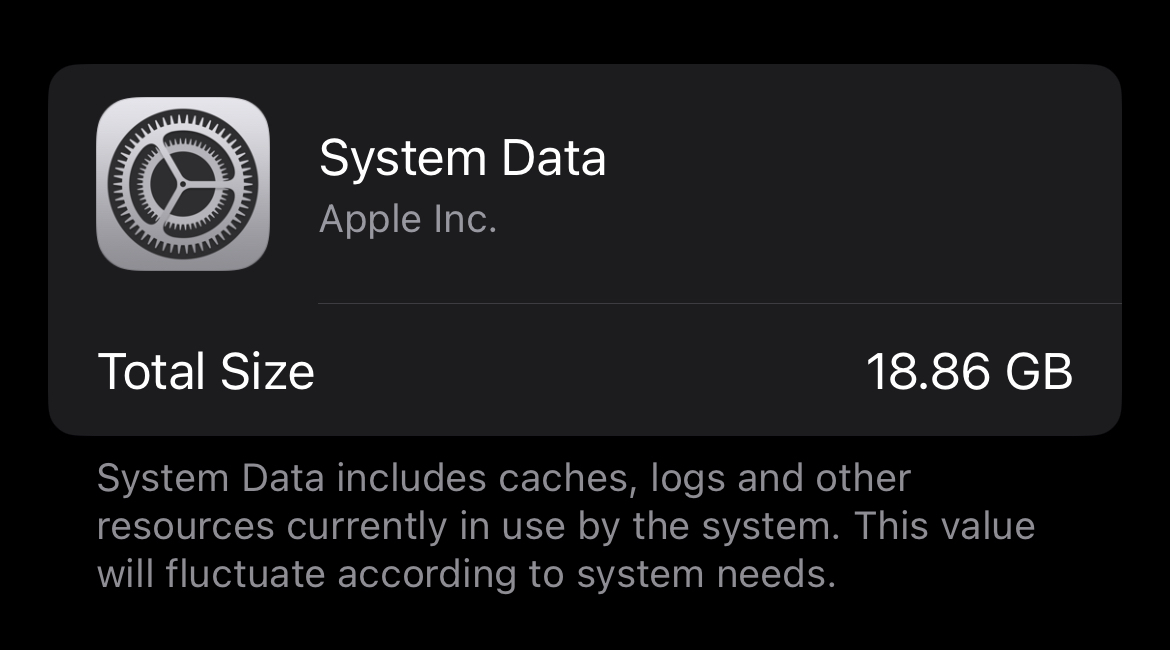
Is there anything I can do about this extremely vague block of data that’s taking up 30% of my phone’s storage? Mind you, this isn’t the operating system itself, as that’s listed as its own category.
EDIT: I tried (a) backing up to my computer, factory resetting, then restoring from backup and (b) setting the date years in the future. Neither worked, in fact (a) actually increased my system data to 34 GB! What DID end up working was updating my iOS from 18 to 26, which I had to do from my computer via iTunes since my phone was full. Apparently major system updates reset system data
57 Comments
moseschrute@lemmy.world · 40 pts · 312d
Is your phone out of storage?
iOS might wait to purge the cache until it needs the space
Etnaphele@lemmy.world · 2 pts · 309d
That was my hope on my old MacBook Pro, too, with 140 out of 256GB of disk space taken by “Other storage” rendering it almost unusable. It never really shrunk it when it should have, had to hard reset everything. Really let down by this closed down automatic shit… Time Machine and backups work well, but this storage piling is a real issue on Apple products.
turkalino@lemmy.yachts · 2 pts · 305d
It was indeed out of storage but system data usage wasn’t budging. After some research, I found out there’s apparently a bug that prevents cache from being properly cleared.
See my post edit for what ended up working
th3dogcow@lemmy.world · 31 pts · 312d
Wow I just checked and mine is at 25gb on iPhone 13, so no AI stuff.
Ugurcan@lemmy.world · 13 pts · 312d
This is a very widespread bug that causes any empty space to fill up quickly.
The solution is pretty convoluted (involves changing the phone date), but two main culprits are Instagram and Discord, which use phone cache to store data where the system doesn’t log as app data. Try remove these and check if System Data got smaller.
The better solution is to change phone’s date 1 year into future and wait a while so iOS can be tricked into delete “old cache”. You can google it for full instructions.
th3dogcow@lemmy.world · 1 pts · 311d
Interesting. I don’t have either of those apps but I do have way more than most people I assume. I’ll look into it. Glad I’ve got a 512gb model.
Cold also be to do with the fact that I’ve been transferring data without a clean install since iPhone 4s lol
Ugurcan@lemmy.world · 4 pts · 311d
Actually backing-up and reloading that backup also helps since the backup doesn’t carry any cache or logs. I’ve done it on my SO’s 12 mini just a few hours ago. So you don’t need a clean install still :D
th3dogcow@lemmy.world · 1 pts · 311d
Thanks for the info! I’ll keep it in mind when I can bothered to do something about it.
henfredemars@infosec.pub · 16 pts · 312d
I don't like the lack of a meaningful explanation. "System Data" might as well be "stuff" and I don't trust it.
Then again, Apple is known for their toddler-compatible interfaces. Maybe they thought that an actual explanation or breakdown would be too complicated and scary for their average user.
ricecake@sh.itjust.works · 12 pts · 312d
I mean... Caches, logs, and other system data currently in use by the system is a fairly decent explanation. Computers need space to put stuff while it's working. It's not particularly odd to not go to extremes labeling the contents of the junk pile that'll get discarded if anything comes up.
Linux is about as open as a system can be and it has several piles of roughly undocumented junk that can be difficult to know exactly what they contain.
There's nothing about it to "not trust". If it wanted to hide something from you it wouldn't tell you it was there and refuse to explain fully, it would just not tell you at all. It's not like you can check it's work.
galoisghost@aussie.zone · 15 pts · 312d
Do a factory reset. Mine got up to 30GB. I did a factory reset and now it’s at 8GB
Bubs@lemmy.zip · 4 pts · 312d
This 100%. Friend had theirs get to some 50+ Gb. After backing it up to iTunes, resetting the phone, then restoring to the backup, it all cleared up. My guys is it's some sort of bug, (or collection of bugs), that prevents temp files from getting deleted properly. After the restore, all she had to do was reset face id and log into a few apps. All the stuff was still there minus expected stuff like Spotify downloads.
i_stole_ur_taco@lemmy.ca · 13 pts · 312d
The advice I’ve seen is to back up your phone (iCloud or iTunes), factory reset, then restore your backup.
These things get bigger and bigger the older your phone is, because OS updates seem to always leave more and more shit laying around (probably for disaster recovery in case the update goes sideways).
Windows has a command you can run to purge all the old update shit to free up space. I wish Apple would get off their ass and implement the same.
brbposting@sh.itjust.works · 3 pts · 312d
Cable backup to Mac’s the best way for some reason is that right?
icedterminal@lemmy.world · 3 pts · 312d
iCloud or local Mac backup is the same in terms of data. A local Mac backup is significantly faster.
adespoton@lemmy.ca · 3 pts · 312d
Local backup saves sensitive data which doesn’t go into iCloud backups. For the most part it doesn’t matter because that data can usually be restored from the keychain and secure enclave, but that takes longer and can still miss some bits you have to enter yourself.
brbposting@sh.itjust.works · 1 pts · 312d
Thought it was something like that ya!
I like the idea of doing a full DFU restore from IPSW when getting a new phone to go full paranoia mode. Haven’t done but… anyway then local restore.
AllNewTypeFace@leminal.space · 12 pts · 312d
A big chunk of that is probably on-device AI models that shareholders demand Apple force on its customers to demonstrate that they’re not being left behind.
ramble81@lemmy.zip · 14 pts · 312d
That’s not listed in the System Data. Apple Intelligence is shown under OS and is about 6GB
Aatube@kbin.melroy.org · 4 pts · 312d
that sounds like it should be in the OS category
MadMadBunny@lemmy.ca · 9 pts · 312d
Metadata, caches, obsolete files and stuff, uncleaned leftovers from miscellaneous apps, out of sync forgotten bytes, and the Ghost in the machine…
W3dd1e@lemmy.zip · 3 pts · 311d
This happened to me and it ended up being the mail app.
Nikls94@lemmy.world · 5 pts · 311d
That’s mail, downloaded songs, app data that’s not needed for the app to function… was 50 GB Spotify for me
sonofearth@lemmy.world · 3 pts · 312d
T156@lemmy.world · 3 pts · 311d
I've found it to happen when an app schedules something for deletion, but the OS doesn't get around to actually completing the deletion operation for one reason or another. A normal restart seems to fix it up for me.
dodos@lemmy.world · 3 pts · 312d
Work computer recently had 400gb of 500 filled with system data stuff. /Tmp doesnt get cleaned except for on reboot.
Longpork3@lemmy.nz · 3 pts · 311d
What lazy scripts are leaving stuff behind in /tmp when they finish with it? It should be cleared out by whatever process put it there.
dodos@lemmy.world · 1 pts · 311d
Xcrun altool
atomicbocks@sh.itjust.works · 3 pts · 312d
Im not endorsing it, but It makes more sense when you realize that the difference between the different Apple OSs is only the UI. They are all the same OS called Darwin. They have gotten sloppy about the optimizations between devices since they started spinning their own silicon.
egrets@lemmy.world · 2 pts · 311d
YMMV, but this problem went away for me when I disabled syncing to my MacBook via WiFi. My guess is that it was caching backup images but never successfully copying and removing them.
kowanatsi@lemmy.world · 2 pts · 311d
Just as well Apple doesn’t charge a premium for storage space ✊💦💦💦
B0rax@feddit.org · 2 pts · 311d
Do you need this space right now? It should free it up automatically if space is tight.
Blue_Morpho@lemmy.world · 1 pts · 311d
When I had the problem on my wife's phone, the answer ended up being text messages and safari. This was 5 years ago so I don't know if it changed but despite the apps saying it used x storage under storage, it was actually kept in System.
luipaard0011@lemmy.zip · 1 pts · 311d
Apply the trick of flight mode and forward 1 year in system date
PlutoniumAcid@lemmy.world · 1 pts · 311d
What does that do?
ChairmanMeow@programming.dev · 6 pts · 311d
Presumably it instantly causes all logs to expire as they're now more than 1 year old, so the system deletes them.
Ugurcan@lemmy.world · 1 pts · 312d
net00@lemmy.today · 1 pts · 311d
CompactFlax@discuss.tchncs.de · -4 pts · 312d
Higher resolution displays need higher res assets.
But also, instead of building more efficient stuff, the pattern is to just take up resources because Moore’s law.
SpaceNoodle@lemmy.world · 12 pts · 312d
Better OSes use vector assets that have effectively infinite resolution
Aatube@kbin.melroy.org · 0 pts · 312d
raster image caches are way way faster to display than the raw vector images
SpaceNoodle@lemmy.world · 0 pts · 312d
Yes, those would be cached in RAM.
Aatube@kbin.melroy.org · 0 pts · 312d
that's an entirely different thing. both raster and vector images are cached in RAM in probably the same format. that doesn't make vector images faster
SpaceNoodle@lemmy.world · 0 pts · 312d
Oh, sorry, I didn't realize you had literally zero idea what you were talking about about.
Aatube@kbin.melroy.org · 0 pts · 312d
loading images from disk? i don't think they'd be keeping every single asset cached in their 6GB RAM all the time. unless you know of superior space-saving measures they have?
apple limits its set of screen resolutions to support as they are the sole provider of hardware supported by iOS. raster assets for each resolution would make perfect sense since they only have to support three or four different screen sizes.
DarkCloud@lemmy.world · -5 pts · 312d
Tracking your behaviors for advertising companies and governments creates a lot of data. Ideally you'd get paid for providing it, and it would be interesting to compare system data on American phones to European ones.
mbirth@lemmy.ml · -18 pts · 312d
Unused storage is wasted storage. The system will free up space when other apps require it.
CompactFlax@discuss.tchncs.de · 18 pts · 312d
No, not really, at all.
Blue_Morpho@lemmy.world · 14 pts · 312d
That's more for ram than SSD. Unnecessary ssd use wears it out.
ricecake@sh.itjust.works · 2 pts · 312d
Only for write operations. Reads are effectively free, and cached files are invariably predominantly read heavy.
Even then, the wear effects of writes on SSDs are exaggerated. Improvements in the technology and wear leveling have made them roughly as reliable as spinning disk.
For a phone, the storage is expected to remain viable beyond the expected usage lifetime of the device. It doesn't really matter if caching wears storage a little faster if the device is inoperable before it's a problem.
LodeMike@lemmy.today · 2 pts · 312d
Also, it's not true for RAM either. The OS will automatically cache files as it sees fit. Helps with video players and the like.
Aatube@kbin.melroy.org · 3 pts · 312d
how does that mean it’s not true for RAM tho? caching is about the time it takes to (compute and) load things into the RAM and RAM r/w operations are pretty much always faster than disk
LodeMike@lemmy.today · -1 pts · 312d
Because the people that say "unused RAM is wasted RAM" have zero understanding of what file caching is and think that RAM only includes program data.
acosmichippo@lemmy.world · 5 pts · 312d
file caching is making use of unused ram which is what people mean by "unused ram is wasted ram". you are saying the same thing.
acosmichippo@lemmy.world · 1 pts · 312d
the SSD is not necessarily being "used" (written to) more here. The issue is that data isn't being cleared when OP wants, but that doesn't cause wear.
reddig33@lemmy.world · 8 pts · 312d
If you’re lucky it will clear it. There were some folks complaining that they couldn’t install a system update because there “wasn’t enough room” according to the update process. This despite caches that could be cleared or apps that could be unloaded.
adespoton@lemmy.ca · 3 pts · 312d
Indeed; my system data is currently at 17.78GB, I have 21GB free, and the last OS update still required me to offload a bunch of apps to free up enough space to install—despite there ALSO being a 10GB reserve for OS updates.
mistermodal@lemmy.ml · 5 pts · 312d
Bullshit that would cut into the iCloud revenue
DarkCloud@lemmy.world · 2 pts · 312d
That's usually called "Virtual Memory" rather than "Storage", as a well written app will take as much storage as it needs when first run, then manage cache size itself.
ColdWater@lemmy.ca · 1 pts · 311d
It makes my blood boils when someone says this on a ram/storage shortage topic